24
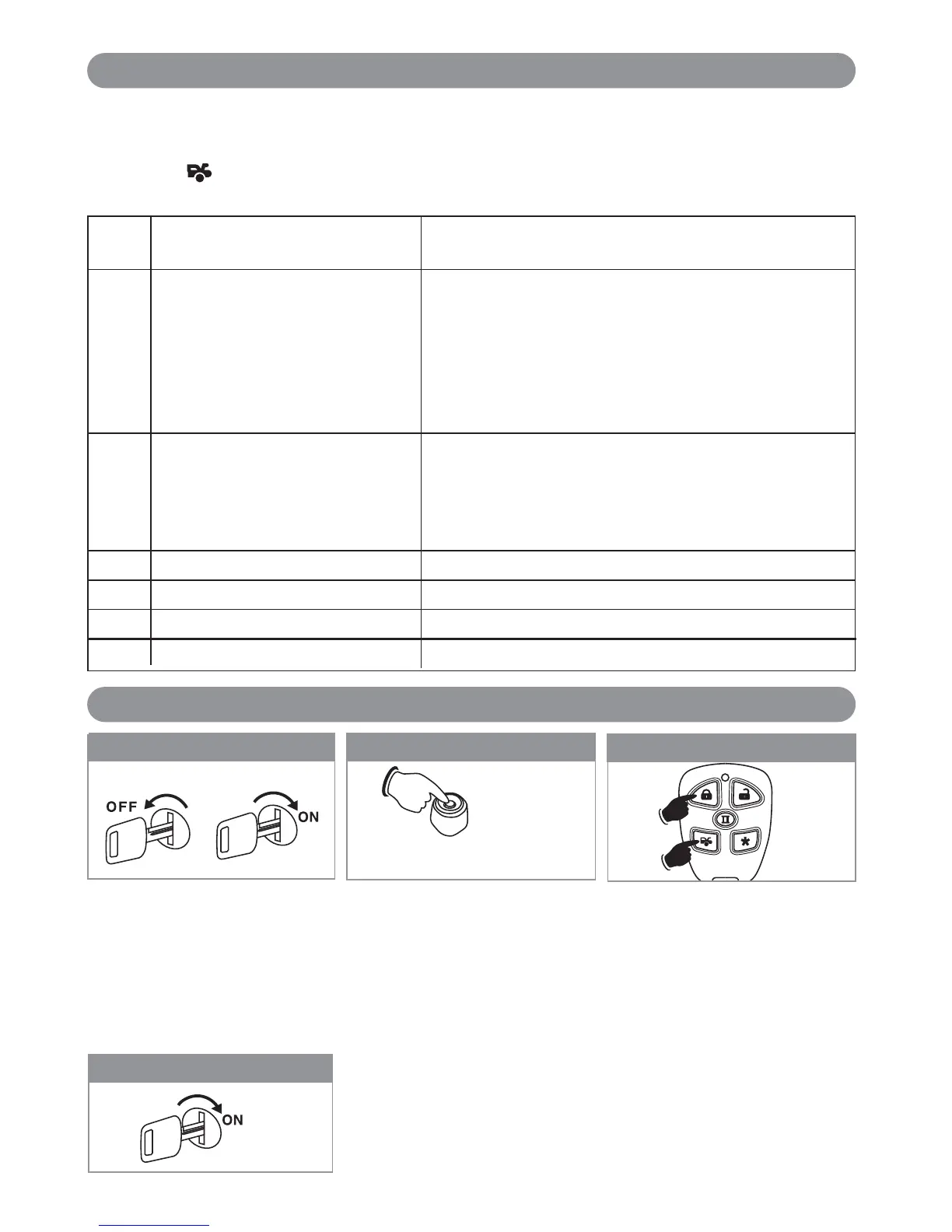
Turn the ignition switch from the
OFF position to the ON position 3
times leaving it in the Off position
the third time.
3X
Step 1
Before 15 seconds has passed, push
and release the valet switch 12 times
holding the button down on the 12th
press. Wait until
you hear 6 short
beeps. Release the button.
11X + 1X (Hold)
Step 2
Press the (Lock) and (Car) button on
the transmitter together for 6 seconds,
there will be a confirmation six chirp
with 3 long chirp and 3 parking light
flashes to confirm the system “Alarm
Features 1, 2 and 3 Programming” all
returns to factory default setting.
Step 3
Turn On the Ignition
3 long chirps and 3 flashes of the parking lights will confirm exit of the
programming mode.
Note: Waiting 15 seconds after the last command will also cause the
system to automatically exit the programming mode.
Step 4: Exit Programming
The unit has the ability to report the cause of the last shutdown of the remote start system.
Enter the Vehicle:
1. Turn the Ignition switch to “On” position.
2. Press the button on the transmitter
3. The LED will now report the last system shutdown by flashing for 3 cycles in the following grouped patterns:
LED Shutdown Mode
Flashes
1 (-) Safety Shutdown Input (Hood) 1. Close the Hood
(+)Safety Shutdown Input (Brake) 2. Check White/Black Wire Connection (7-Pin Mini Black)
or Neutral Safety Switch Input 3. Check White/Violet Wire Connection (7-Pin Mini Black)
noitisop ”nO“ ot hctiwS elggoT elbanE eht evoM .4liaF
(If Installed)
5. Move the gear selector to “Park”/”Neutral” Position.
6. Check Black/White Wire Connection (7-Pin Mini Black)
3 No RPM or Low Voltage: Tachometer Checking Type:
Check White/Red wire Connection
Voltage Checking Type:
Program the “Check Level” from “Hi Check Level” to
“Low Check Level”
5 Over-Rev
6 System Timed Out
7 Transmitter is Off
8 Tach. Signal has not been learned Re-learning the RPM
Remote Start Shutdown Diagnostics
Returning to Factory Default Settings (Reset Keyless Features Only)
X6-IM.qxp 9/12/2008 1:51 PM Page 24



 To Next Page