Product Description
Triplematic
12 Triplematic 201708 EN
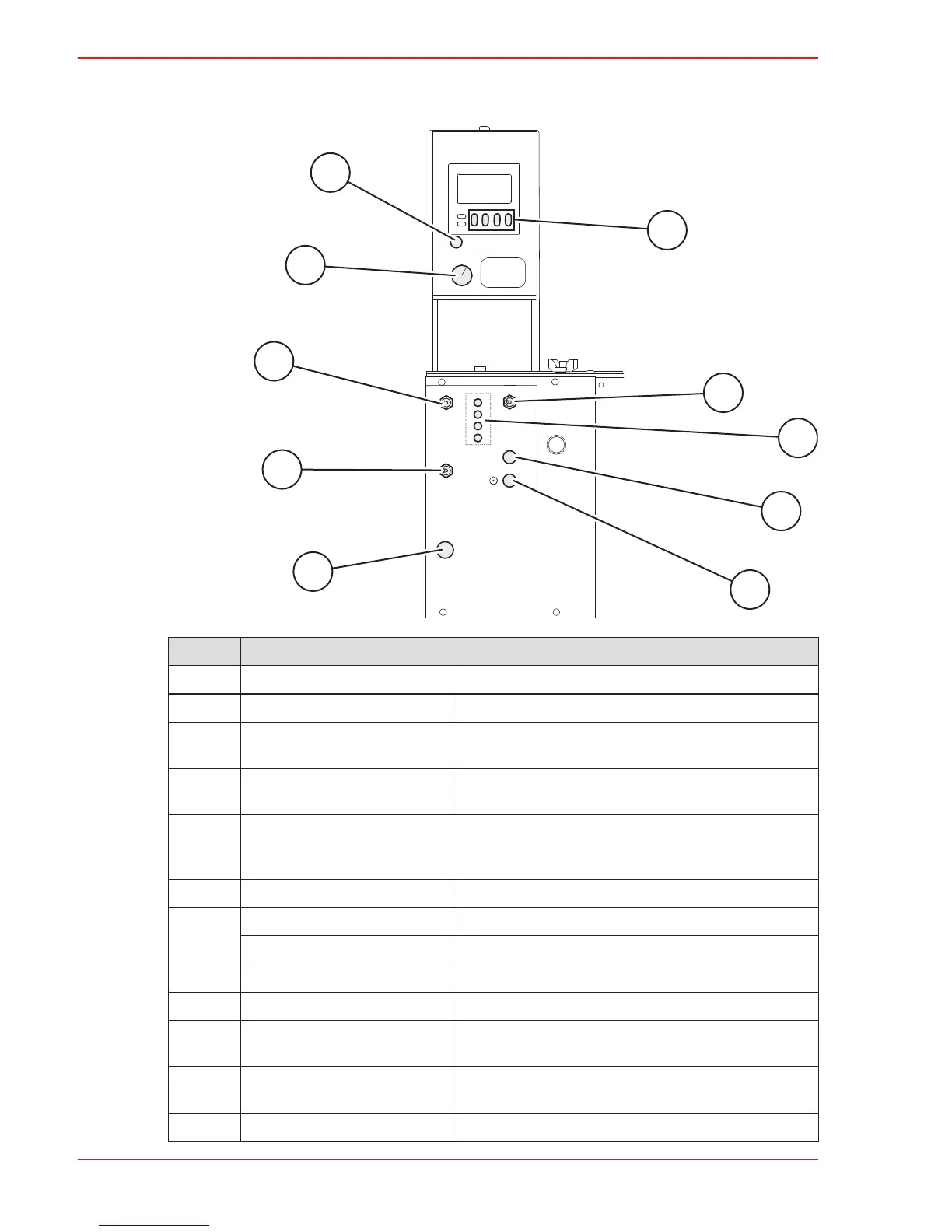
3.6 Controls
F
B
C
D
E
G
H
I
J
A
Pos Part Description
A Reset button Resets the counter.
B Grinding speed knob Sets the grinding speed.
C Chain Pusher switch
ON: starts the chain feed, so that the chain moves in a forward
direction. OFF: Stops the chain feed.
D 3 in 1 switch
ON: all 3 edges (the cutters, the gullet and the depth gauge) on the
chain are sharpened. OFF: only the cutters are sharpened.
E Emergency stop button
Shuts off the power and stops the machine. The emergency stop
button is used to turn off the machine after operation and to do an
emergency shut-down.
F First digit button Sets the first digit in the counter. (1xxx-9xxx)
Second digit button Sets the second digit in the counter. (x1xx-x9xx)
Third digit button Sets the third digit in the counter. (xx1x-xx9x)
Fourth digit button Sets the fourth digit in the counter. (xxx1-xxx9)
G Grinding wheel motor switch Starts the grinding motor.
H Troubleshooting indicators
Indicates potential problems with the machine. See section 8.4,
“Troubleshooting indicators”.
I Grinding head positioning button
Changes the angle of the grinding head from left to right, or vice
versa.
J Power Button Turns on the machine.


 To Next Page