Operation
Triplematic
24 Triplematic 201708 EN
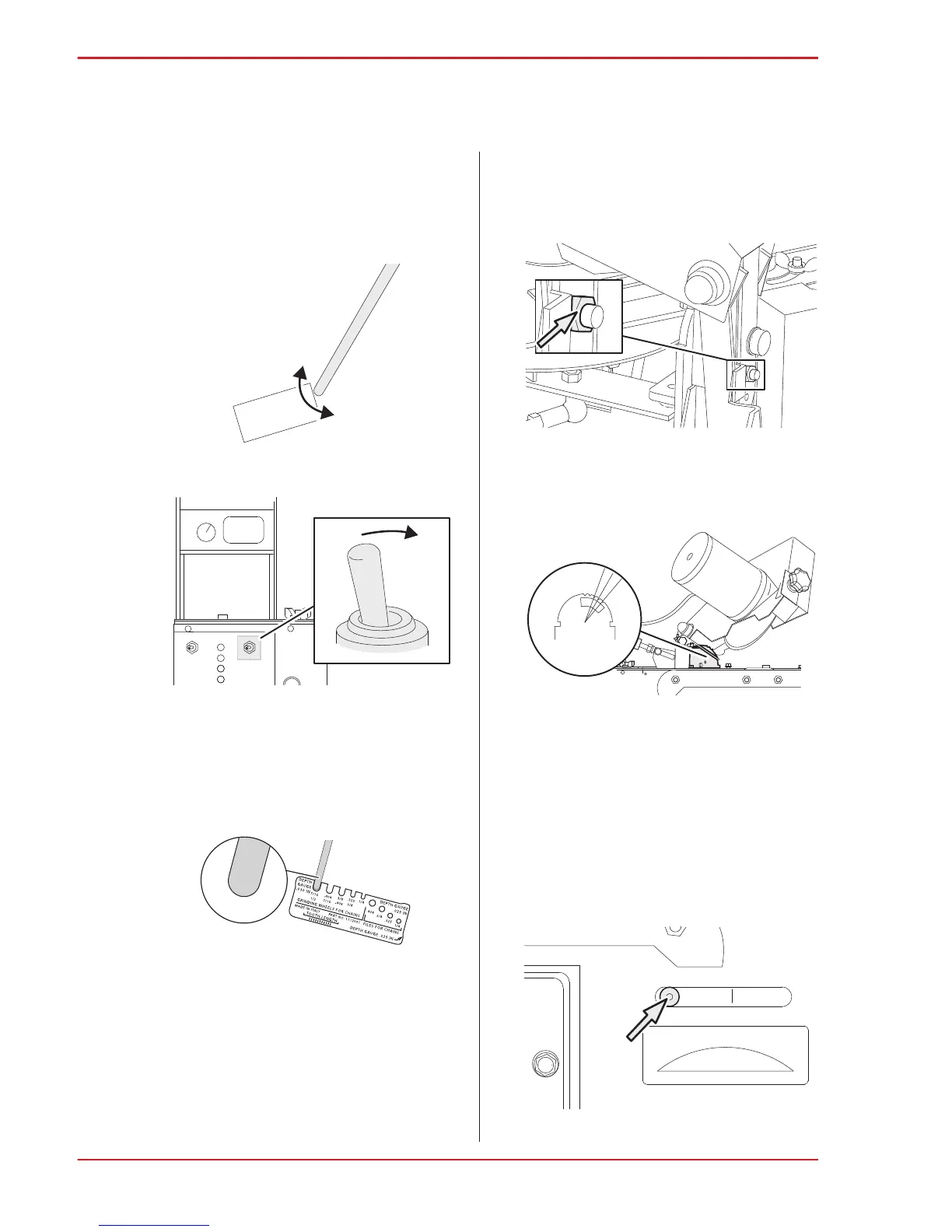
5. Make sure the grinding wheel edges match the
shape of the chain type.
• For Ceramic grinding wheels: Use the profile
stone (included in delivery) to shape the
edges on the grinding wheel. Use a
light-sweeping action to shape the edges of
the wheel. Use the provided template to verify
proper radius shape for the specific grinding
wheel being used.
6. Set the grinding wheel switch to OFF.
7. Use the profile template to verify that the
grinding wheel has the same profile as the type
of chain to be sharpened.
8. Repeat steps 4-8 until the grinding wheel profile
is the same as the selected profile on the
profile template.
5.2.2 Set the head-tilt angle
Note: Read the specifications from the chain
manufacturer to find out the recommended head-tilt
angle for your chain.
1. Use an adjustable wrench to loosen the
head-tilt angle nut located on the back of the
machine.
2. Turn the grinding head to set the desired
head-tilt angle (50-70°) on the head-tilt angle
scale. The default head-tilt angle is 60°.
3. Tighten the head-tilt angle nut.
5.2.3 Set the top-plate angle
Note: Read the specifications from the chain
manufacturer to find out the recommended top-plate
angle for your chain.
1. Use the hex key (provided with the machine) to
loosen the top-plate angle screw up to three
turns.
70°
60°
50°


 To Next Page