- User Manual
4.3 Recognising the connected arm
When it is switched on, E32A SSR acquires the status of a series of input signals in order to identify the type
of arm it is connected to, and then configures itself accordingly. The resulting configuration, that is
maintained until the equipment is switched off, is indicated for 2 seconds by the 2 LEDs, that remain at the
beginning switched off for 2 seconds and then flash in synchronous way, as follows:
Arm type YELLOW LED/RED LED
Mida-Set 1 Flashing
Manual Mida Tool Eye 2 Flashings
Electrical Mida Tool Eye 3 Flashings
O
perating mode other than that specified for the arm type indicates that the configuration is
incorrect and that an equipment alarm is active.
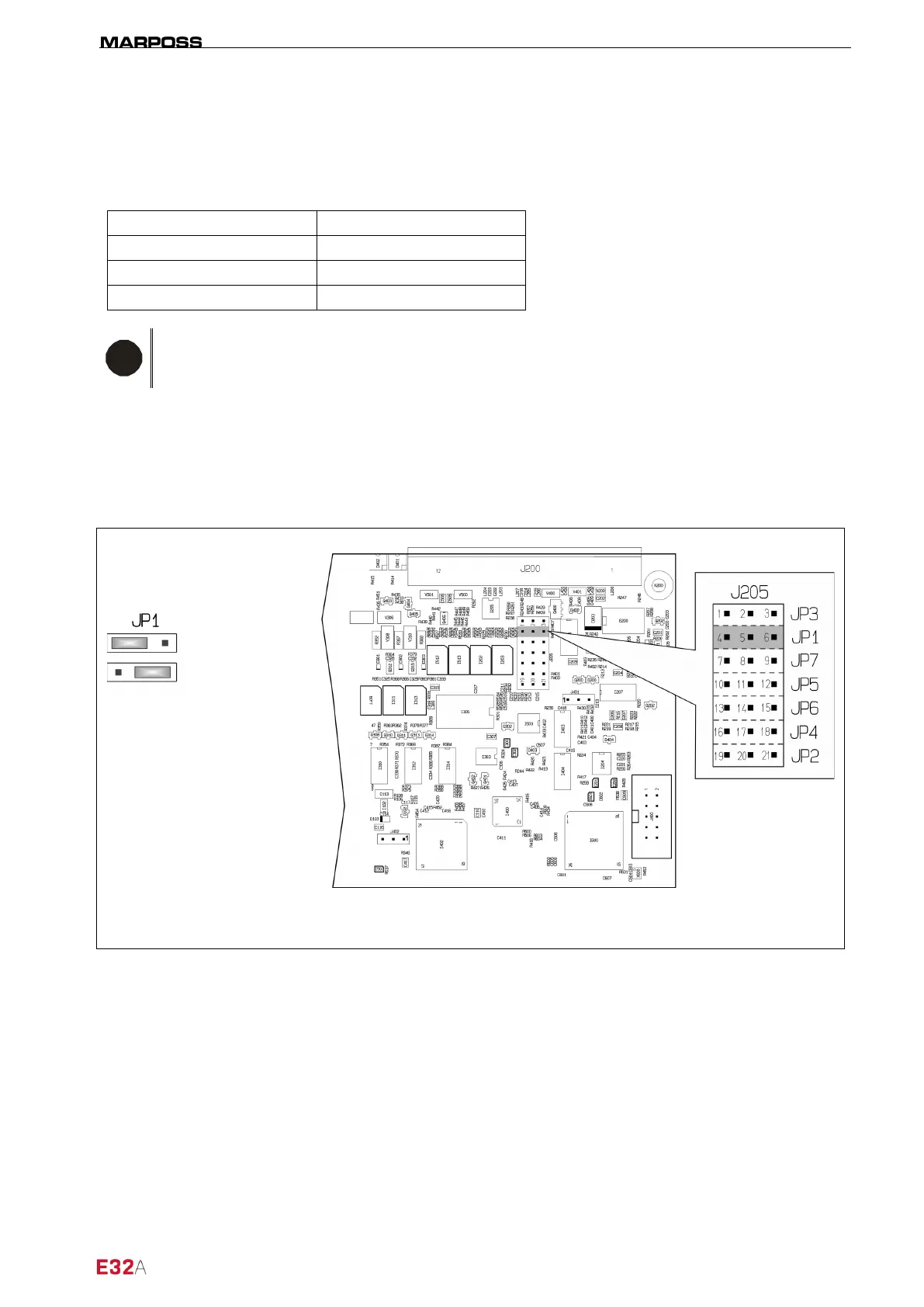
4.4 Selecting SINK/SOURCE operating mode (JP1)
E32A can be programmed so that the J1 connector outputs and inputs operate in the SINK or SOURCE
mode. To program the operating modes install the jumpers JP1 on the circuit board as indicated in the
Figura 4-4).
Figure 4-4. Selecting SINK/SOURCE operating mode.
: default configuration.
I/O SOURCE*
I/O SINK



 To Next Page