Page 31
8.12 EVENT LOGGING
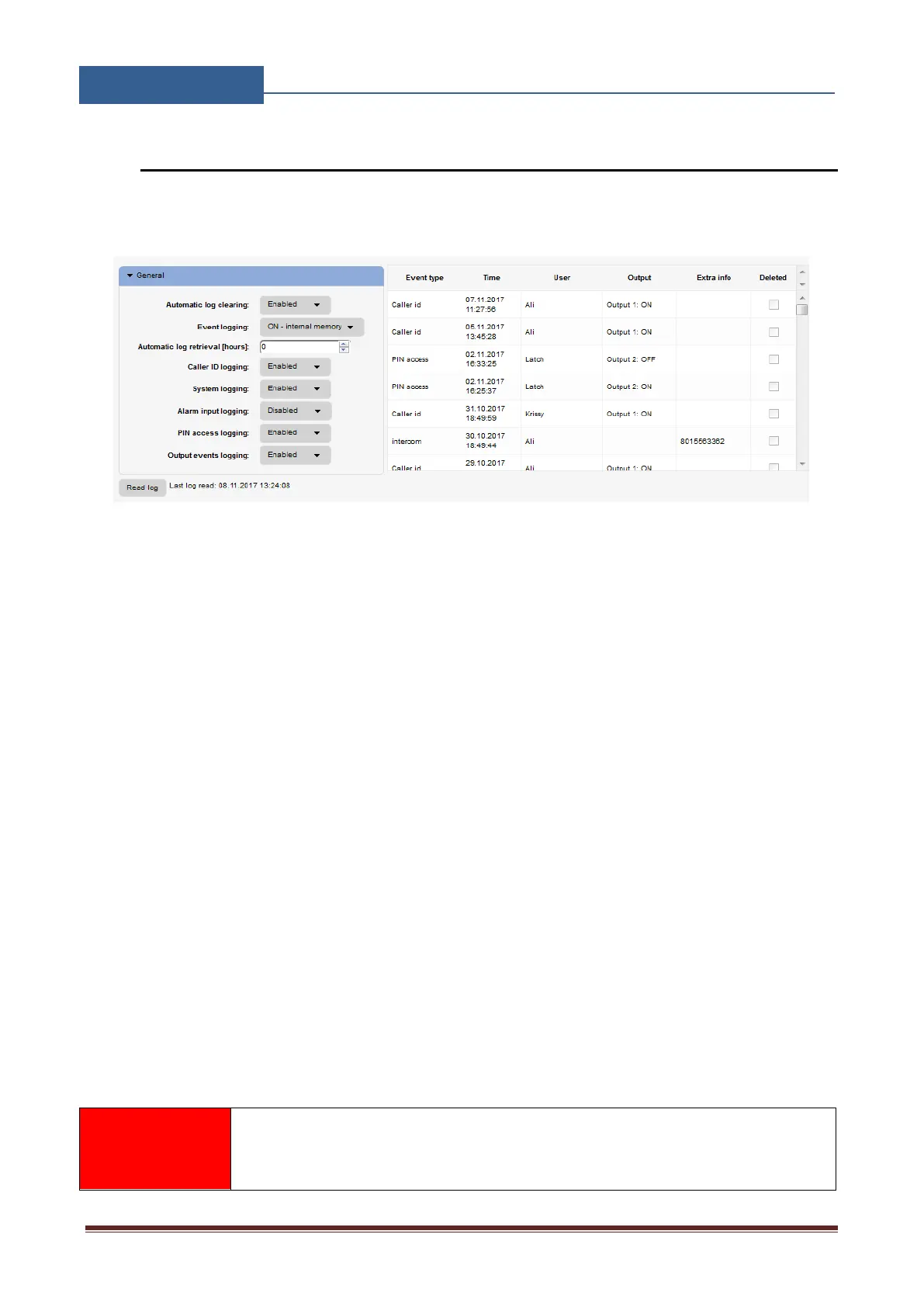
GSW2 PLUS unit itself supports up to 20000 log events entry. These log events can be pull up to
the server by clicking Read Log button in the “Event Log” tab. Events are listed in the table.
Figure 19: WEB Server-Log event
Each event is equipped with the event type, time, output if triggered and the user name of the user
responsible for the event.
If user names are available (Called ID #, PIN codes, Intercom user …) user name will be shown in
the user column.
Automatic log clearing: Behavior if the internal LOG buffer on the unit is FULL of
events, unit can CLEAR events or STOP recording new events.
Event logging: User can select between, not logging, logging to internal memory (unit) or
optional sending events over units USB connection to the external PC.
Automatic log retrieval: Definition of Time Out period for unit to upload LOG events to
the WEB server.
Caller ID logging: Enable/Disable logging of the Caller ID # events.
System logging: Enable/Disable logging of special system evens.
Alarm input logging: Enable/Disable logging for input alarm events.
Pin access logging: Enable/Disable of the Pin access and Temporary pin access events.
Output events logging: Enable/Disable of the events triggering the outputs (Timer,
Intercom, … )
After events are read and stored to the server, the local copy on the unit gets
deleted.


 To Next Page