Page 28
8.10 ADMINISTRATION
Administration tab allows user to enable advanced settings: notification of unauthorized access,
periodic test messages, lock down of the unit…
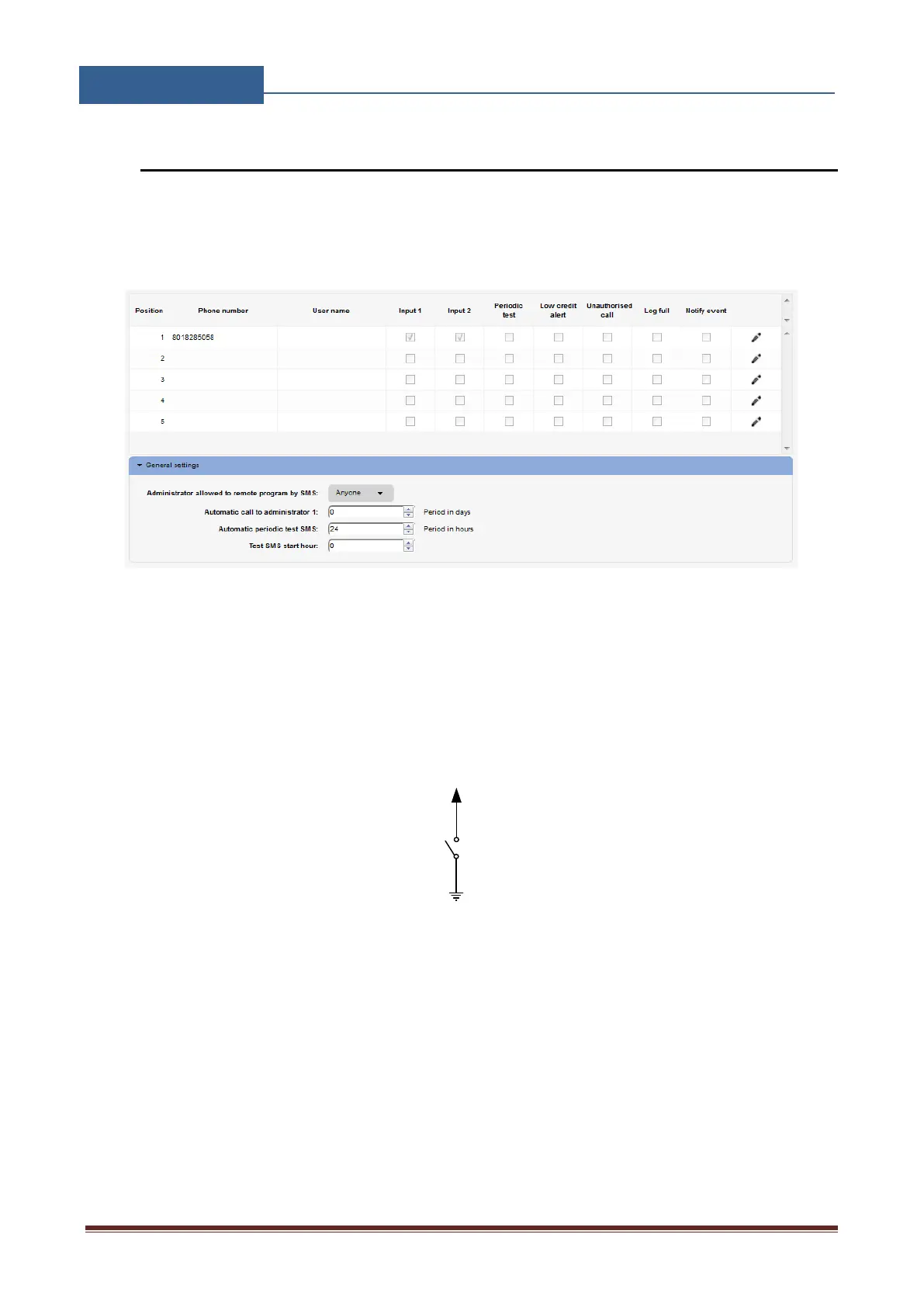
Figure 16: WEB Server-Notification numbers
Phone number, User name: Phone number and user name of the user that will be receiving
notification messages.
Input 1, Input 2: If on input lines 1 & 2 if alarm condition is meet, users with check boxes
will receive alarm notification SMS.
INPUT 1-2
GND
INPUT 1-2
N.O.
Contact
N.O.
Contact
Figure 17: WEB Server-Input alarm configuration
Periodic test: User can receive periodic (keep-alive) SMS, tick the check box for the
appropriate user. Timer period is defined under parameter Automatic periodic test SMS, it
is definable in hours.
Low credit alert: In case of prepaid SIM card the unit can notify the user if the credit on the
SIM card is low. To enable notification SMS tick the check box in corresponding position.
Note that additional input in the Misc tab is needed to fully enable credit checking function.


 To Next Page