model no. 046-0265-2 | contact us 1-800-689-9928
INSTALL SAFETY BEAM SENSOR
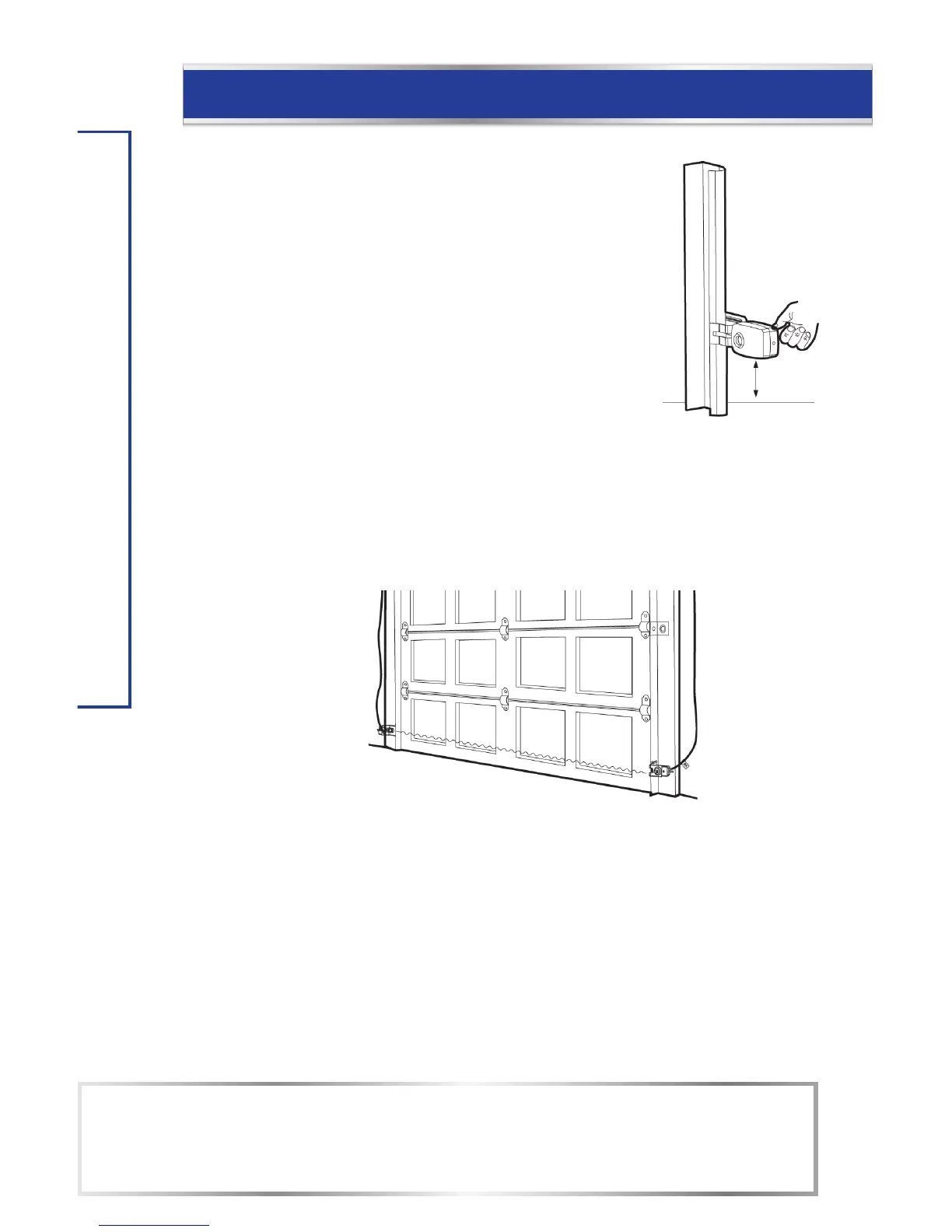
Align the sensors
Check the Safety Beam Sensor LED
Plug in the opener. The receiving sensor indicator's blue LED should
glow steadily if the wiring and alignment are correct. The transmitting
sensor indicator's red LED will glow steadily regardless of alignment
or obstruction.
Align the Safety Beam Sensor
If the receiver LED is off, dim, or flickering (while the invisible light beam path is not
obstructed), alignment is required.
If the blue LED is flashing or off, slide the mounting bracket up or down on the track until
the blue LED is steadily on. The tab for the sensor can also be adjusted by a slight bend if
needed for alignment.
When properly adjusted both the red and blue LED will be steadily on.
Receiving Sensor (Blue LED)
Blue Light:
On – Beam Aligned. No Obstructions.
Off – Beam Not Aligned Or Obstruction – Sensors Need Alignment.
Dim/Flickering – Sensors Need Alignment.
Transmitting
Sensor (Red LED)
Red Light:
On – Power On.
Off – Power Off.
NOTE:
After two minutes the sensors will go into sleep mode and the red and blue LED will flash
every 10 seconds. When the door is closing, the sensors will return to normal operation
with red and blue LED steadily on.


 To Next Page