B. Changing Force Adjustment
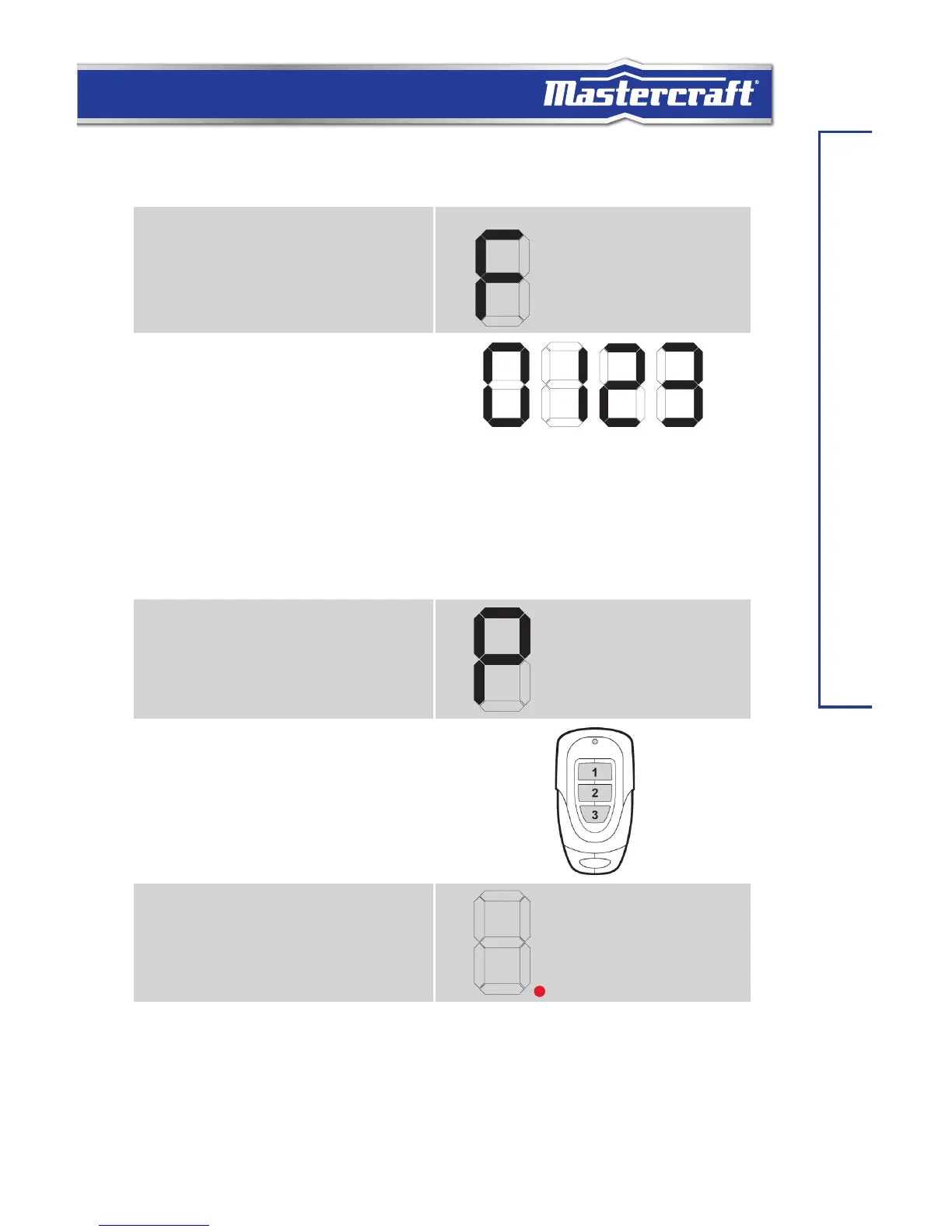
1. Press and hold the [SET] button for 10
seconds. When the LED display shows
“F”, release the [SET]button.
2. The LED display will show “0”.
SET FORCE LEVEL
3. Press the p or q button to set the
force 0, 1, 2 or 3.
0 is the default force level.
3 is maximum force level.
4. Press the [SET] button again to
confirm the force at the desired level.
C. Programming Remote Control
1. Press the [SET] button for one second.
The LED display will show the letter
“P”.
LEARN WIRELESS
CONTROL
2. Program a Remote:
Within 30 seconds, press any button
on the remote that you would like to
program to the opener.
3. Once the button on the remote is
programmed, the LED display will turn
off and emit one beep indicating the
programming has been successful.
LEARN WIRELESS
CONTROL


 To Next Page
 Loading...