65
9.12 CONSOLE REMOVAL
CHAPTER 9: PART REPLACEMENT GUIDE
1) Turn off the power and disconnect the cord from the machine.
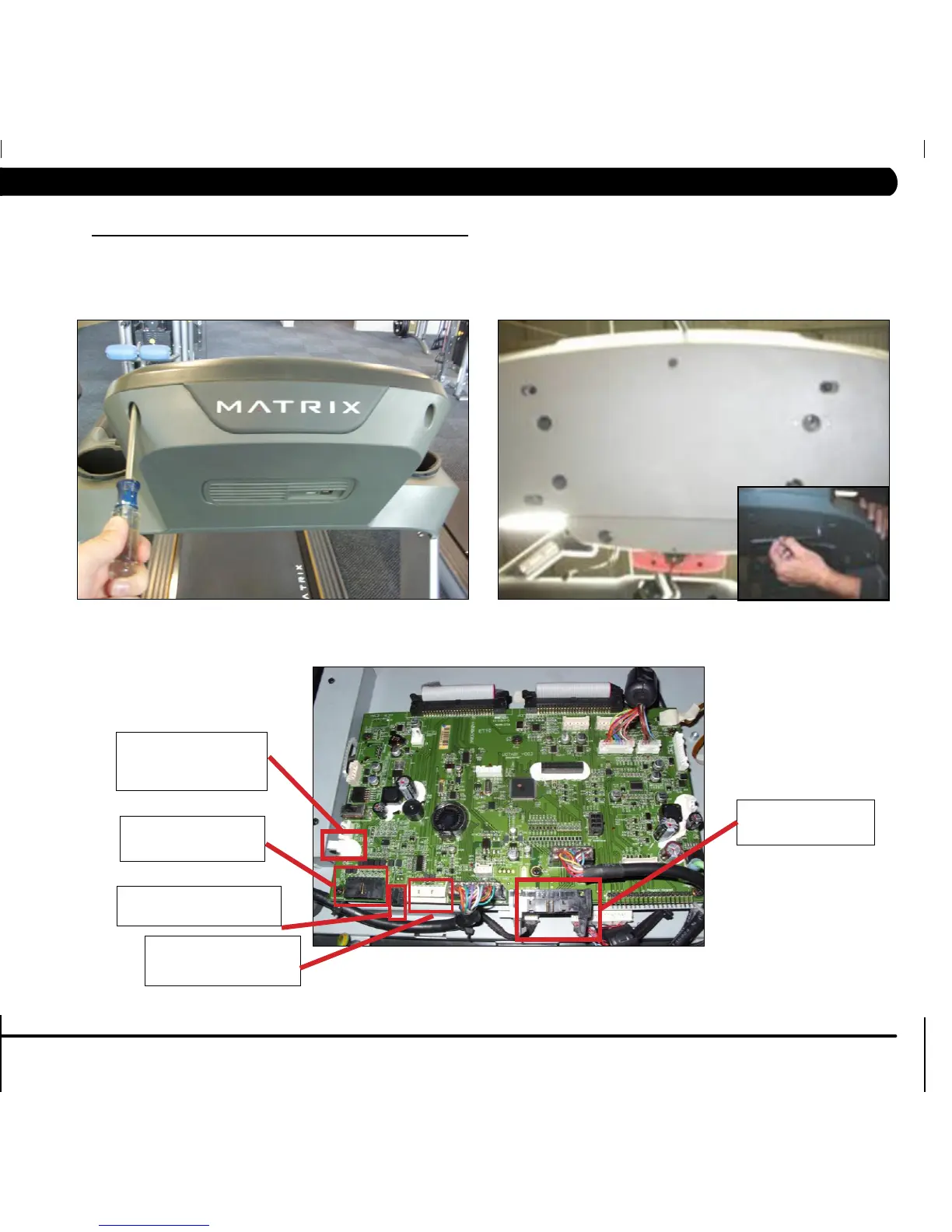
2) Remove the 4 screws holding the console back to the front (Figure A).
3) Lean the console back away from the console and disconnect the coax cable connection.
4) Remove the six 6 mm screws from underneath the console. There are arrows stamped in the plastic at the proper openings (Figure C).
5) Disconnect the remaining connectors holding the console to the frame and remove the console.
6) Reverse Steps 1-5 to install a new console. NOTE: Be sure to re-connect any wire connections removed in Steps 3 and 4 (Figure D).
7) Auto Calibration must ALWAYS be run after replacing the console (see Section 3.5).
FIGURE A FIGURE B
FIGURE C
20 pin gray connector
from the HR Board
8 pin black connector
from the console cable
2 pin black connector from
the Emergency Stop
8 pin white connector
from the console cable
This port is not used
with the Delta MCB (is
used with the DCI MCB)


 To Next Page