Connecting video sources to Matrox Rapixo CXP 27
Connecting to the CoaXPress video input connectors
When attaching video sources to your Matrox Rapixo CXP, you must use
75 Ohm, coaxial cables with a 12G rated HD-BNC male connector (plug). For
the best performance, it is recommended that you use high-quality cables, such as
Belden 1694A cables (which are good for typical cable lengths), or Belden 4794R
cables (which maintain signal quality at greater lengths).
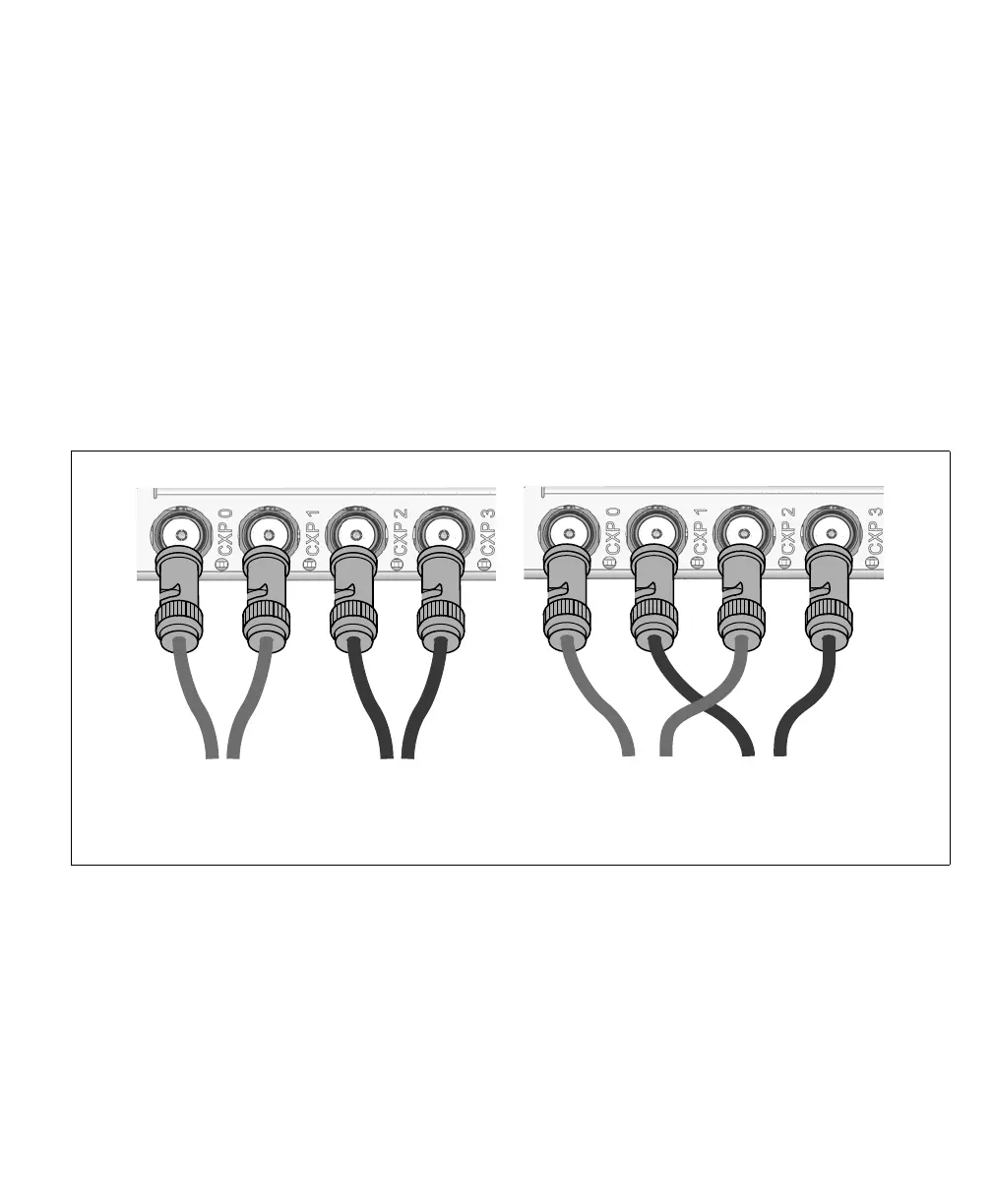
Note that a video source with multiple cables will have one master connection
(typically attached to connector 1 on the camera) and the others as extension
connections. Keep track of the video input connector to which you attach the
master connection because you will need this information when using MIL-Lite
(MdigAlloc() with M_DEVn) to identify the video source.
Matrox Rapixo CXP communicates with the video sources to identify which video
source is connected to which input connectors.
❖ Note that if you are using more than one coaxial cable to connect to the same
video source, the cables you choose must be of the same type and length.
Video source 2Video source 1
Matrox R CXP main bracketapixo
Configuration 1
M
E
M
E
M - Master connection
E - extension connection
Video source 2Video source 1
Matrox R CXP main bracketapixo
MEME
Configuration 2
M - Master connection
E - extension connection


 To Next Page