Page 32 P/N 03521015 Rev K
5. Standard System Set Up
5.1 Components Check List
Required Components
ITEM O.N. QTY DESCRIPTION
1 2070-03 1ea MAXAIR CAPR Helmet
2
2365-02SM or
2365-02ML
1 Lens Disposable Lens Cuff (DLC) - Small/ Medium (SM) or Medium/ Large (ML)
3 2500-36TSC 1ea Li-Ion Battery
4 2600-01 1ea Li-Ion Battery Charger
5 2000-76 1ea Battery Belt
5.2 Setting Up
1. Check the position of the Headband Comfort Strips. (See Section16 for Comfort Strip assembly and replacement instructions).
2. Adjust the Rear Headband Ratchet Adjustment Knob counterclockwise to expand the Headband circumference to ensure the
Helmet will t easily before donning. (See Section 9 Donning section for more detail.)
3. Adjust the Height Adjustment Snaps on the Helmet Liner to ensure proper and secure t of the CAPR System on the head
and good visibility of the Safety Status Indicator LEDs. (See Section 9 for more detail.)
4. Check to ensure that the Helmet Power Cord is rmly attached to the Helmet Power Cord Connector.
5.3 Assemble and Dis-assemble Components
CAUTION
Prior to operation, review all components’ Instructions For Use regarding set-up, assembly/dis-assembly,
and don/doff in sections 17-27.
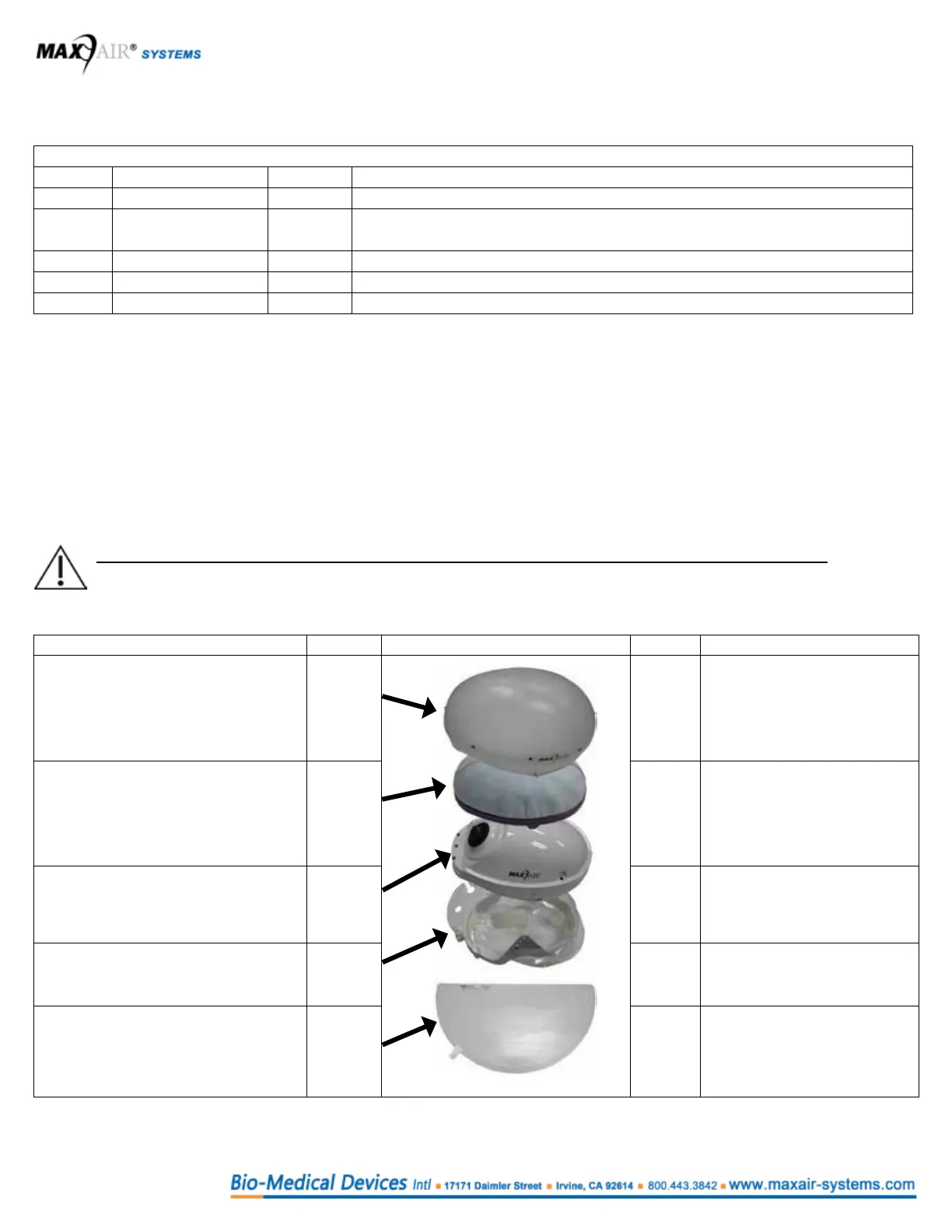
The general assembly/dis-assembly steps are as follows:
Assemble Step Step Dis-assemble
Assemble the 2061-03
Filter Cover Cap.
(Alternate Filter Covers or no Filter
Cover are appropriated for some
congurations.)
If required, dis-assemble the
2061-03 Filter Cover Cap.
Assemble the 2164-10 Filter
Cartridge.
(Alternate Filter Cartridges or a Filter
Frame may be used.)
If required, dis-assemble the
2164-10 Filter Cartridge.
(If necessary, dispose
appropriately as hazardous
waste.)
Inspect and ready the
2070-03 Helmet for use.
If required, prep the
2070-03 Helmet for storage.
If required, assemble the 2071-01
Helmet Liner.
If required, dis-assemble the
2071-01 Helmet Liner
Assemble the DLC.
(Alternate Face covers/seals may be
used for other congurations.)
Dis-assemble the DLC
(Dispose appropriately as
hazardous waste.)
2
3
5
4
1
2
3
5
4
1



 To Next Page