P/N 03521015 Rev K Page 49
Filter Cover Cap: O.N. 2016-03; PN 01031284
The 2061-03 Filter Cover Cap is a component of the MAXAIR CAPR Line of Powered Air Purifying Respirators.
WARNING
Never mount a FCC on a Helmet until a fully functional Filter Cartridge is securely in place on the Helmet.
CAUTION
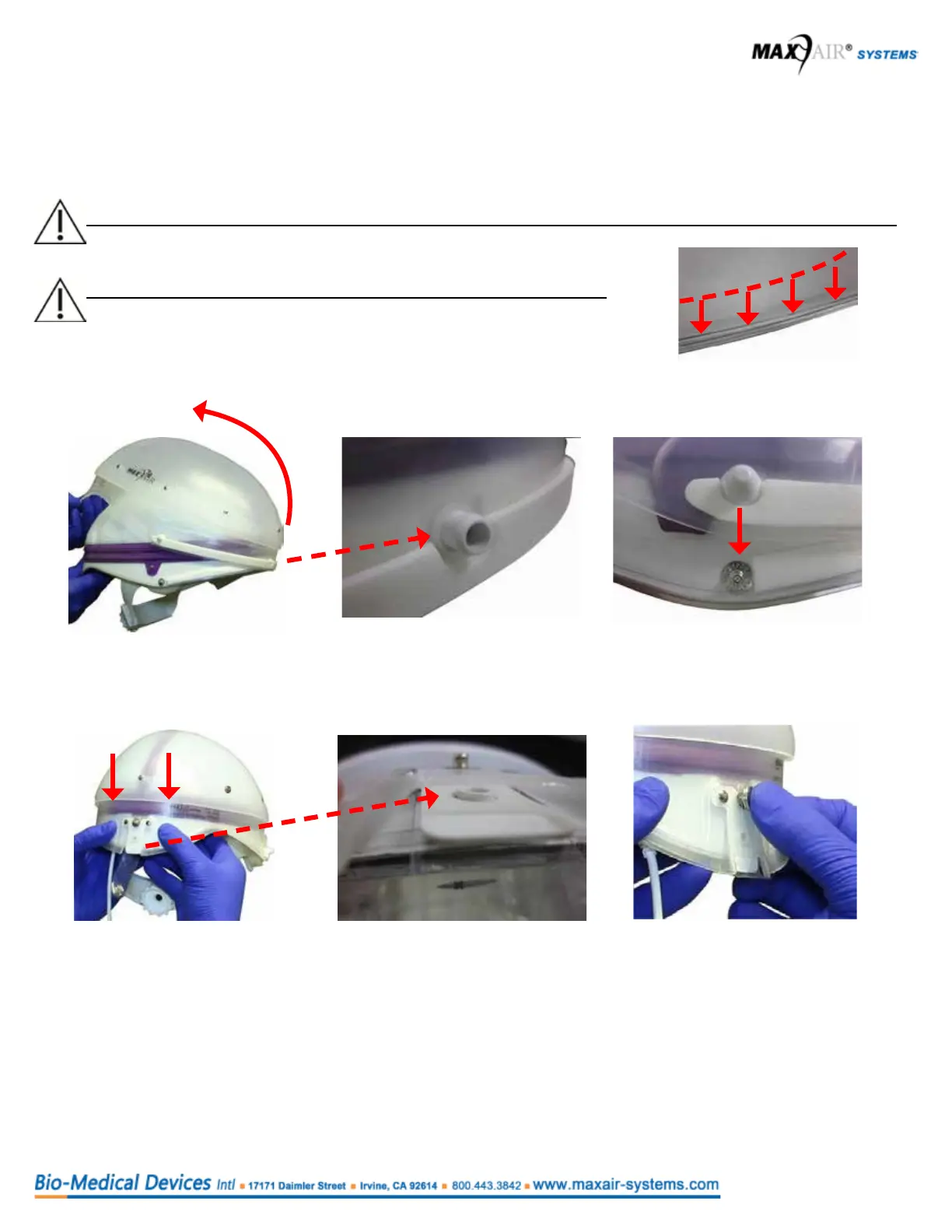
Prior to assemble, visually inspect the perimeter of the Helmet and verify
the white edges are tucked in. If not, manually tuck the white edges
behind the clear lip.
Asssembly
1. Hold the Helmet/Liner/ Filter Cartridge upright by its rear underside with one
hand and align/insert the front FCC hole to the Helmet Front Adapter Post.
Pull the FCC over and down the back of the Helmet.
2. The FCC Side Adapter Posts should
align and slide over the Helmet side
lower snaps.
3. With two hands, slide the rear FCC downward so that the FCC T-Tab snaps
over the Helmet Rear Adapter Post.
4. If equipped, snap the Helmet
FCC Pull Tab (Optional, not on all
Helmets) to the FCC rear snap.
13. Instructions For Use: Filter Cover Cap (FCC)



 To Next Page