Page 54 P/N 03521015 Rev K
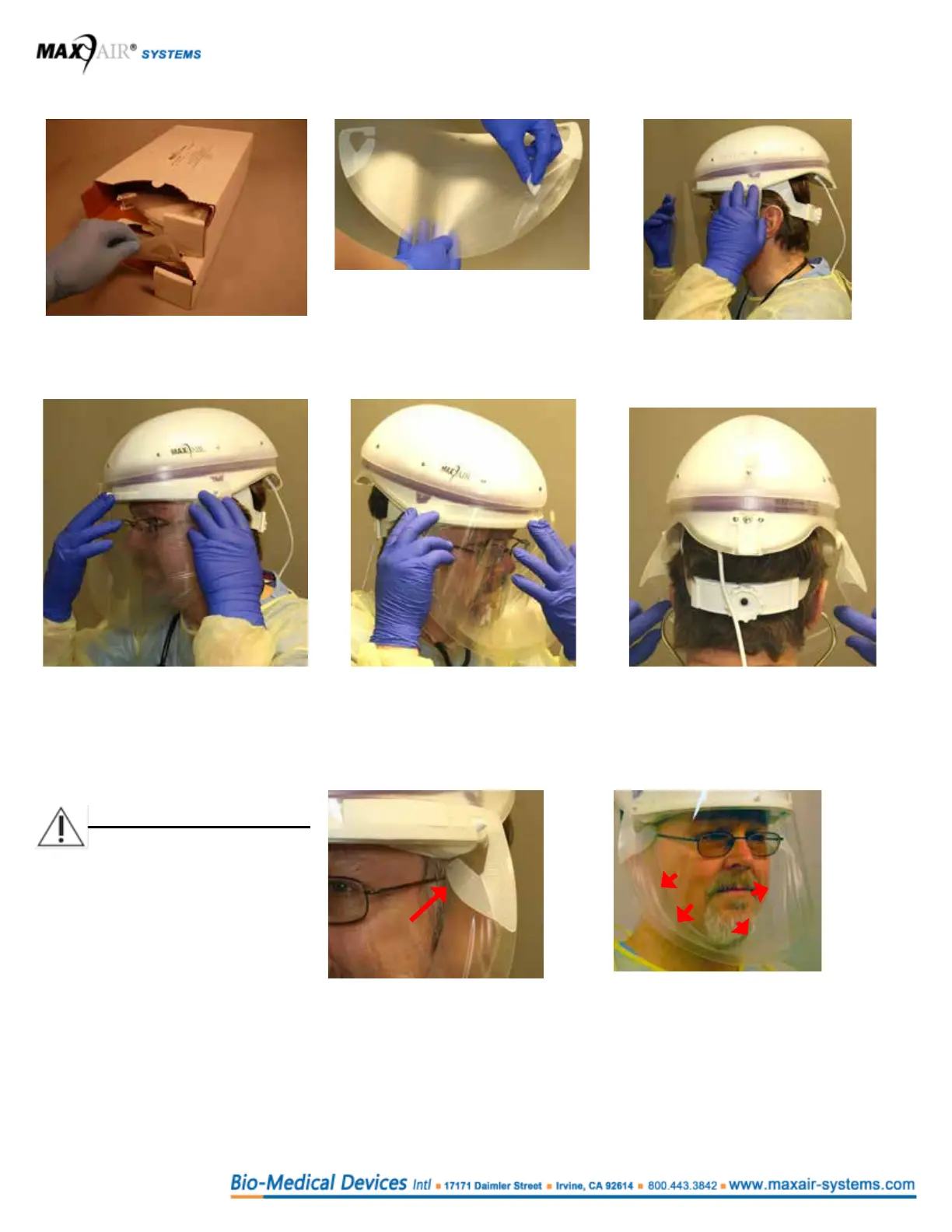
Replacing a DLC for continued use with the Helmet donned
1. Obtain the correct replacement
DLC from the corresponding DLC
dispensing Box.
2. Pull the DLC Peel Tab up, over
and to the left to remove the Lens
Protective Cover off the Lens.
4. Align and snap the DLC Front
Alignment Hole over the Helmet Front
Alignment Post.
5. Align and Snap the other DLC Side
Attachment Hole over the other FCC
Side Attachment Post.
6. Slide your ngers between the Cuff
and face from each temple down
and under your chin to pull the DLC
Flappers away from the lens, and to
properly position the cuff.
WARNING
After donning, if conditions 1
and 2 both are not achieved,
switch to the other size DLC
and repeat steps 1 through 6
above.
Condition 1: Ensure the DLC
Flappers are away from the Lens,
positioned perpendicular to your
temples, and within ¼ inch of the
temples on each side of the head.
Condition 2: Ensure slight tension
on the cuff is felt continuously while
sliding the index or rst nger between
the cuff and the face all along the chin
and up to the temples, from the right
side of the face to the left.
3. Align and snap one DLC
Side Attachment Hole over
the respective FCC Side
Attachment Post.



 To Next Page