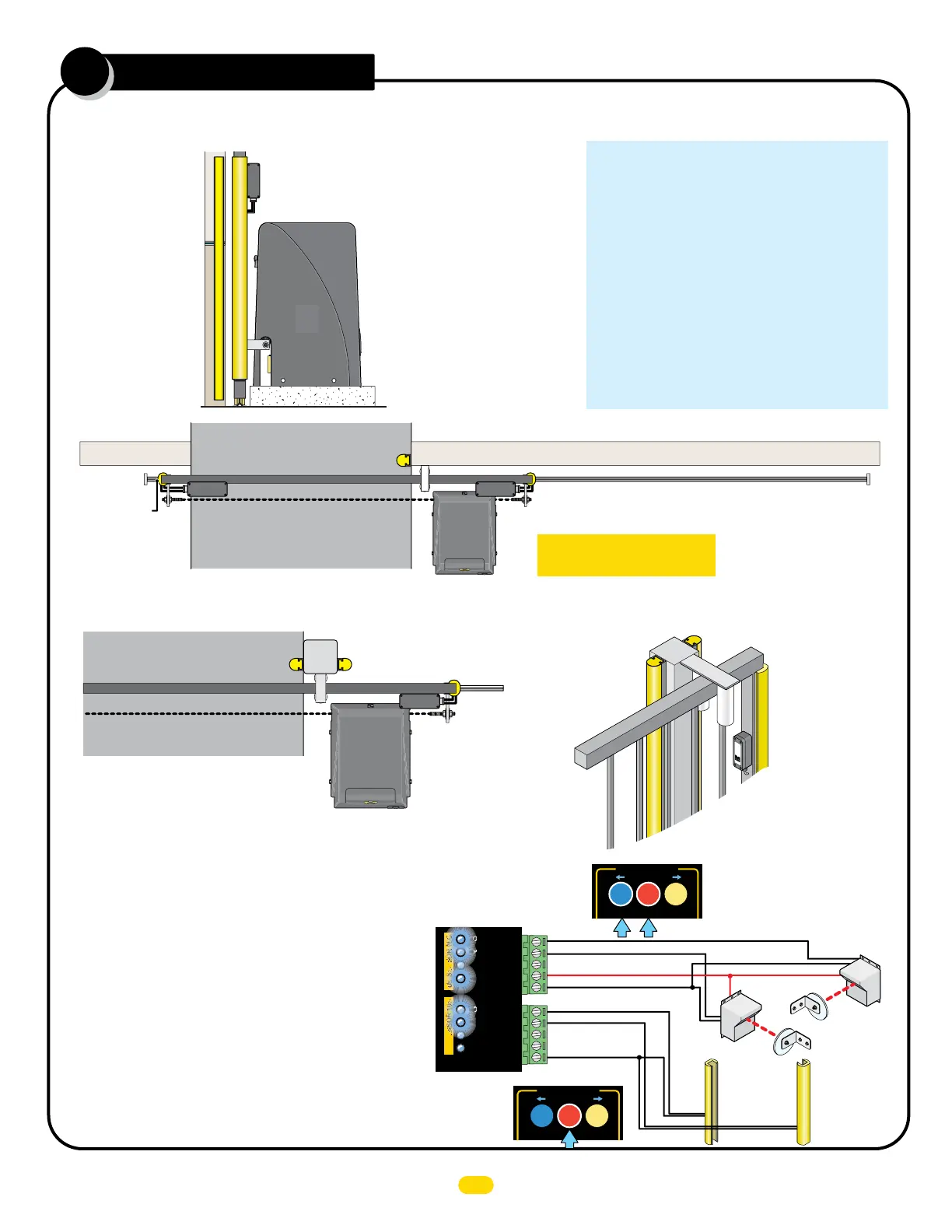
If a self-supporting post is being used, then sensing edges need to be installed on EACH side of the post to protect against
entrapment in the OPENING and CLOSING direction of gate travel.
Self-Supporting Post
Gate Closed
OPENING direction
Sensing Edge
CLOSING direction Sensing Edge
OPENING
direction
Sensing
Edge
Wireless
Module
OPENING
direction
Sensing
Edge
CLOSING direction Sensing Edge
OPENING
direction
Sensing
Edge
(Wireless)
M
G
L
-T
X
2
0
Mo
nitored
Gat
e
Link
Mi
ll
e
r
E
d
g
e
WIRELESS NOTE: See page 26 OR Refer to
the instruction sheet that comes with the
wireless module for wiring and mounting
instructions when using wireless option.
Wall
Wireless
Module
Wall
Gate Closed
OPENING direction 10K
NORMALLY CLOSED Sensing Edge
OPENING direction10K NORMALLY CLOSED Sensing Edge Wirelessly
CLOSING direction
10K NORMALLY CLOSED
Sensing Edge Wirelessly
Wireless Module
Wireless
Module
Wireless
Module
Sensing Edges
continued
5
IMPORTANT: Sensing edges
MUST be Monitored 10K Type.
Entrapment Protection Device Options and Locations:
The following is a list of recommended accessories for
the MAX Slide PRO Operators.
Omron E3K-R10K4-10R Photocell
EMX IRB-MON Photocell (Thru-Beam)
EMX IRB-RET Photocell (Reflector)
EMX Wireless Edge Link WEL-200T / WEL-200R
Enforcer E931-S50RRGQ Photocell (Reflector)
Enforcer E960-G90GQ Twin Beam (Thru-Beam)
Miller Edge Prime Guard Photocell (Thru-Beam)
Miller Edge GEM-104 10K to NC Converter
Miller Edge R-Band Wireless Edge Unit
P/N: RB-G-RX10 & RB-TX10
Transmitter Solutions IGAZER50LR-UL Photocell (Reflector)
Transmitter Solutions IGAZESR66HD Photocell (Thru-Beam)
Transmitter Solutions Wireless Edge Sensor Model: RCOO900
P/N: IGAZEREKIT-UL
ASO Edge MAX Mini Edge Contact Edge Sensor
ASO Edge Thin Edge MAX Edge 1 Contact Edge Sensor
Test Connected Sensors
Test ALL connected entrapment protection sensors using learn mode:
1. Press and HOLD the STOP button & then the OPEN button together until beeping is heard, learn mode begins.
NOTE: DO NOT press the OPEN button before the STOP button or learn mode will NOT function.
3.
Press STOP button again within 5 min. to end learn mode, beeping stops.
NOTE:
If
STOP button is not pressed within 5 min. learn mode automatically end after 5 min.
2.
LEDs should be ON
for each connected entrapment sensor detected.
If LEDs are NOT
on for each connected sensor then they have a problem.
Possible problems:
• Photocells are out of alignment
• Photocells are wired wrong - N.C. or N.O. depending on which type
of photocells are used
• Sensing edges are wired wrong - Not 10K type edge sensor
• Sensor is bad
MOTION CONTROL
OPEN STOP
CLOSE
MOTION CONTROL
OPEN
STOP
CLOSE
OPEN ONLY NC
OPEN ONLY 10K
PHOTO CLS NC
OPEN/CLS NC
GND
12VDC OUT
GND
CLS ONLY 10K
OPEN/CLS 10K
12VDC OUT
UL SENSOR N.C.UL SENSOR 10K
NC
NC
Closing Direction
Factory Learned Input
Opening Direction
Factory Learned Input
12VDC OUT monitored
Unlearned Input
Unlearned Input
Opening
Direction
Unlearned Input
Closing
Direction
Unlearned Input
10K Sensing Edges
NC Photocells
8
UL 325 2018 Standard - MAX 1500 PRO/2200 PRO/F18 PRO Matrix III Install Version 7a


 To Next Page