24
4. REMOTE CONTROLLER
4. REMOTE CONTROLER
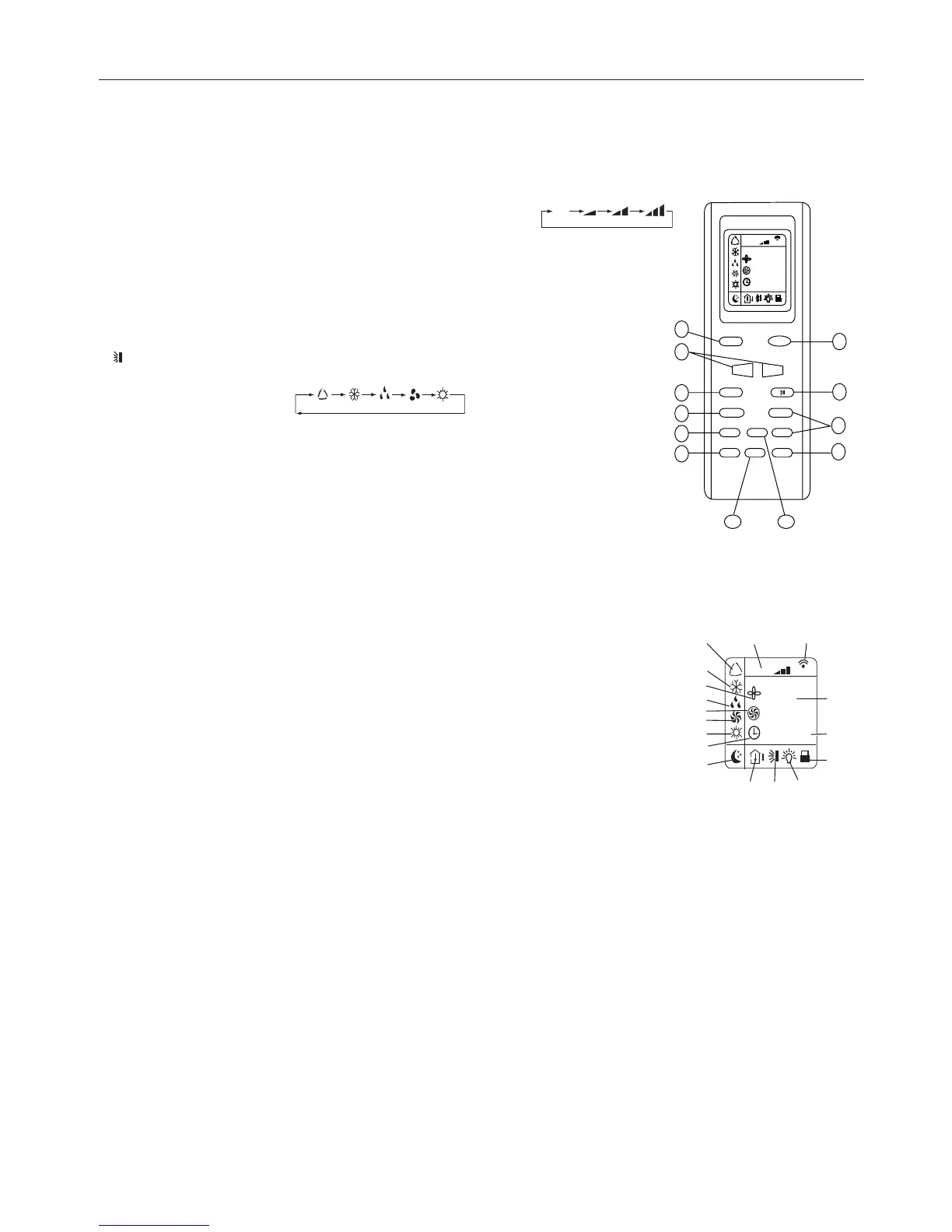
DISPLAY
DESCRIPTION OF FUNCTIONS OF REMOTE CONTROLLER KEYS
1) ON/OFF key to turn the air conditioner on and off.
2)
TEMPERATURE keys to adjust ambient temperature and the timer: "+" increasing, "-" decreasing.
3) FAN key to set the fan speed by the choosing Automatic - low - mid - high:
4) The CLOCK key is used to set the current time
5) BLOW button: active only in COLD and DEHUMIDIFICATION modes.
6) TURBO button to enable/disable the rapid cooling mode.
7) SLEEP overnight button to set/cancel the Sleep mode regardless of the operating mode of
the conditioner.
8) TEMP button: press to show the set point temperature on the unit’s display.
9) LIGHT button: activates or deactivates the unit’s display.
10) TIMER selection button.
11)
button to enable/disable the air louver automatic mode.
12) MODE button to select the operating mode: AUTO - COOL- DRY - FAN - HEAT:
AUTO: the conditioner automatically sets the suitable operating mode (HEAT, DRY, FAN, COOL)
depending on room temperature.
COOL: the unit begins to operate if the set temperature is lower than that of the room.
DRY: for Dehumidify
FAN: the unit get the air automatically circulating in the room.
HEAT: the unit begins to operate if the set temperature is higher than that of the room.
Name and functions of the display indicators.
1) AUTO mode indicator.
2) COOL mode indicator.
3) BLOW mode indicator.
4) DRY mode indicator.
5)
TURBO mode indicator.
6) FAN mode indicator.
7) HEAT mode indicator.
8) CLOCK indicator.
9)
SLEEP mode indicator.
10) TEMP indicator.
11) Air deflector indicator.
12) LIGHT indicator.
13)
LOCK indicator.
14) TIMER ON-OFF mode indicator.
15) Temperature display indicator.
16) Signal sent confirmation LED.
17) Fan Speed indicator: Auto - Low - Mid - High.



 To Next Page