4. REMOTE CONTROLLER INSTRUCTIONS
4.1. Remote controller specifications
Lowest Voltage of CPU Emitting Signal
8m (when using 3.0 voltage, it gets 11m)
Environment Temperature Range
4.2. Performace features
1. Operating Mode: COOL, HEAT, DRY, FAN and AUTO.
2. Timer Setting Function in 24 hours.
3. Indoor Setting Temperature Range: 17°C~30°C.
4. LCD (Liquid Crystal Display) of all functions.
4.3. Introduction of function buttons on the remote controller
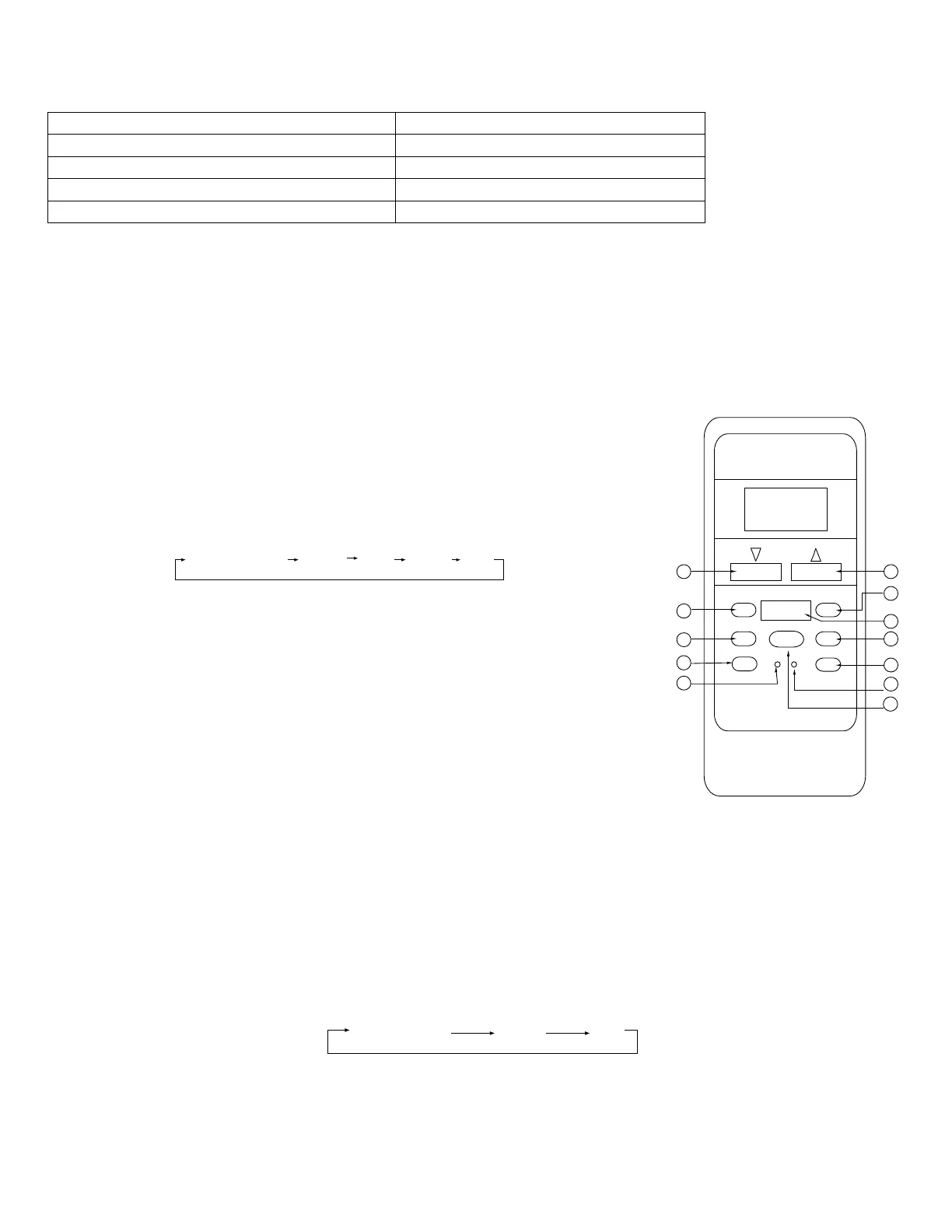
① TEMP Button ▼: Push the TEMP button to decrease the indoor temperature
setting or to adjust the TIMER in a counter-clockwise direction.
② MODE Select Button: Each time you push the button, a mode is selected in a
sequence that goes from AUTO, COO, DRY, HEAT and FAN as the following
figure indicates:
NOTE: HEAT only for heating and cooling units.
③ SWING Button: Push this switch button to change the louver angle.
④ RESET Button: When the RESET button is pushed, all of the current settings
are cancelled and the control will return to the initial settings.
⑤ ECONOMIC RUNNING Button: Push this button to go into the Energy-Saving
operation mode.
⑥ LOCK Button: Push this button to lock in all the current settings. To release
settings, push again.
CANCEL Button: Push this button to cancel the TIMER settings.
CANCE
L
LO
CK
1
SET TEMPERATURE (°C)
AU
TO
CO
OL
DR
Y
HEAT
FAN
H
IG
H
MED
L
O
W
TE
MP
MODE
SWING
TIMER
RESET
ON/OFF
FAN SPEED
2
3
4
5
6
7
8
9
10
ECONOMICRUNNING
11
VENT
12
Fig. 1
⑧ TIMER Button: This button is used to preset the time ON (start to operate) and the time OFF (turn off the operation).
⑨ ON/OFF Button: Push this button to start the unit operation. Push the button again to stop the unit operation.
⑩ FAN SPEED Button: This button is used for setting Fan Speed in the sequence that goes from AUTO, LOW, MED to
HIGH, then back to Auto.
⑪ TEMP Button: Push the button to increase the indoor temperature setting or to adjust the TIMER in a clockwise
direction.
⑫ VENT Button: Push this button to set the ventilating mode. The ventilating mode will operate in the following sequence:
Ventilation Function is available for the Fresh Star Series.
24


 To Next Page