21
AMPLIFIER SETTINGS
AMPLIFIER SETTINGS
Before preparing the source unit and dash reassembly, make the following adjustments to the setting. See
the TEST & TUNE section for additional information on nal system adjustments and personalized settings.
The chart below provides general crossover and bass boost switch settings depending on the RZR tuned
package you have.
TUNED PACKAGE TWO-CHANNEL AMPLIFIER MONO AMPLIFIER
MBQ-STG-5-1 HP-OFF-LP/BP
Switch to HP - High Pass
Bass Boost to 0dB
MBQ-STG-3-1 HP-OFF-LP/BP
Switch to HP - High Pass
Bass Boost to 0dB
MBQ-STG-2-1 HP-OFF-LP/BP
Switch to – OFF
N/A
MBQ-SUBSYS-1 N/A Bass Boost to 0dB
This manual assumes the full Stage 5 System and provides the information for initial settings accordingly.
STEP 1 – ADJUST TWO-CHANNEL AMPLIFIER
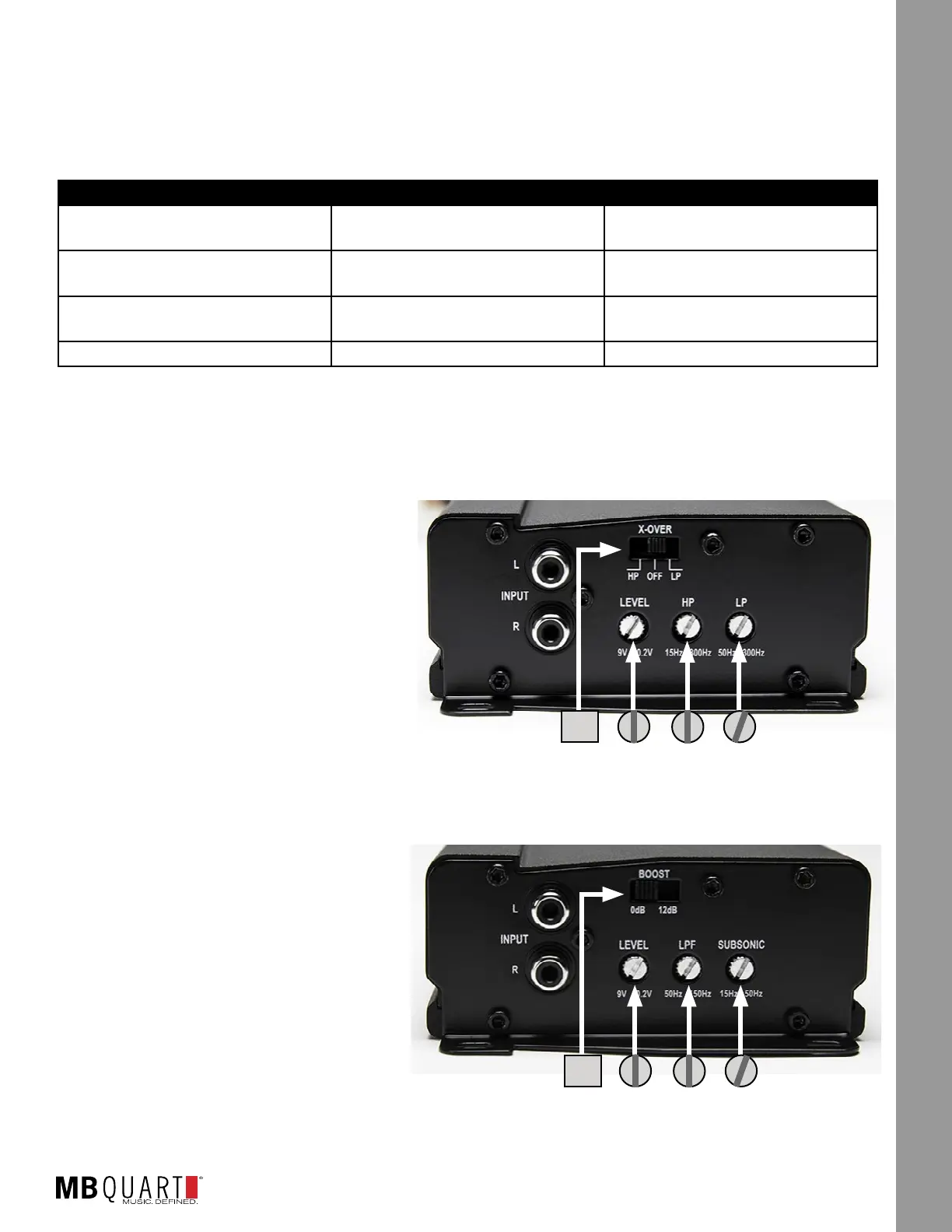
Looking at the NA2-400.2 shown in Figure 15.1, make the following initial adjustments:
● X-OVER - Switch to “HP” position.
● LEVEL - Rotate control to halfway (pointing
up). This represents an input level that will
closely match the source unit’s output at full
volume allowing the amplier to achieve full
power without notable distortion.
● HP - Rotate control to halfway (pointing up).
This is approximately 80HZ.
● LP - Not used in this application.
STEP 2 – ADJUST MONO AMPLIFIER
Looking at the NA2-400.1 shown in Figure
15.2, make the following initial adjustments:
● BOOST - Switch to “0dB” position.
● LEVEL - Rotate control to halfway (pointing
up). This represents an input level that will
closely match the source unit’s output at full
volume allowing the amplier to achieve full
power without notable distortion.
● LPF - Rotate control to halfway (pointing
up). This is approximately 100HZ.
● SUBSONIC - Leave in the lowest (15Hz position). If the subwoofer has trouble with the lowest notes in
your choice of music upon testing, you can adjust up slightly about 1/4 turn.
Figure 15-1
Figure 15-2
HP
0dB



 To Next Page