10
Sound Controls (Continued)
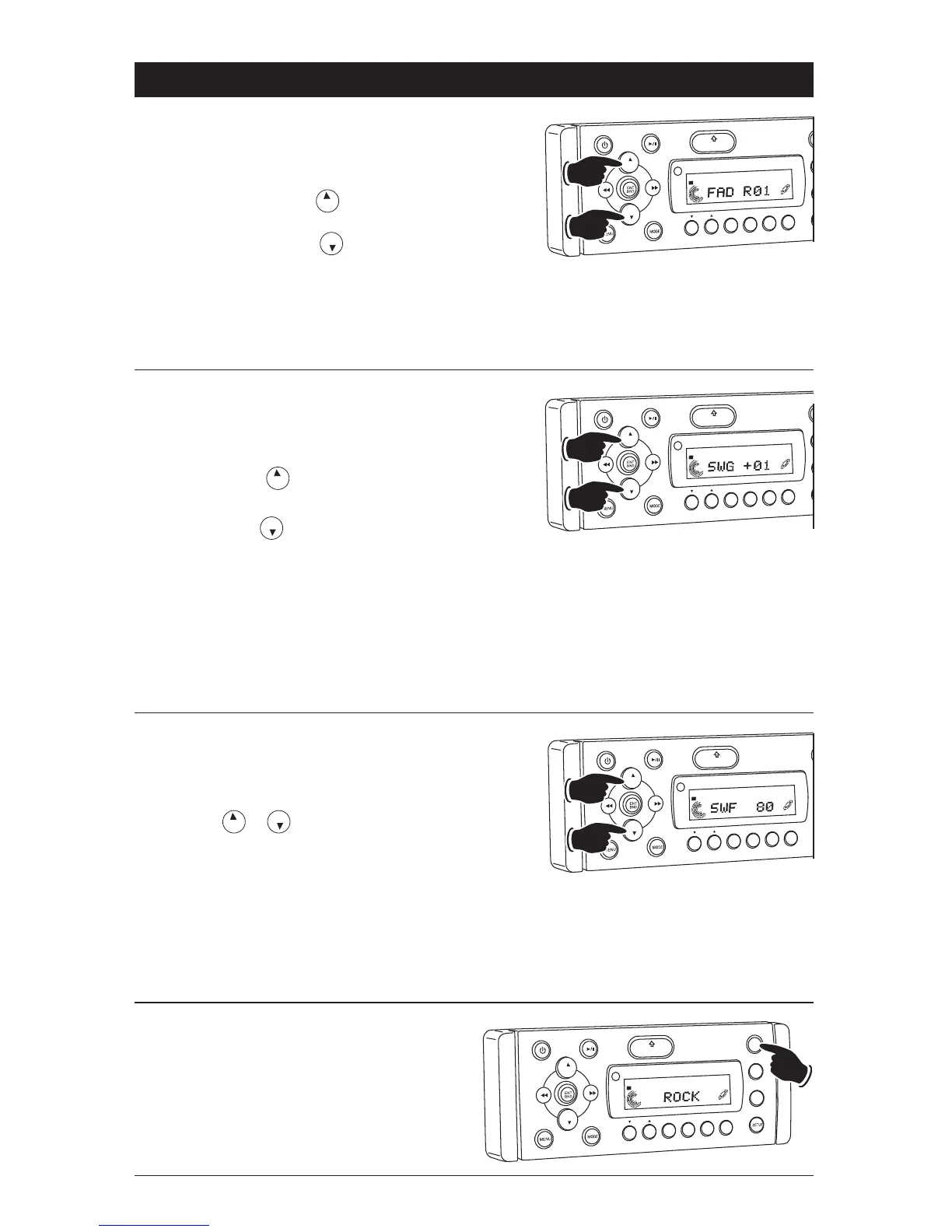
Fader:
1. Select the Fader mode (FAD) by pressing the
SETUP button.
2. To adjust the amount of sound output to the
Rear speakers press the button.
To adjust the amount of sound output to the
Front speakers press the button.
FAD 00 = Equal sound front and rear speakers.
FAD R12 = Rear speakers only.
FAD F12 = Front speaker only.
3. After 5 seconds control reverts back to volume
control.
VOL
LOU
D
VOL
MU
TE
OPEN
1
2
3
4
5
6
SHF
R
PT
SC
N
DIR/CAT
ST
Front
Rear
Equalizer (EQ):
Press the EQ button to choose between the pre-
set equalizer settings: Rock, Pop, Classic, Vocal,
Flat and Jazz as indicated in the display area.
VO
L
LOU
D
VO
L
MU
TE
DM
S-MOD
Pod MEN
U
OPEN
1
2
3
4
5
6
ASM
DISP
EQ
SUB
W
SHF
R
PT
SC
N
DIR/CAT
ST
Subwoofer Line Level Output (SWG):
1. Select the Subwoofer Line Level Output mode
(SWG) by pressing the SETUP button.
2. To adjust the Subwoofer Line Level Output
higher press the button.
To adjust the Subwoofer Line Level Output
lower press the button.
SWG 00 = No gain.
SWG -12 = Minimum level.
SWG +12 = Maximum level.
3. After 5 seconds control reverts back to volume
control.
Note: If subwoofer output is turned Off, Subwoofer
Line Level Output mode is not accessi
ble. See
Subwoofer Output (page 11) for more informa
tion.
VO
L
LOU
D
VO
L
MU
TE
OPEN
1
2
3
4
5
6
SHF
R
PT
SC
N
DIR/CAT
Lower
Higher
ST
Subwoofer Cutoff Frequency (SWF):
1. Select the Subwoofer Cutoff Frequency mode
(SWF) by pressing the SETUP button.
2. To adjust the Subwoofer Cutoff Frequency
press the or button.
SWF 160 = Low Pass 160Hz
SWF 120 = Low Pass 120Hz
SWF 80 = Low Pass 80Hz
3. After 5 seconds control reverts back to volume
control.
Note: If subwoofer output is turned Off, Subwoofer
Cutoff Frequency mode is not accessi
ble. See
Subwoofer Output (page 11) for more informa
tion.
VOL
LOU
D
VO
L
MU
TE
OPEN
1
2
3
4
5
6
SHF
R
PT
SC
N
D R/CAT
Lower
Higher
ST



 To Next Page