14
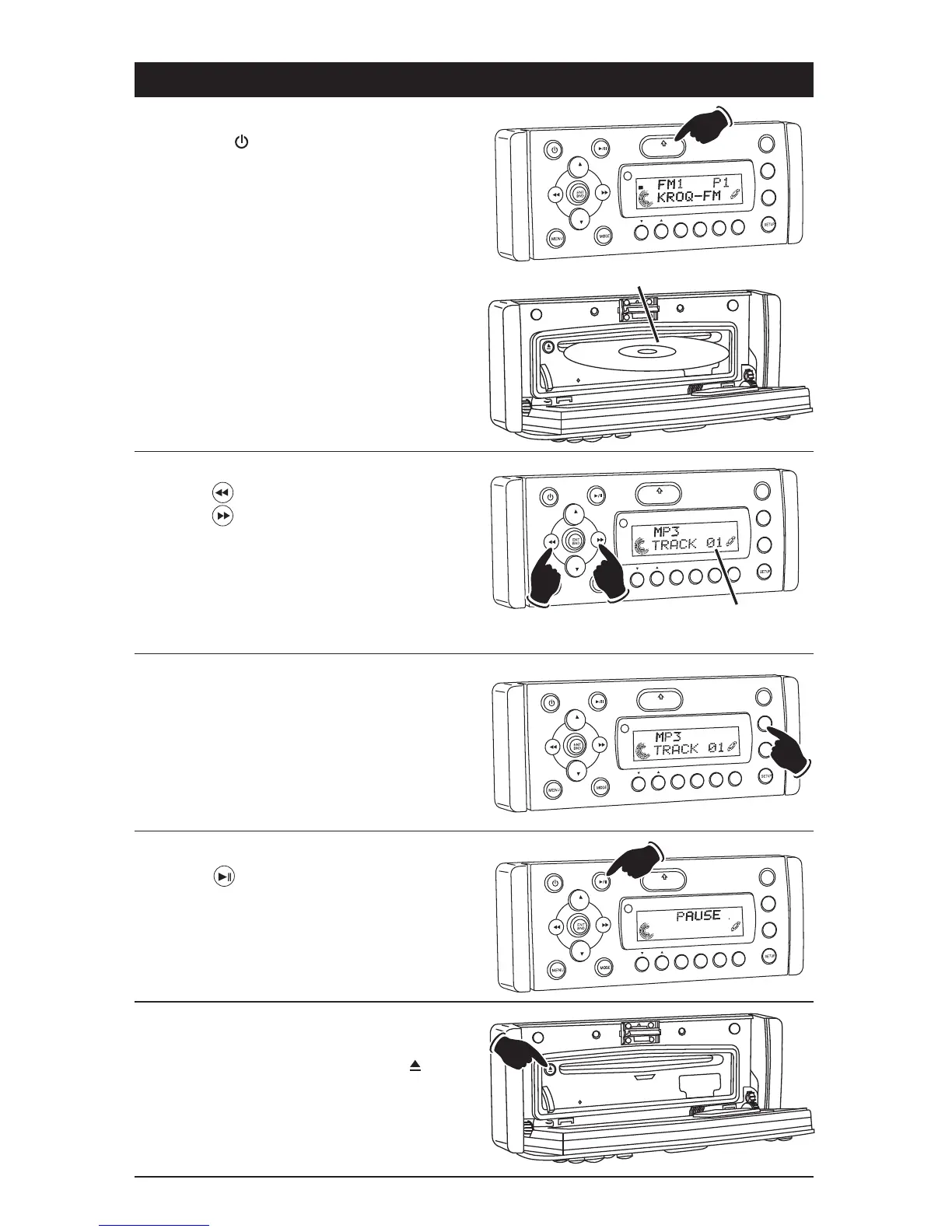
MP3 Disc Operation
General Operations:
1. Press the button to turn the unit On.
2. Press the OPEN button to fold down the front
panel to access the disc player slot.
3. Gently insert the disc into the slot with the
label side up. The unit will automatically load
the disc.
Note: If a disc does not auto-load, DO NOT
FORCE into the slot, as you may already have a
disc loaded.
VOL
LOU
D
VOL
MU
TE
DM
S-MOD
i
Pod MEN
U
OPEN
1
2
3
4
5
6
ASM
DISP
EQ
SB W
SH
F
R
PT
SC
N
DIR/CAT
ST
Label Side Up
Disc Track Selection:
Press the button to select a lower track.
Press the button to select higher track. The
track number will appear in the display.
VO
L
LOU
D
VOL
MU
TE
DM
OPEN
1
2
3
4
5
6
ASM
DISP
EQ
SUB
W
SHF
R
PT
SC
DIR CAT
Track
Number
Lower
Track
Higher
Track
VOL
LOU
D
VOL
MU
TE
D
M
S-MOD
Pod ME
N
U
OPEN
1
2
3
4
5
6
ASM
DSP
EQ
SUB W
SHF
R
PT
SC
N
D R/CAT
Pausing a Disc:
Press the button to pause the disc. Press it
again to resume play.
Ejecting a Disc:
Press the OPEN button to fold down the front
panel to access the disc slot. Press the but-
ton to eject the disc.
VOL
LOU
D
VOL
MU
TE
DIM
S-MOD
Pd ME
N
U
OPEN
1
2
3
4
5
6
ASM
DSP
EQ
SUB W
SHF
R
PT
SC
N
DRCAT
Display Selection:
Press the DISP button to display the following
MP3 disc information: DIR NAME
_
> TITLE
_
>
ARTIST
_
> ALBUM.
Repeating a Track/
Random Track Play Order/Preview Tracks:
(see "CD Operation" for details)



 To Next Page