22
IPOD Operation (Option) (Continued)
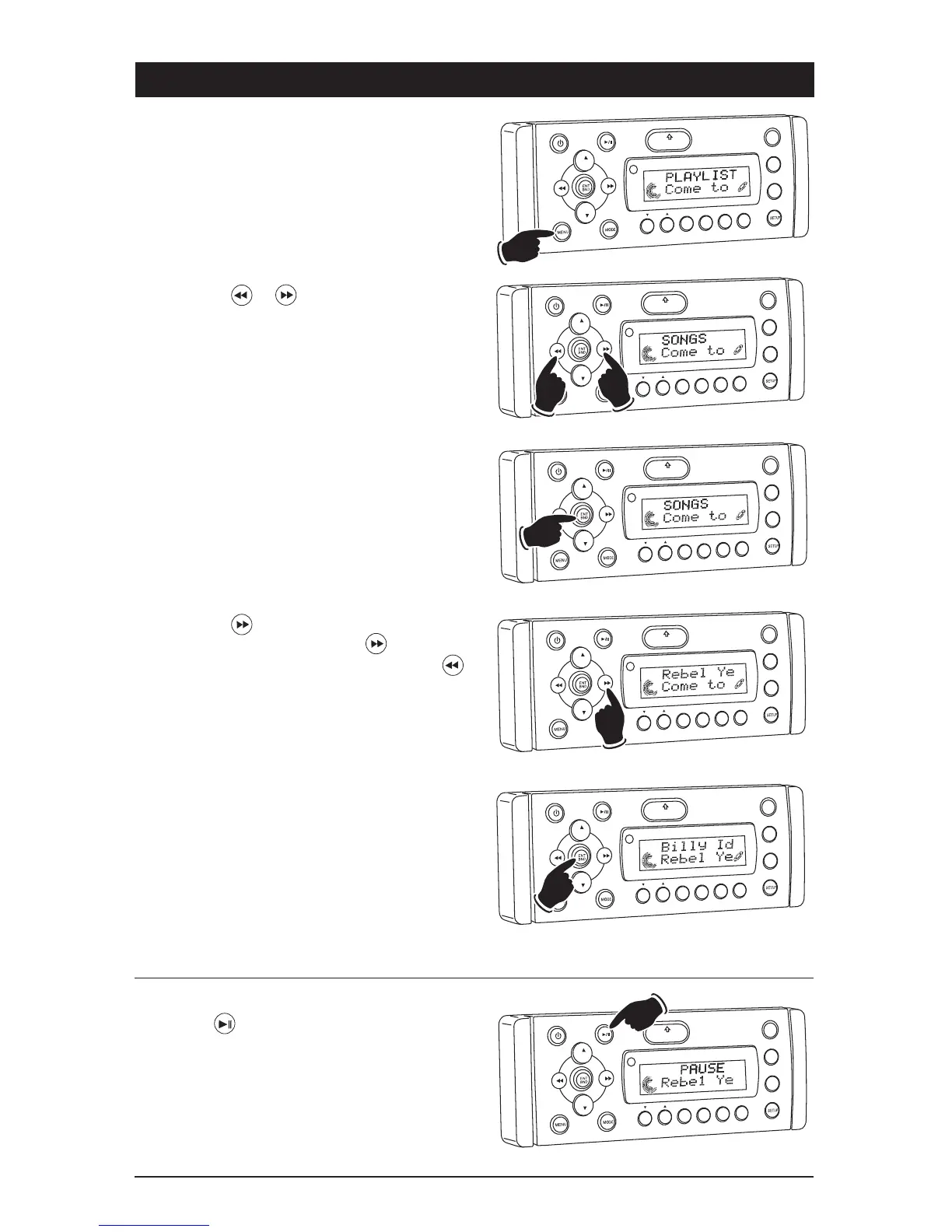
Browse for a Song:
1. Press the MENU button until PLAYLIST
appears in the display.
VOL
LOU
D
VOL
MU
TE
DM
SMOD
i
Pod ME
N
U
OPEN
1
2
3
4
5
6
ASM
DISP
EQ
UB W
SHF
R
PT
SC
N
DIR CAT
VO
L
LOU
D
VOL
MU
TE
DM
MENU
OPEN
1
2
3
4
5
6
ASM
DISP
EQ
SB
W
SHF
R
PT
SC
N
DIR/CAT
VOL
OU
D
VOL
MU
TE
D
IM
OPEN
1
2
3
4
5
6
ASM
DISP
EQ
SUB
W
SHF
R
PT
SC
N
DIR CAT
or
VOL
LOU
D
V
OL
MU
TE
DM
S-MOD
Pod ME
NU
OPEN
1
2
3
4
5
6
ASM
DSP
EQ
SUB
W
SH
F
R
PT
SC
N
D R/CAT
VO
L
OU
D
VOL
MU
TE
D
IM
SMOD
i
Pod MEN
U
OPEN
1
2
3
4
5
6
ASM
DISP
EQ
SUB
W
SH
F
R
PT
SCN
DIR C T
Pausing a Track:
Press the button to pause the track. Press it
again to resume play.
2. Press the or button to select the
“SONG” menu.
3. Press the ENT BND button to activate the
“SONG” menu.
4. Press the button to select the desired
song from the menu. Once the button has
been used to scrolled into the song list the
button can be used to scroll backwards.
5. Press the ENT BND button to start playing the
selected song.
VO
L
LOU
D
VOL
MU
TE
D
M
OPEN
1
2
3
4
5
6
ASM
DISP
EQ
SUB
W
SHF
R
PT
SC
N
DIR CAT



 To Next Page