Extreme 9" Monitor/DVR System© 2014 McNeilus Truck and Manufacturing, Inc.
30
Main Menu Functions
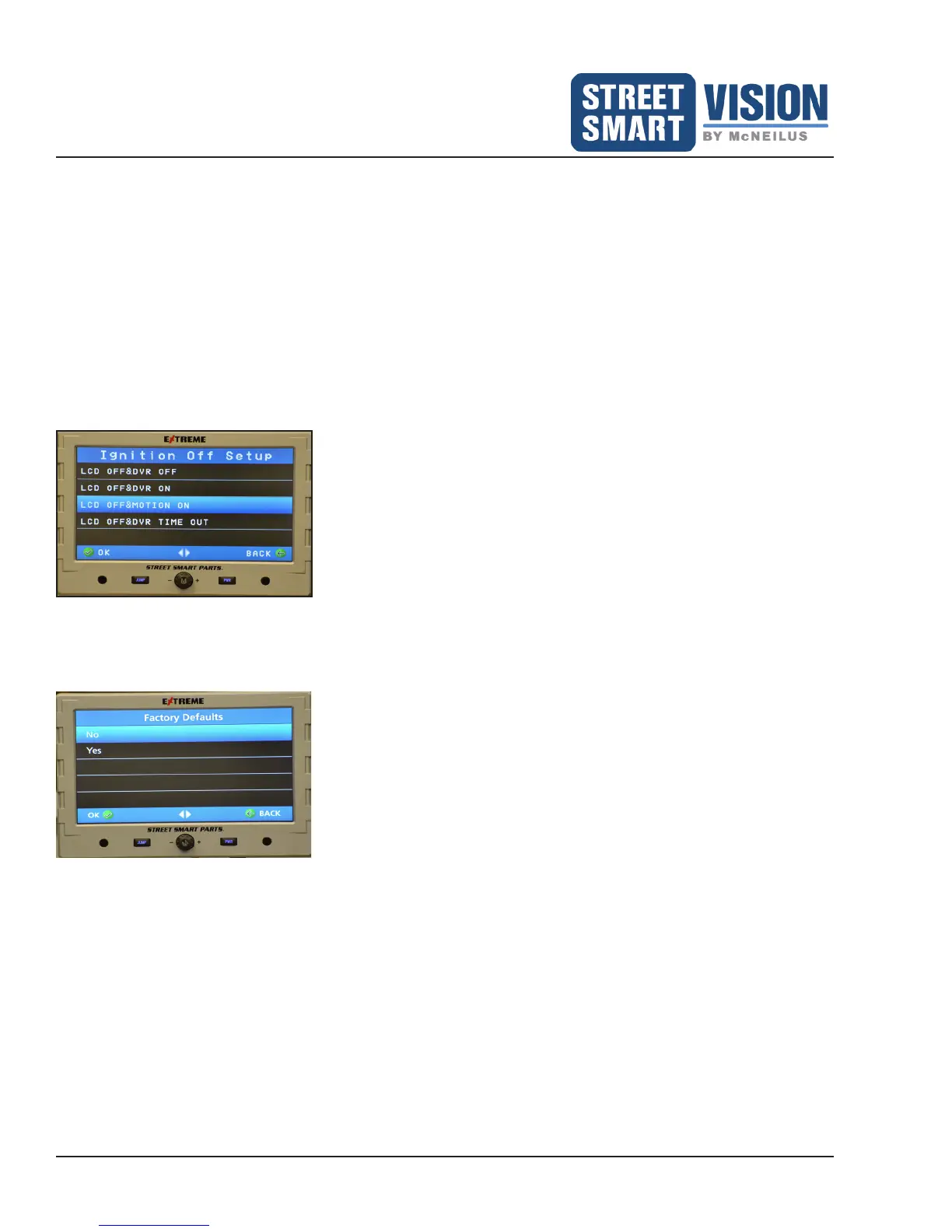
• Ignition Off Setup - Tell the DVR what you would like it to do with the system is powered down (Figure 21).
Ensure the Yellow wire from the Power Accessory Harness is plugged into a constant power source or directly
to the battery.
LCD OFF and DVR OFF - When the LCD monitor is powered off, the DVR will be powered off (will not
record).
LCD OFF and DVR ON - When the LCD monitor is powered off, the DVR will continue to record per preset
recording settings.
LCD OFF and Motion ON - When the LCD monitor is powered off, the DVR will record when motion is
detected on the camera. (Refer to Page 23 for set up of camera(s) motion detection/recording.)
LCD OFF and DVR Time Out (ON) - When the LCD monitor is powered off, the DVR Time Out will remain
recording for the chosen amount of time (1 - 180 minutes) after the LCD monitor screen goes off when the
ignition key is turned off. Factory default is 10 minutes.
Figure 21: Ignition Off Setup.
• Menu Alert (Beep) - Turns on/off the beeping sound emitted when pressing buttons on the touchscreen.
• Factory Defaults - Resets the Monitor settings to factory default (Figure 22).
Figure 22: Factory Default for Monitor/OSD.


 To Next Page