Extreme 9" Monitor/DVR System© 2014 McNeilus Truck and Manufacturing, Inc.
68
Preco Preview Radar System
• Detection Zone Set Up
Set up and test the PreView
®
Dual Sensor system outdoors. It is important to make sure the sensors have a clear
eld of view, especially if it the detection zone set up must be completed indoors. Two people are needed to set
up the detection zone.
1. With the parking brake applied, power up the PreView
®
system by turning on the vehicle's ignition and
placing the transmission in reverse. DO NOT start the engine unless it is necessary to engage reverse gear.
2. Make sure the SSV Extreme Monitor/DVR System display is illuminated and the system does not detect any
objects (all black/white indicator circles are off).
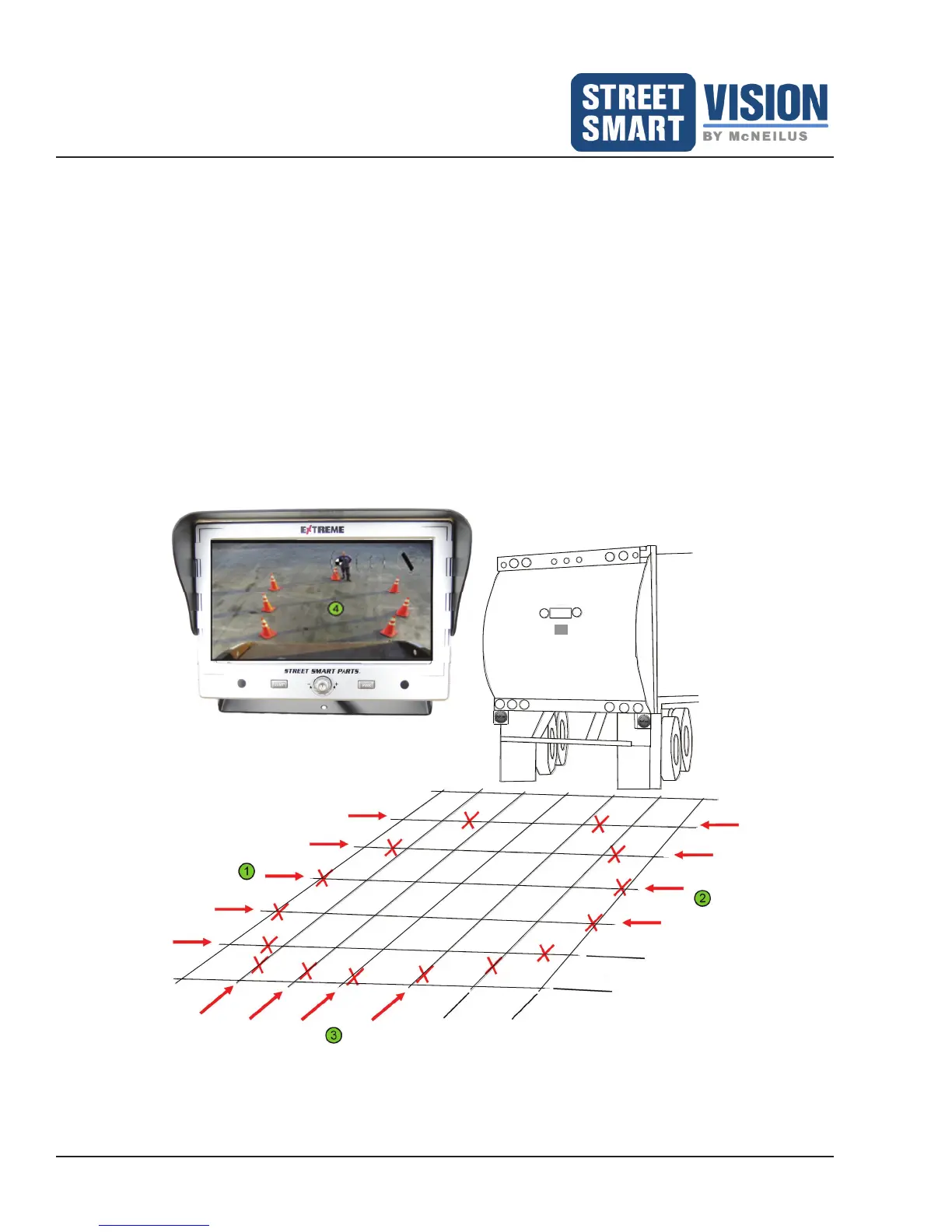
3. Have an assistant test the detection zone by walking in the direction of the arrows in approximately 3 ft.
(1M) increments, starting from direction 1, then 2, and nally 3 (see Figure 50).
4. Use the monitor to determine view points. Have the assistant place a trafc cone or other highly visible
object at the rst point of detection of the assistant on the monitor screen (Figure 50). Mark each point of
detection for each arrow direction. Repeat as necessary to conrm accurate detection zone.
5. The nal detection zone, as viewed through the monitor, should look similar to Figure 50. The arrows
indicate the points of detection of the assistant on the monitor.
~ 3 ft.
(1 m)
~ 3 ft.
(1 m)
CAM
Figure 50: Detection Zone as viewed through the monitor.


 To Next Page