10
piezo smart - manual of use and maintenance
11
piezo smart - manual of use and maintenance
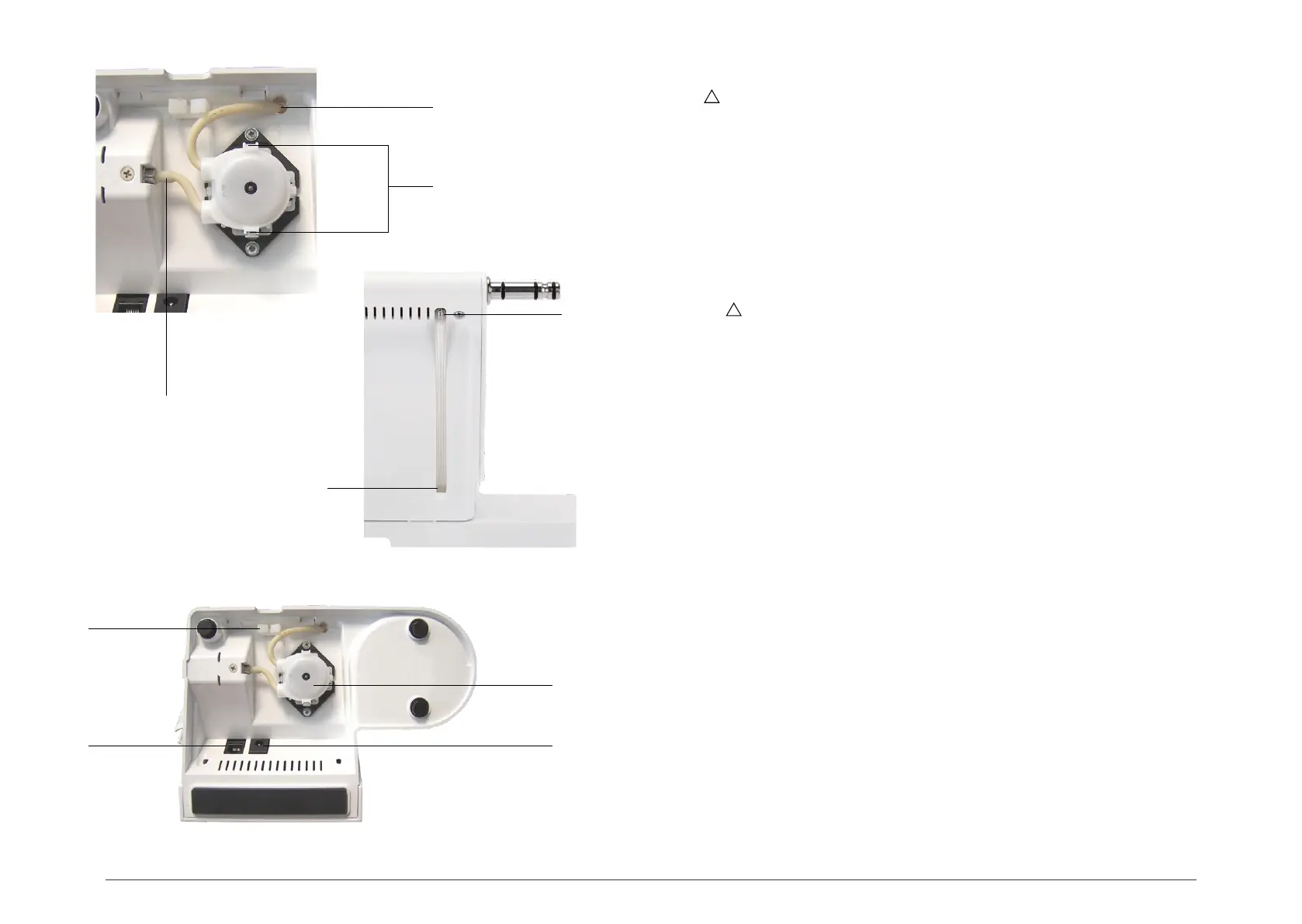
04.2 Installation of the peristaltic pump
WARNING: All activities involving the peristaltic pump must be carried out only after
disconnecting the device from the mains power supply and without installing the bottle of liquid.
1 Turn the device upside down;
2 Plug the short end of the tube of the pump into the connector shown in Fig. 4, Ref.A;
3 Secure the pump to the black base as shown in Fig. 4. It must click audibly into place;
4 Pass the longer end of the tube of the pump through the hole shown in Fig. 4, Ref.B;
5 Plug the tube into the connector shown in Fig. 4, Ref.D.
04.3 Connection of the device
1 Plug the pedal into its socket on the housing of the device (Fig.4 - Ref.F).
2 Plug the power cable into its connector on the housing of the device (Fig.4 - Ref.G), then plug
the other end into the power outlet.
WARNING: Make sure that the voltage and frequency of the mains power supply match
those indicated on the data plate of the external power supply unit.
3 Fasten the pedal and power cables in the cable gland as shown in Fig.4 - Ref.H
E
H
GF
Fig. 4
A
B
B
C
D



 To Next Page