14
piezo smart - manual of use and maintenance
15
piezo smart - manual of use and maintenance
05.0 Use
05.1 Controls
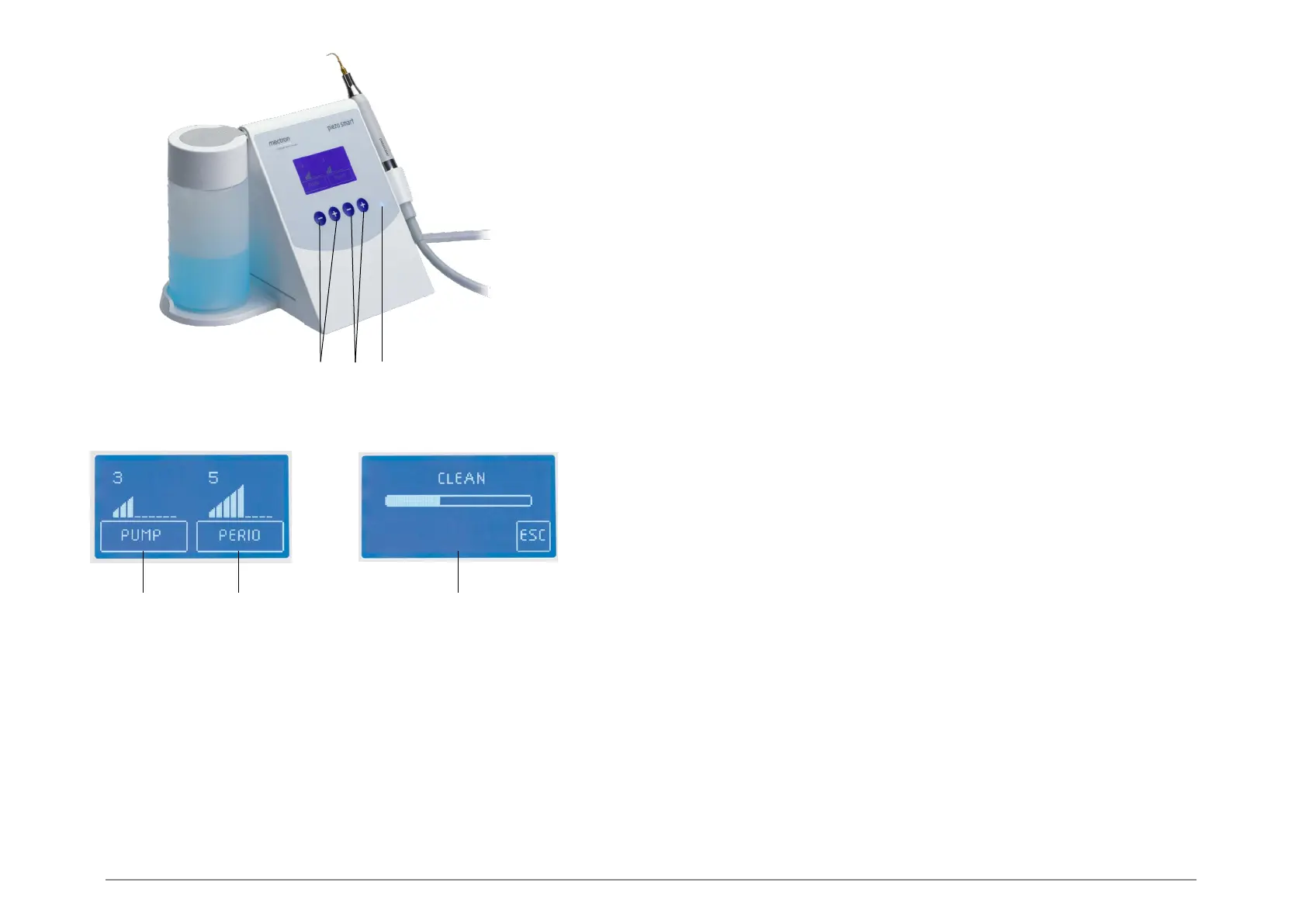
This section illustrates the front panel (Fig.7) of the piezo smart, to as to enable immediate
identification of the controls described in this manual.
Description of the controls
Ref. A - Set of 2 keys, - and +
Function For setting the flow rate of the peristaltic pump (0-9).
Ref. B - Set of 2 keys, - and +
Function For setting the required power level (1-9).
Ref. C - Blue LED
Function The LED lights up to signal that the device is powered.
Ref. A/B - Set of 4 keys, - and +
Function When the device is off, press this key to switch it on.
When the device is on, hold this key down for at least 3 seconds to switch it off,
The other controls on the device are:
The pedal (Fig.3 - Ref. F) for enabling operation.
05.2 Switching on and off
To switch on the device
1 Press one of the 4 keys on the front panel;
2 The device will switch on.
To switch off the device
1 Press one of the 4 keys on the front panel and hold it down for at least 3 seconds;
2 The device will switch off.
NOTE: If the device is not used for at least 5 minutes i twill switch off automatically.
NOTE: If the device is not switched off correctly, when it is switched on again the message
WARNING 35 will appear on the display for a few seconds.
05.3 Description of the display and functions
The display shows the current settings of the instrument.
After the system check, two bars are shown, as follows:
- The part on the left indicates the output level of the peristaltic pump: “PUMP” (Fig.8 - Ref.A).
- The part on the right indicates the power level of the scaler and the associated level
(Fig.8 - Ref.B).
The device can be used at different power levels for three different functions:
- Levels 1 to 2 ENDO
- Levels 3 to 5 PERIO
- Levels 6 to 9
SCALER
Use the - and + keys (Fig.7 - Ref.A) to lower or increase the output of the peristaltic pump. The
indication on the display will change (Fig.8 - Ref.A).
Use the - and + keys (Fig.7 - Ref.B) to lower or increase the power of the scaler. The indication on
the display will change (Fig.8 - Ref.B).
A B C
Fig. 7
Fig. 8
A B C



 To Next Page