5
EN
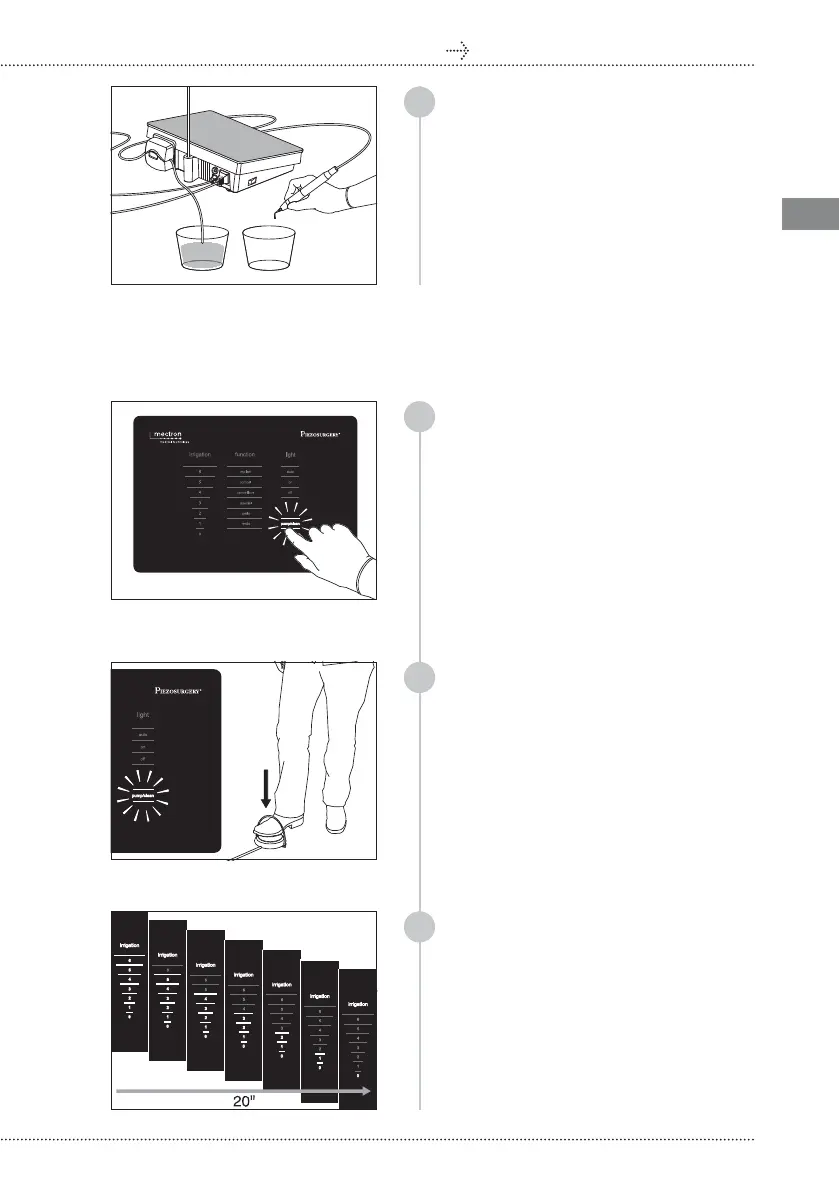
Position the handpiece, with or without
insert, above a container to contain the
OLTXLGWKDWZLOORXWÁRZGXULQJWKHFOHDQLQJ
cycle;
02 CLEAN/FLUSH FUNCTION
5a
5b
PIEZOSURGERY
®
touch
4
5c
To enter the cleaning mode, select PUMP/
CLEAN on the keyboard: all the other
selection options present on the display
are disabled, and the PUMP/CLEAN writing
ÁDVKHV
PLEASE NOTE You can exit the cleaning
mode by pressing on PUMP/CLEAN again
or, alternatively, by waiting for at least 15
seconds. The CLEAN function is disabled
and the keyboard is enabled again, and
displays the last setting used;
To make the CLEAN function start while
WKH3803&/($1ZULWLQJLVÁDVKLQJSUHVV
the foot pedal once and release it: PUMP/
&/($1VWRSVÁDVKLQJDQGWKHFOHDQLQJ
cycle starts;
PLEASE NOTE The Clean function can
be interrupted at any time by pressing
the PUMP/CLEAN writing again or,
alternatively, by pressing on foot pedal. The
keyboard is enabled again, and displays
the last setting used;
As soon as the peristaltic pump starts, the
entire scale of values of the “irrigation”
section lights up and during the liquid
passage, the value of the irrigation shifts
from 6 a 0 . The cycle lasts 20 seconds.
Once it has ended, the keyboard is enabled
again, and displays the last setting used;
Go to point 6



 To Next Page