Calibration
32
Syringe calibration aims to increase the infusion accuracy of the syringe brands not built in the pump. The
parameters to be calibrated include Diameter, Mark Len., and Holder Len. Various data of the user-defined
brands is left blank when the pump is delivered. If a user-defined syringe brand is not calibrated, users cannot
use it.
a) Method 1:
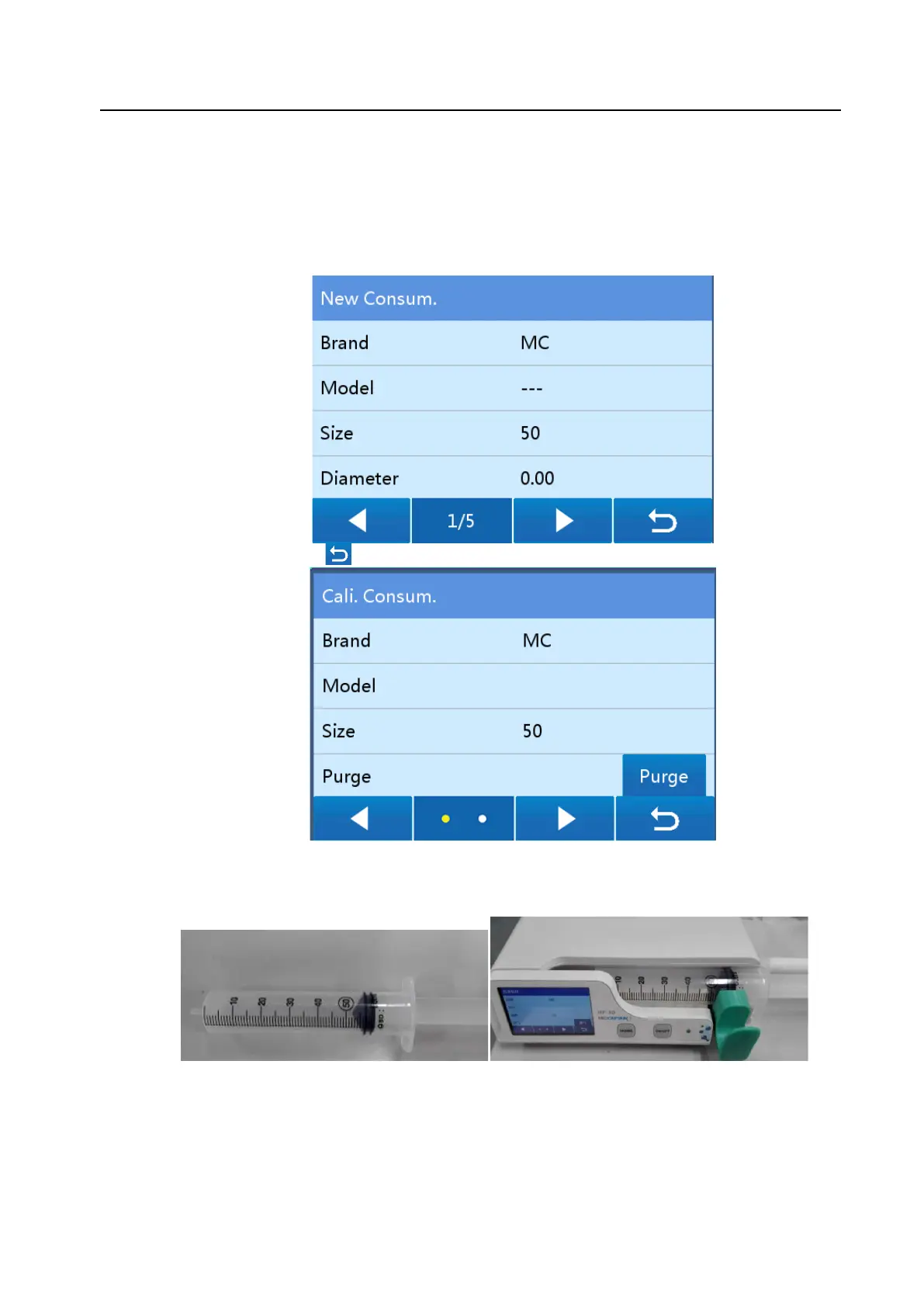
1 Choose HOME>Local Set>Maintenance, input the password 1666, choose Cali. Consum.>New
Consum. to access the new consumables editing screen, and specify Brand, Model, and Size (Brand
and Size are mandatory).
2 After the setting, press to access the Cali. Consum. screen, and calibrate the syringe.
3 Pull the plunger of the to-be-calibrated syringe to the position of a scale exceeding the specification to
be calibrated (for example, pull the plunger of a 50 ml syringe to the position of 56 ml, as shown in the
following left figure). Then, install the syringe onto the device as requested (as shown in the following
right figure).
4 Press Purge, and stop purge when the plunger reaches the position of the specification scale to be
calibrated (for example, 50 ml).
5 Press Start to start consumables calibration, and wait until a message indicating that calibration is
finished is displayed on the screen.



 To Next Page