EN
Overview | 15
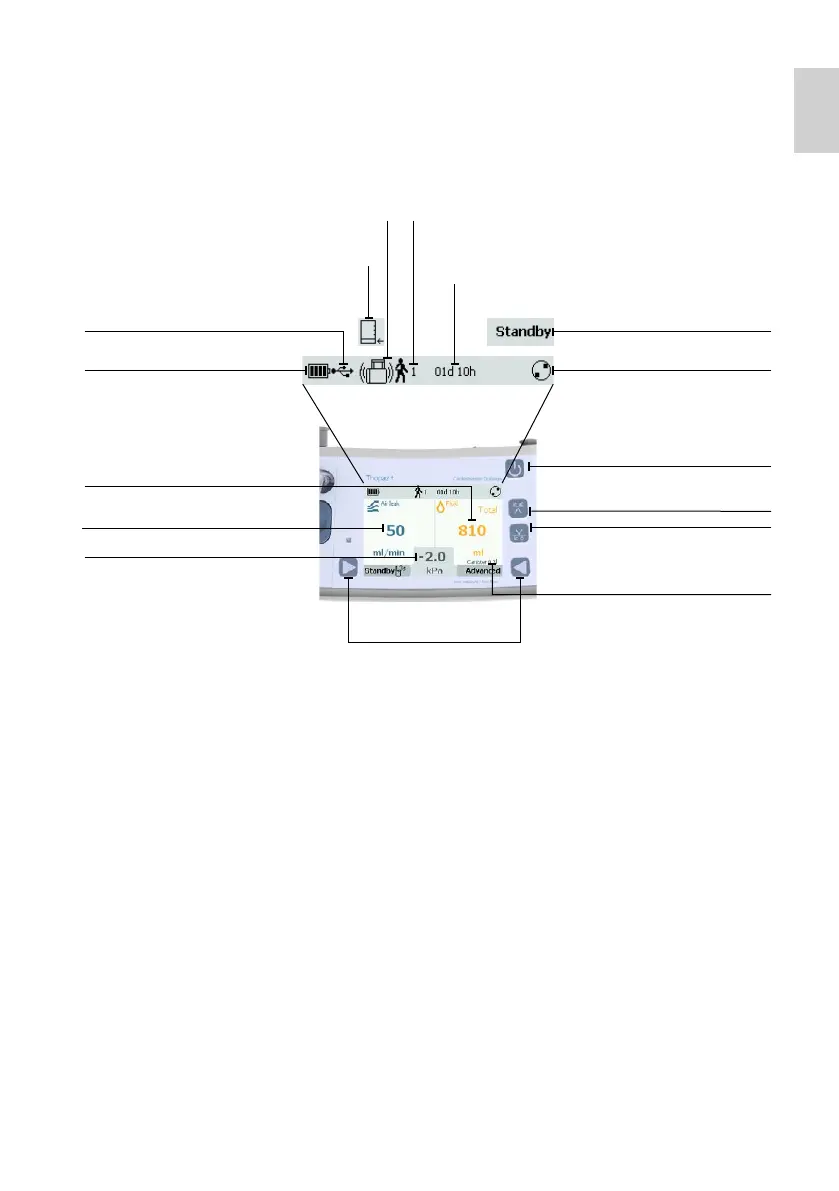
Display
How to activate a button
Press the buttons briefly to activate the desired action.
Exception: for the function switch to «Standby», press the button for longer than 3 seconds.
Action bar
Action status of Thopaz
+
:
Optional buttons
Press simultaneously to change
pressure during operation
(see chapter 9 – Changing
pressure during operation)
Battery status
Air leak size
Set pressure
Total collected fluid amount
Therapy time
Patient numberThopaz
+
is out of axis
(fluid can currently not be measured)
Not enough fluid for
valid fluid measurement
USB connection
Thopaz
+
is running
Fluid history/
Selection button
Power on/off
Thopaz
+
is on Standby
Air leak history/
Selection button
Detected canister size
(check match with
attached canister)





 To Next Page