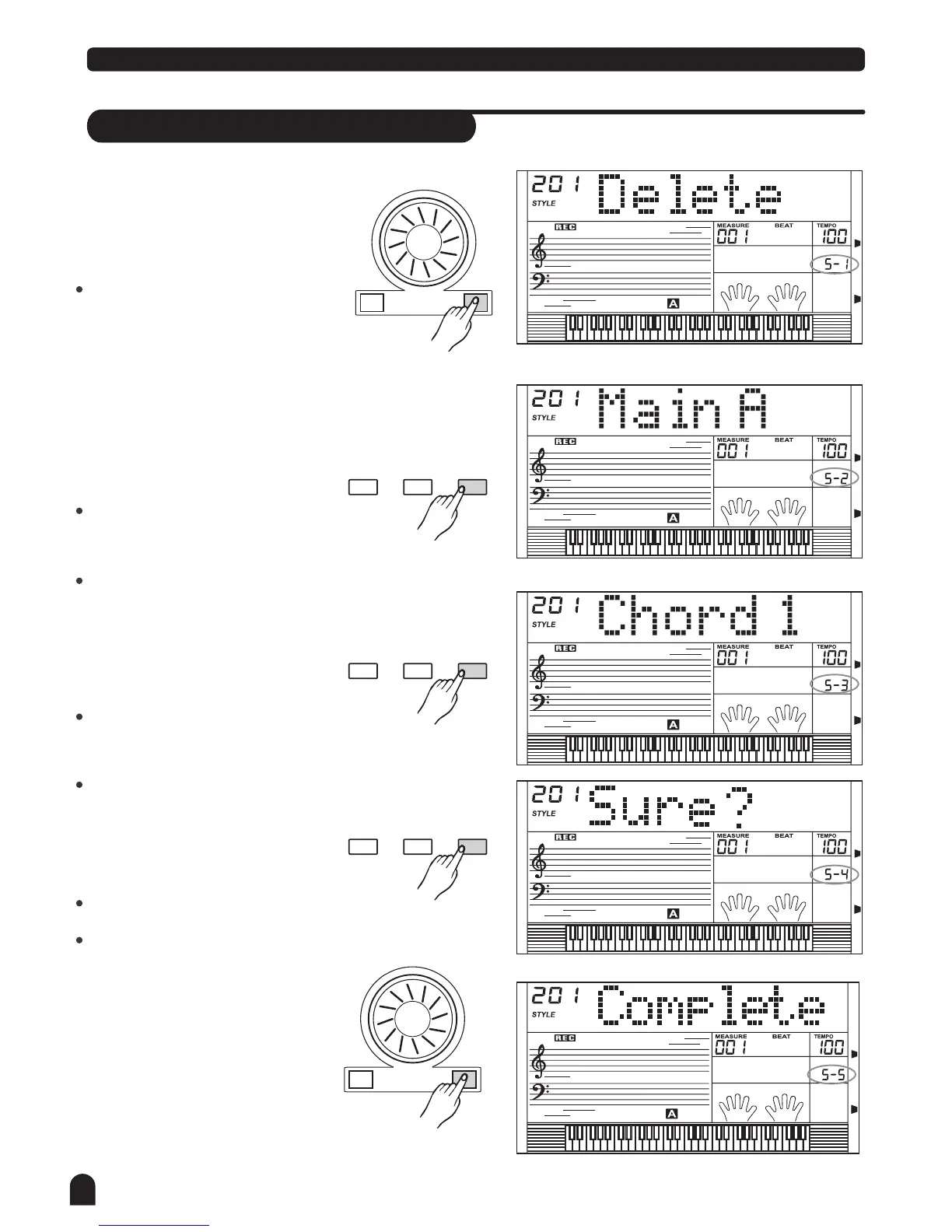
Delete a style
44
Style Record
STY LE
1.
+/YES-/NO
STY LE
2.
FUNCTIONMIXER
BACK NEXT
STY LE
3.
4.
FUNCTIONMIXER
BACK NEXT
STY LE
FUNCTIONMIXER
BACK NEXT
+/YES-/NO
5.
STY LE
Select the user style that needs to
be deleted.
Press [FUNCTION/NEXT] button
to enter choice menu.
Press [+/YES], [-/NO] button or
rotate the DIAL to choose "Delete".
Press [FUNCTION/NEXT] button
to enter Paragraph Selection
page.
Press [+/YES], [-/NO] button or
rotate the DIAL to select the paragraph
that needs to be deleted.
If All is selected, the menu will jump
to step 4.
Press [FUNCTION/NEXT] button
to enter Track Selection page.
Press [+/YES], [-/NO] button or
rotate the DIAL to select the track
that needs to be deleted.
If All is selected, the rhythm will be
deleted.
Press [FUNCTION/NEXT] button
to enter next menu.
LCD will display "Sure?".
Press [+/YES] to confirm.
Press [-/NO] to return to previous menu.
Press [+/YES] to finish deleting.



 To Next Page