28
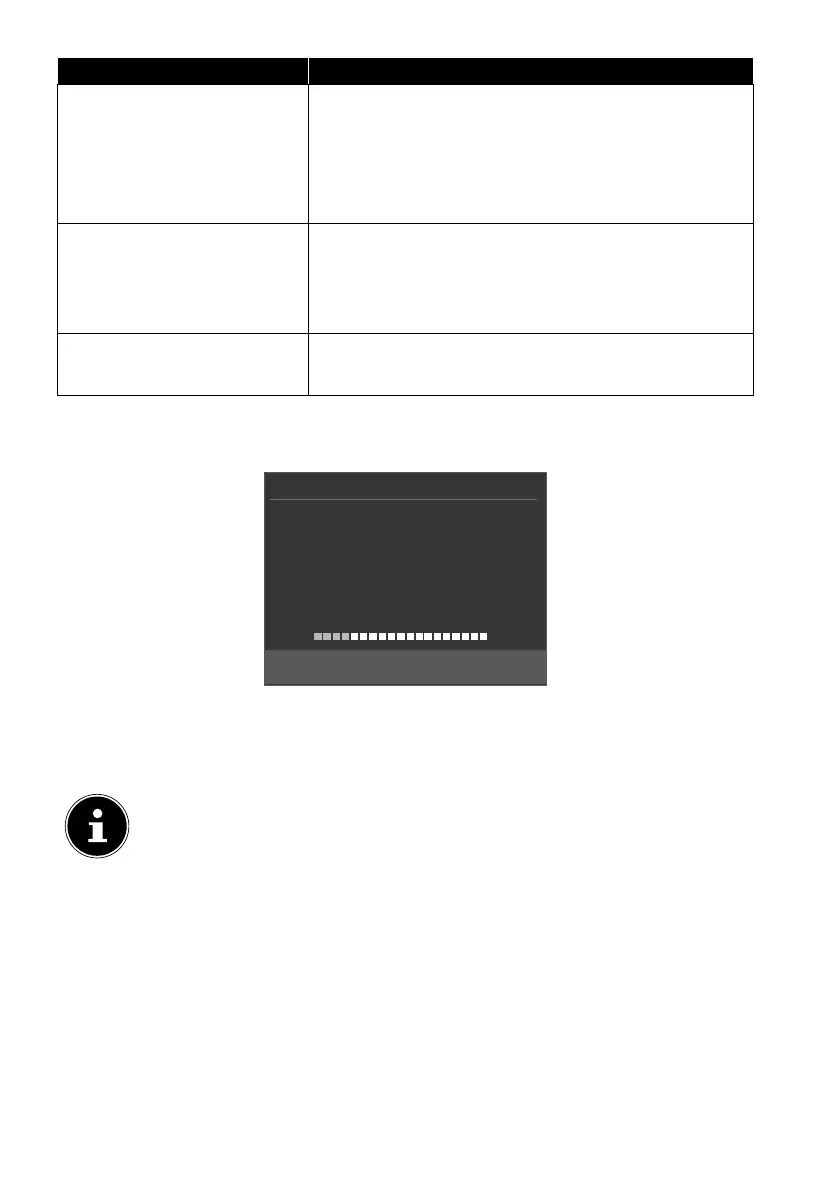
Menu option Setting
SERVICE TYPE Select the channel type.
DTV: Search for digital TV channels.
RADIO: Search for digital radio stations.
ALL: Search for digital TV channels and digital ra-
dio stations.
LOAD PRESETLIST The preinstalled channel list for the Astra 19.2E
satellite is loaded. This search mode takes the least
time. Select YES to load the channel list. Select NO
to start the channel search.
DISH SETUP You can configure the same settings here as in the
CHANNEL > DISH SETUP menu option.
After you have configured all the settings, press OK. The channel search will then
start.
Channel Tuning
TV : 0 Programme
DTV : 0 Programme
Radio : 0 Programme
Data : 0 Programme
Please press MENU key to exit
10892 MHz ASTRA 1H,1KR,1...
The device will now search for the different types of channels in sequence. Wait for
it to finish. You can quit the search process prematurely by pressing the MENU but-
ton.
The initial installation described here corresponds to the FIRST TIME IN
STALLATION option in the OPTION menu.



 To Next Page