27
EN
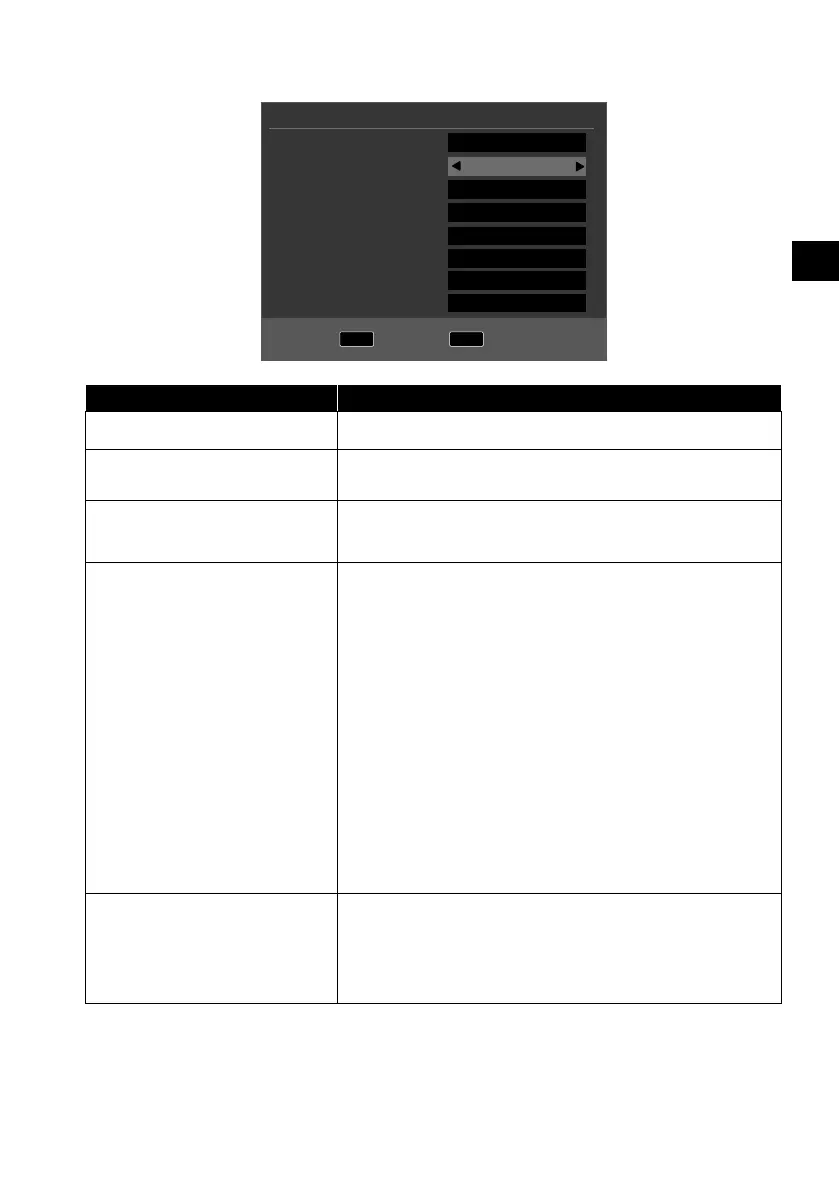
6.8.2. Satellite
MENU
Back
OK
Start
Tune Type
Digital Type
Satellite
Scan Mode
Channel Type
Service Type
Load Presetlist
Dish Setup
Tuning Setup
DTV
Satellite
01 HOTBIRD 6,7A,8
Network
Free+Scrambled
All
OK
OK
Menu option Setting
TUNE TYPE No settings can be entered here in Satellite mode.
DIGITAL TYPE
Use the direction buttons to select the connection
type (DVBT, DVBC or SATELLITE).
SATELLITE Select the satellite on which the search will be
started.
SCAN MODE Set the search mode.
DEFAULT: A search will be carried out on the se-
lected satellite, based on the transponder list
saved for this satellite. This requires a little time.
NETWORK: Activate/deactivate the network scan.
BLIND SCAN: A complete search will be carried
out on the selected satellite. This will also take into
account new transponders that have not been
added to the list of transponders. Two searches
are carried out with the blind scan. The first search
identifies the transponders for the satellite, while
the second search locates the channels. The blind
search takes the longest time.
CHANNEL TYPE Decide which channels you want to search for:
FREE (available channels), SCRAMBLED (encrypt-
ed channels) or FREE+SCRAMBLED (available
and encrypted channels).



 To Next Page