page 66 of 73
project's co-ordinates and inser 0 for all three axes.
Configuration
Configuration
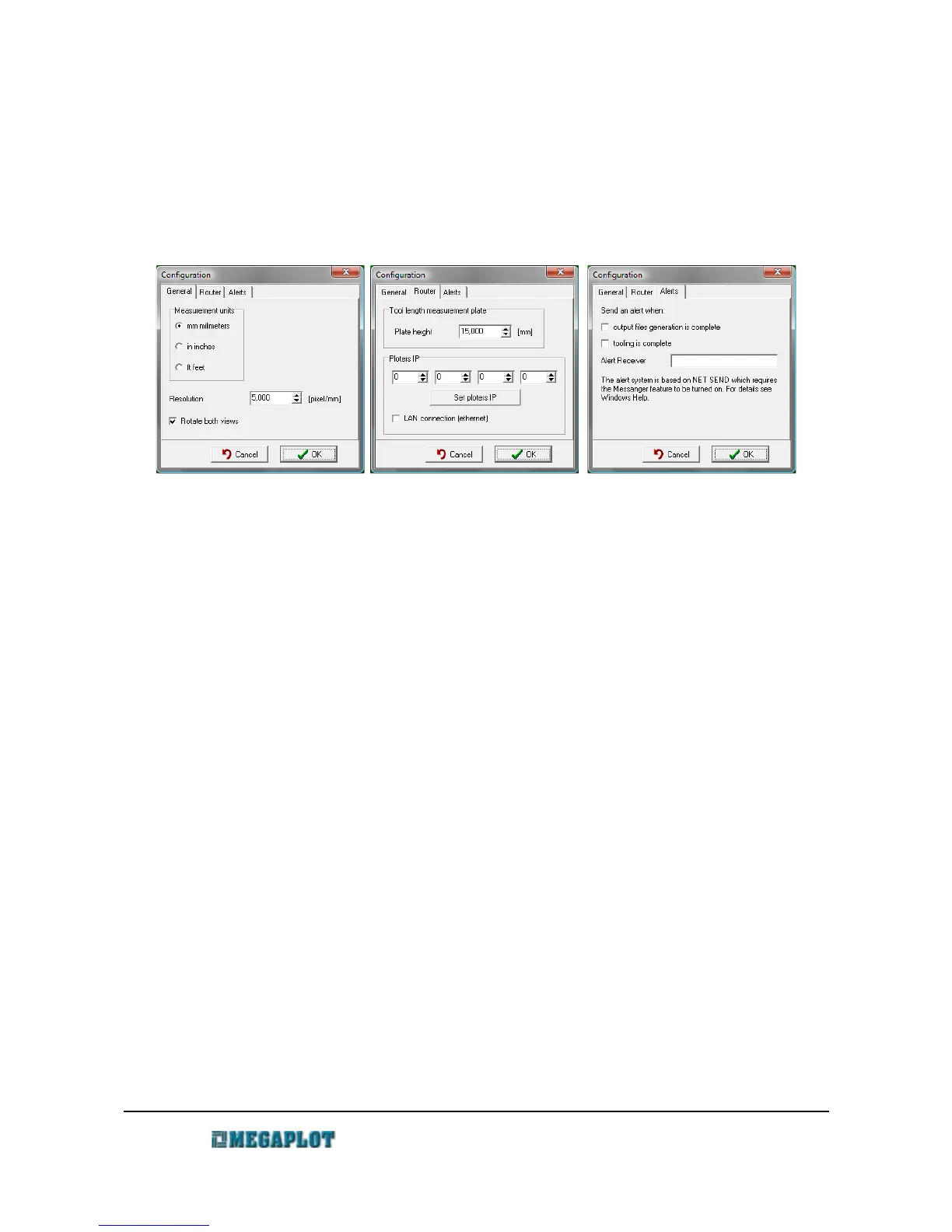
All the main parameters are set in the three tabs in the Configuration window.
General tag
Resolution - preciseness in points/mm at which the algorithms calculate the output files. The
default value is 5 points/mm i.e. the accuracy will be 0.2 mm.
Increasing this value will significantly slower the output files
generation.
Connected preview windows - when on, rotating the 3D model will result in identical rotation of
the output files.
Ploter tab
Tool Lenthg Measurement Plate - Pad Thickness - real thickness of the measuring plater
Set ploter IP - saves the inserted IP into the electronic controller. USB connection is
required for this operation.
Network connection (ethernet) - activates the network connection
Notifications tab
MegaCut3D can send a notification to another PC on the same network at the following events:
• output files generation completion
• tooling process end.
These notifications are only available in Windows XP as they use the messenger service.
Recipient - name of the user or PC on the local network
www.megaplot.com phone: +48 693 707 575 office@megaplot.com



 To Next Page