Trouble shooting
57
GB
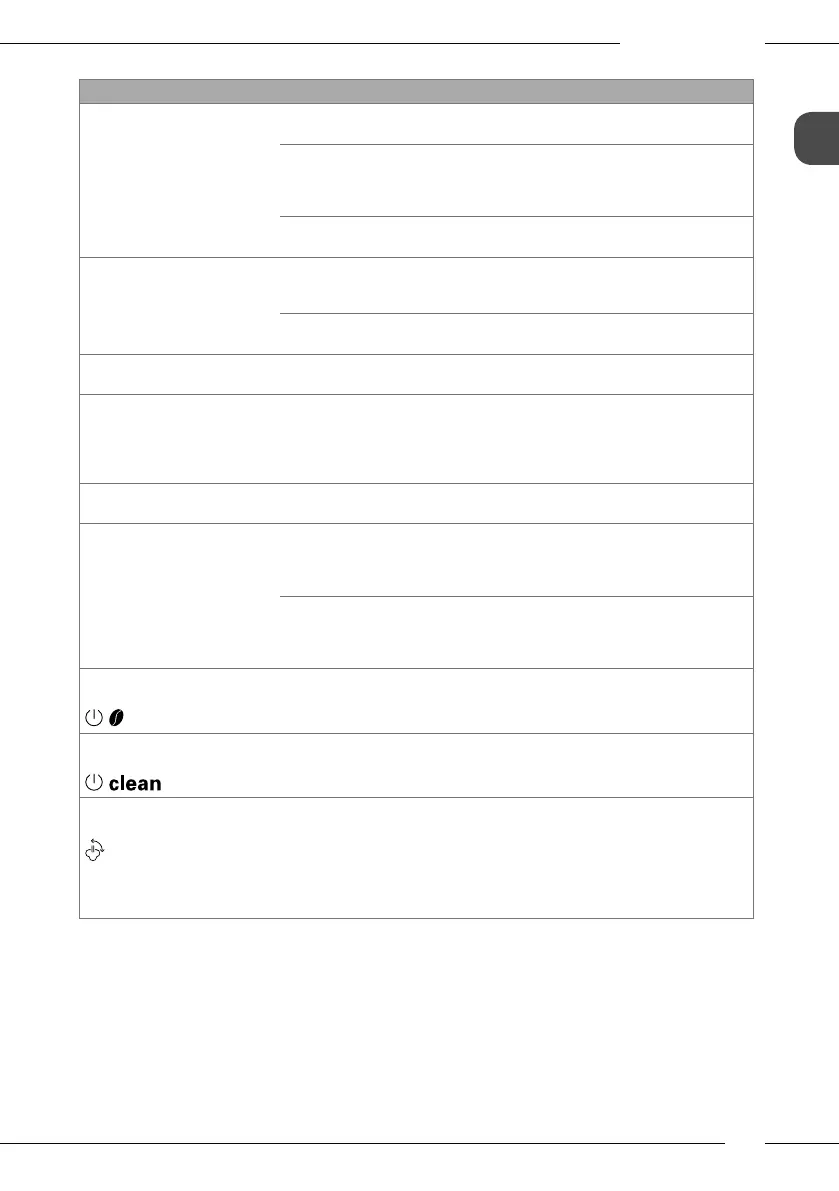
Problem Cause Action
Coee only emerges from
the outlet in drips.
Grinding neness is too ne.
Set a coarser grinding neness (see
section6.8 on page47).
Appliance is soiled.
Clean the brewing unit (see sec-
tion7.3 on page48).
Run the cleaning programme (see
section7.4 on page49).
Appliance is covered inside
with limescale.
Run the descaling program (see
section7.5 on page50).
Coee does not ow. Water tank is not lled or is
not correctly inserted.
Fill the water tank and ensure it is
positioned correctly (see section4.3
on page40).
Brewing unit is clogged.
Clean the brewing unit (see sec-
tion7.3 on page48).
When foaming milk, there is
not enough milk foam.
Cappuccinatore is soiled.
Clean the Cappuccinatore (see sec-
tion7.2 on page48).
Although the bean con-
tainer is full, the appliance
indicates that coee beans
must be lled.
Coee beans do not drop
into the grinder.
Press a direct key.
Tap lightly on the bean container.
Clean the bean container.
Coee beans are too oily. Use dier-
ent coee beans.
Loud grinder noise. Foreign objects in the
grinder.
Contact the hotline.
Brewing unit cannot be
inserted after removing.
Handle for the locking
mechanism of the brewing
unit is not in the correct
position.
Check that the handle for the locking
mechanism is correctly engaged (see
section7.3 on page48).
Drive is not in the correct
position.
Press the "Coee" direct key and the
"2 cups" button simultaneously for
more than 2seconds.
The appliance initialises.
Rapid alternate ashing of
the displays:
Software problem. Switch the appliance o and on again
(see section4.1 on page38).
Contact the hotline.
Rapid alternate ashing of
the displays:
Brewing unit is not inserted. Insert and lock the brewing unit.
The display lights up with-
out having been activated:
Appliance is not fully
vented.
Vent the appliance, turn the rotary
regulator clockwise to the stop for
this. Once the Steam display lights up
permanently, turn the rotary regula-
tor anti-clockwise up to the stop.
Clean the brewing unit (see sec-
tion7.3 on page48).


 To Next Page
 Loading...