PERFECT page 14
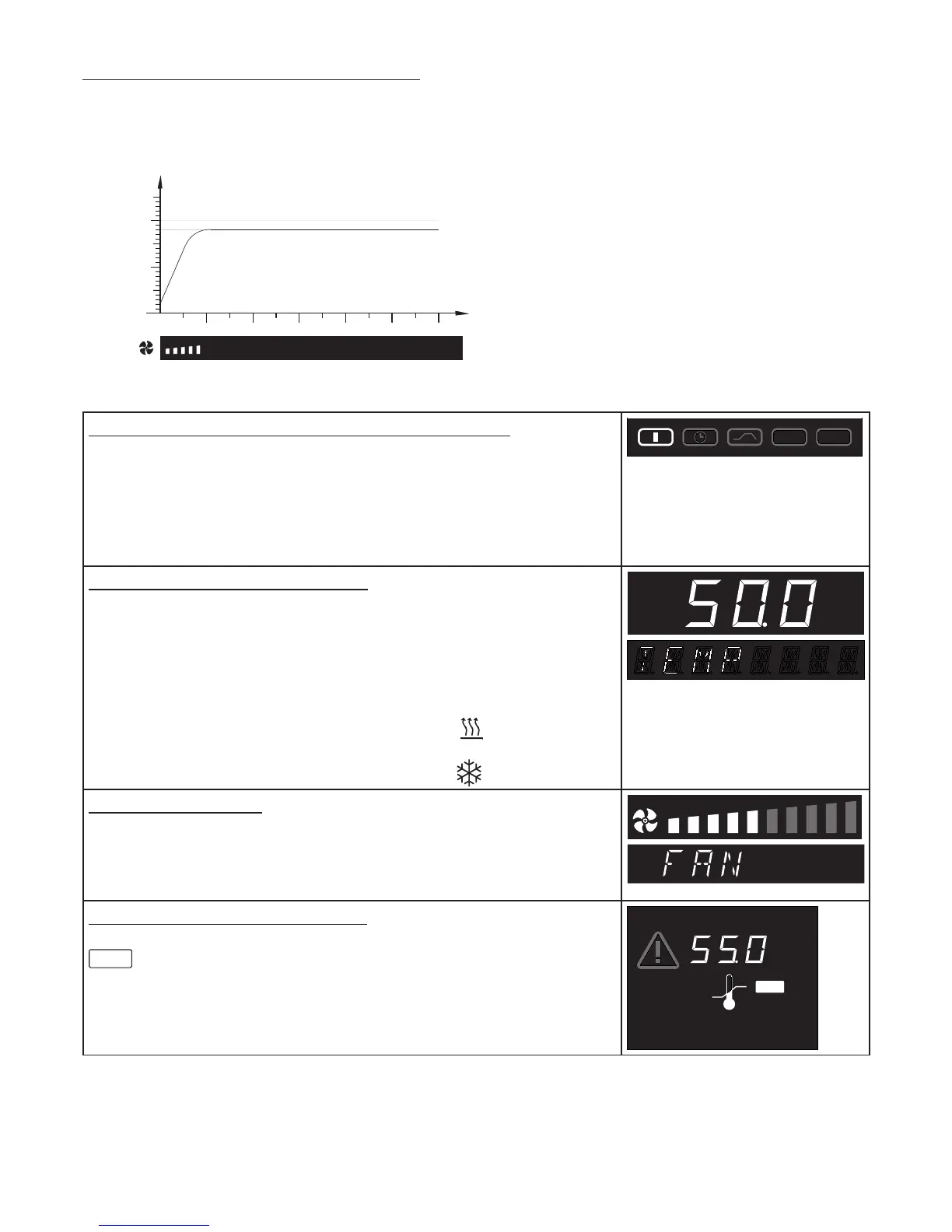
Setting example “Normal operation“
The incubator (ICP500) has to heat up to 50°C at 50% fan speed. The monitor function has to operate
at 55°C.
50°C
monitor temperature 60°C
˚C
t
1. Select operating mode “Normal operation“
After holding down the SET key (approx. 3 sec), the current operating
mode is flashing. Select operating mode I with the push/turn control
while holding down the SET key.
After the SET key has been released the controller is in
operating mode I.
PRINT
SETUP
2. Select temperature setpoint
Hold down the SET key and use the push/turn control to select the
required temperature setpoint of 50°C.
After the SET key has been released the oven briefly flashes the
temperature setpoint. The display then changes to the actual temperature
and the controller starts to control to the selected temperature setpoint
50°C.
Heating is indicated by the orange heater symbol
Cooling is indicated by the green cooling symbol
˚C
3. Select fan speed
Turn the push/turn control clockwise until the fan symbol is flashing.
While holding down the SET key, use the push/turn control to set 50%
fan speed.
4. Select monitor temperature
Turn the push/turn control clockwise until the overtemperature display
MAX
is flashing. Hold down the SET key and use the push/turn control
to set the monitor temperature to 55°C.
MIN
AUTO
MAX
°C



 To Next Page