CL-Profiler operating instructions page 12 of 15
www.cl-profiler.com
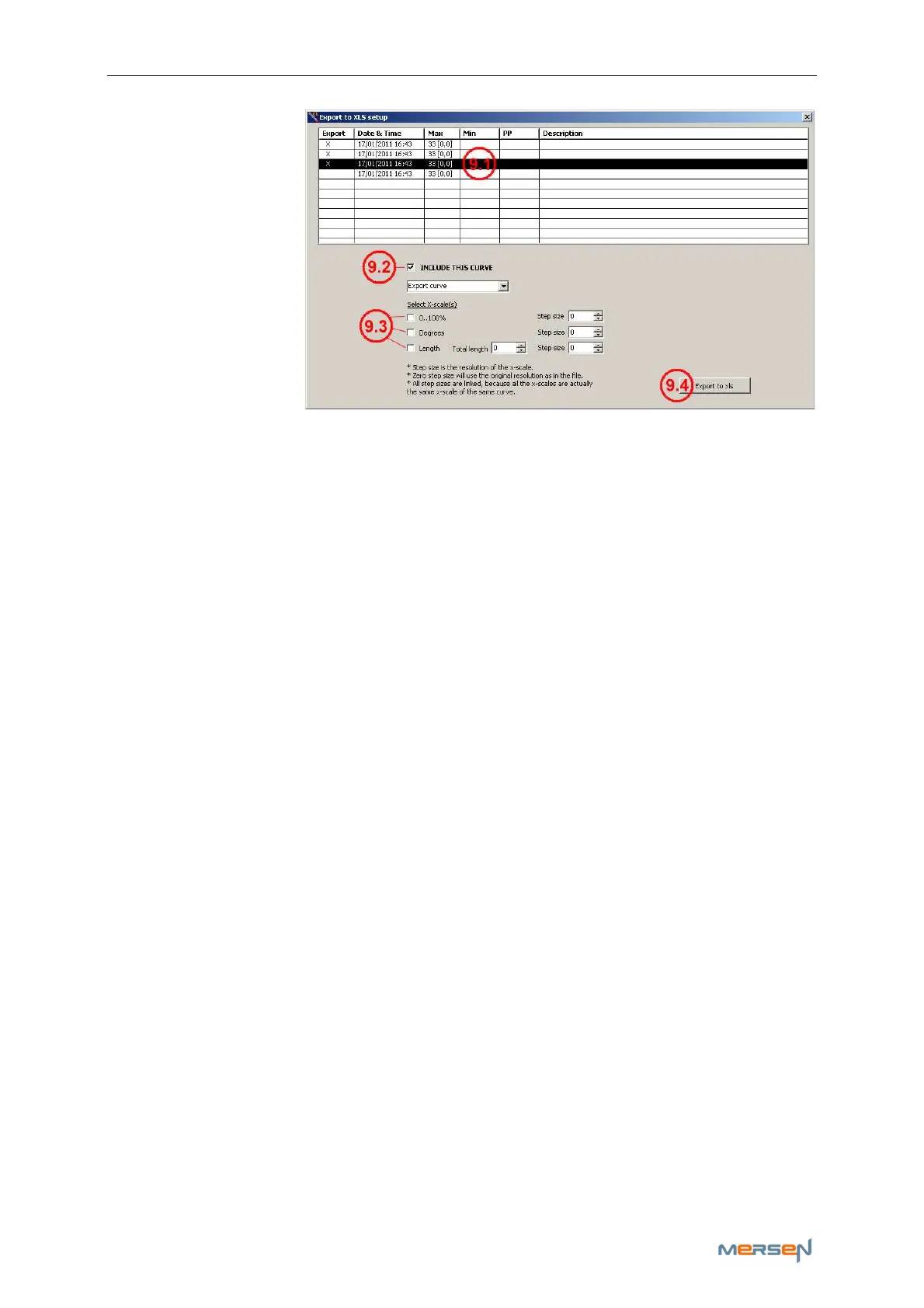
A window pops up
“Export to XLS
setup” in which
you can select the
curves you’d like
to export to Excel.
Select a curve
(9.1) and wink the
“Include this
Curve”-box (9.2)
to export the rele-
vant curve.
“Select X-scale” (9.3), gives you the option to export you’re curve(s) in
percent and/or degrees and/or length.
Once exported to xls (9.4), you can create an automatic Excel format to
calculate the different measurements in your curve(s). This way you can
systematically judge your curve(s) state.
f - Other buttons
The remaining buttons have similar function as explained in chapter: (IV)
7) ViRoTi tool
ViRoTi stands for Virtual Roller Tip and is used to profile grooved slip
rings and grooved commutators.
To use this tool you need:
- two free USB ports on your computer
- two CL-profiler probes or one CL-profiler and one ViRoTi probe.
This function can only work on condition that the measure part “A” is
wider than the wide of the groove “B”, including the chamfers
Note: Before using this tool you need to update the probe software. See
chapter: (IV,2) d - CL-profiler software update



 To Next Page