CL-Profiler operating instructions page 7 of 15
www.cl-profiler.com
3) Linear measurement
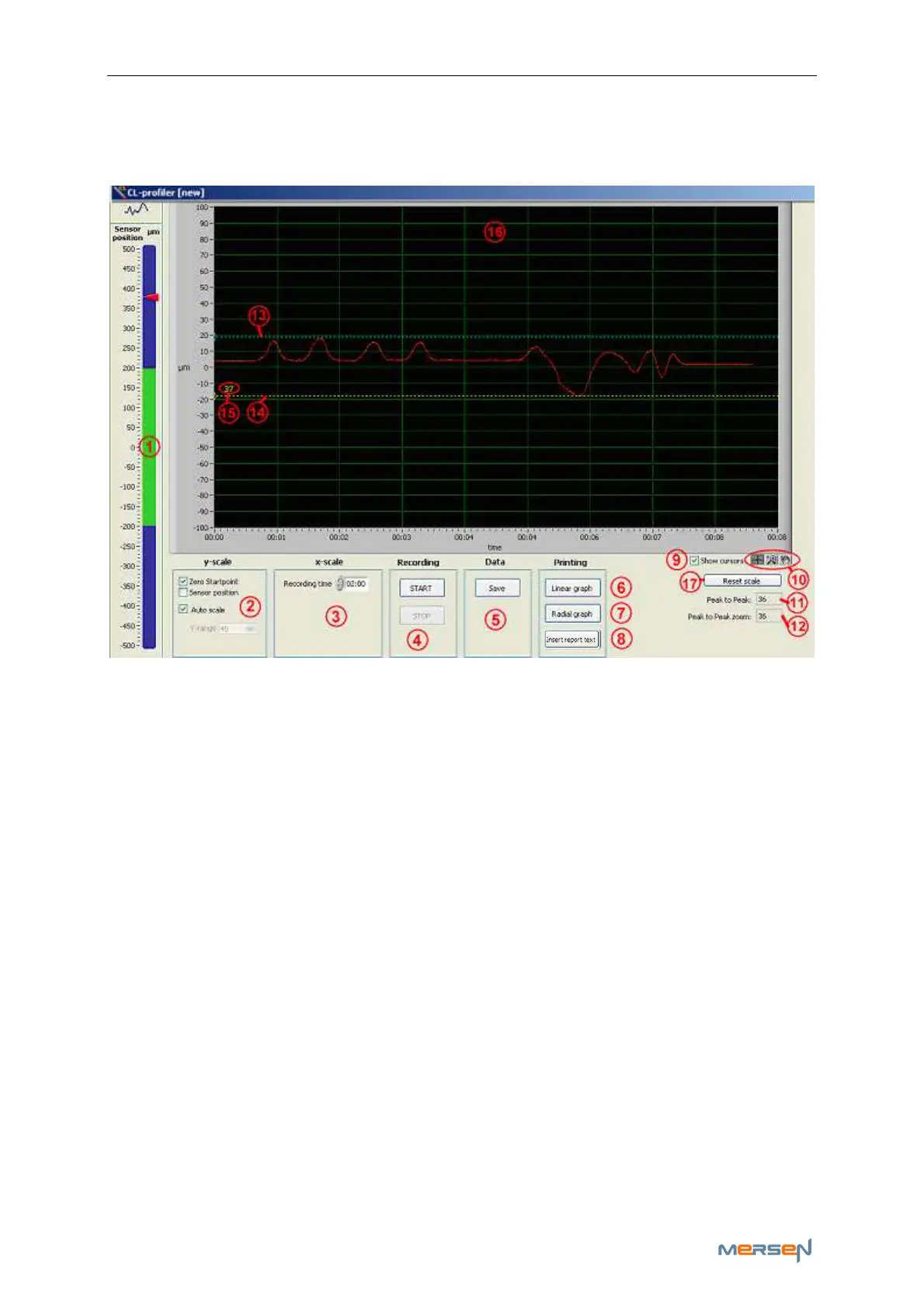
Click on button (3) to open the linear measurement screen:
a - Slider
On the left side, the slider (1) indicates the current location of the sensor,
in the centre or at the end of the range. The scale will become narrower
when the middle point (zero) is approached. It is better to move the sen-
sor close to the zero point since the sensor has lower noise around it.
b - Y-scale
There are several settings for setting the Y-scale (2). Select “Zero Start-
point” or “Sensor position” (is absolute value). “Zero Startpoint” will use
the start point as zero value when recording starts. When recording stops,
the y-scale will be adjusted so that the zero point is middle between
maximum and minimum.
Auto scale will make the scale of the graph (16) fit to the running meas-
urement. If auto scale is disabled, one can select the range of the Y-scale
by means of the menu “Y-range”.
c - Recording
The recording time (3) determines how long the signal will be recorded. A
running measurement can always be interrupted with the “STOP” button
(4).



 To Next Page