39
GB
2. COMMISSIONING
WARNING
Power off the system before plugging or unplugging the connector (risk of functional damage).
Connect the device to the earth using a suitable lead.
Failure to make the earth connection may cause faults and irrevocable damages in the event of electrostatic discharge.
Use fully assembled valve units only.
2.1 CONNECTIONS TO THE EB 80 EtherNet/IP SYSTEM
Connect the device to the earth.
Connect the IN input connector to the EtherNet/IP network.
Connect the OUT output connector to the next device. Otherwise close the connector with the cap provided to guarantee IP65 protection.
Connect the connector to the power mains. The power supply of fieldbus supply is separate from that of the valves.
The valves can be powered off keeping the communication with EtherNet/IP controller active.
2.2 INSTALLATION OF THE EB 80 SYSTEM IN A EtherNet/IP NETWORK
2.2.1 EDS configuration file
To configure the EB 80 system correctly in a EtherNet/IP network, upload the EDS EB80 EIS file to the programming software used.
It can be downloaded quickly and easily from http://www.metalwork.it/ita/download.html
The EDS configuration file explains the characteristics of the EB 80 EtherNet/IP system.
In order for it to be identified as a EtherNet/IP device and its inputs and outputs be properly configured, the file must be imported into the
controller development environment.
2.2.2 Generic Adapter configuration
The EB 80 system can be configured as a Generic Adapter, using the following parameters.
2.2.3 IP Address assignment
Like all Ethernet components, the EB 80 EtherNet/IP system has a permanently-memorised univocal MAC address.
In an EtherNet/IP network, each device must be assigned a univocal IP address, which is stored permanently.
The EtherNet/IP Electrical Connection can be addressed using the EIP Configuration Tool software provided, which can be downloaded from
Metal Work’s website: http://www.metalwork.it/ita/download.html.
Factory settings:
IP address: 192.168.192.32
Subnet Mask: 255.255.255.0
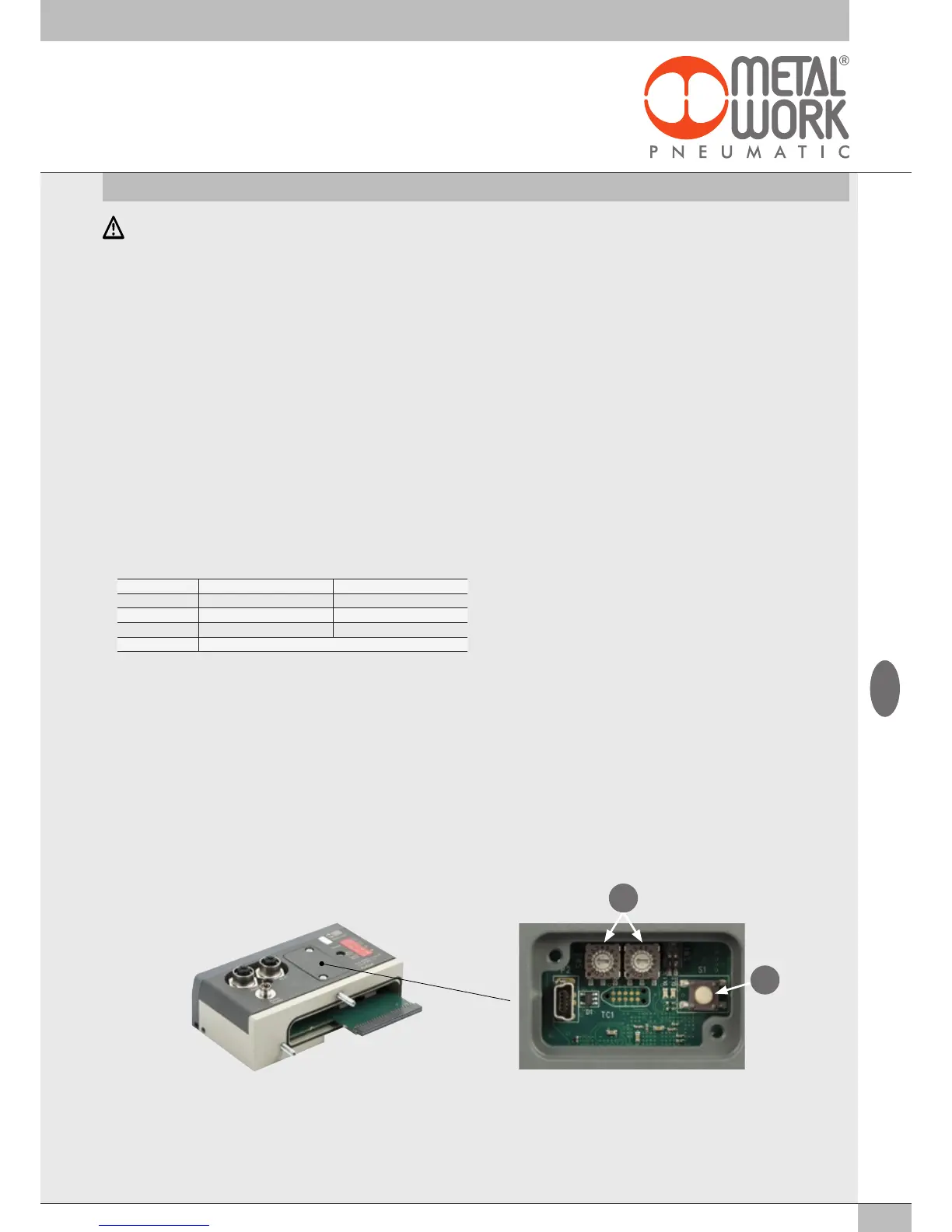
Alternatively, the device can be set to DHCP mode by setting the two rotary switches "B" to FF. In this way the address will be assigned by a DHCP
server. By setting the two rotary switches back to 00, the factory address is restored.
Correct communication between the Master and the EB 80 system only occurs if at this system it has been assigned the same IP address specified in
the Master configuration. Otherwise there is no EtherNet/IP communication. The fault is indicated by the EtherNet/IP diagnostic LED lights.
Type Assembly Instance Size byte
Output 100 102
Input 101 146
Configuration 3 0
Comm Format DATA - SINT
A
B


 To Next Page