11
3.2.1 CONTROL UNIT
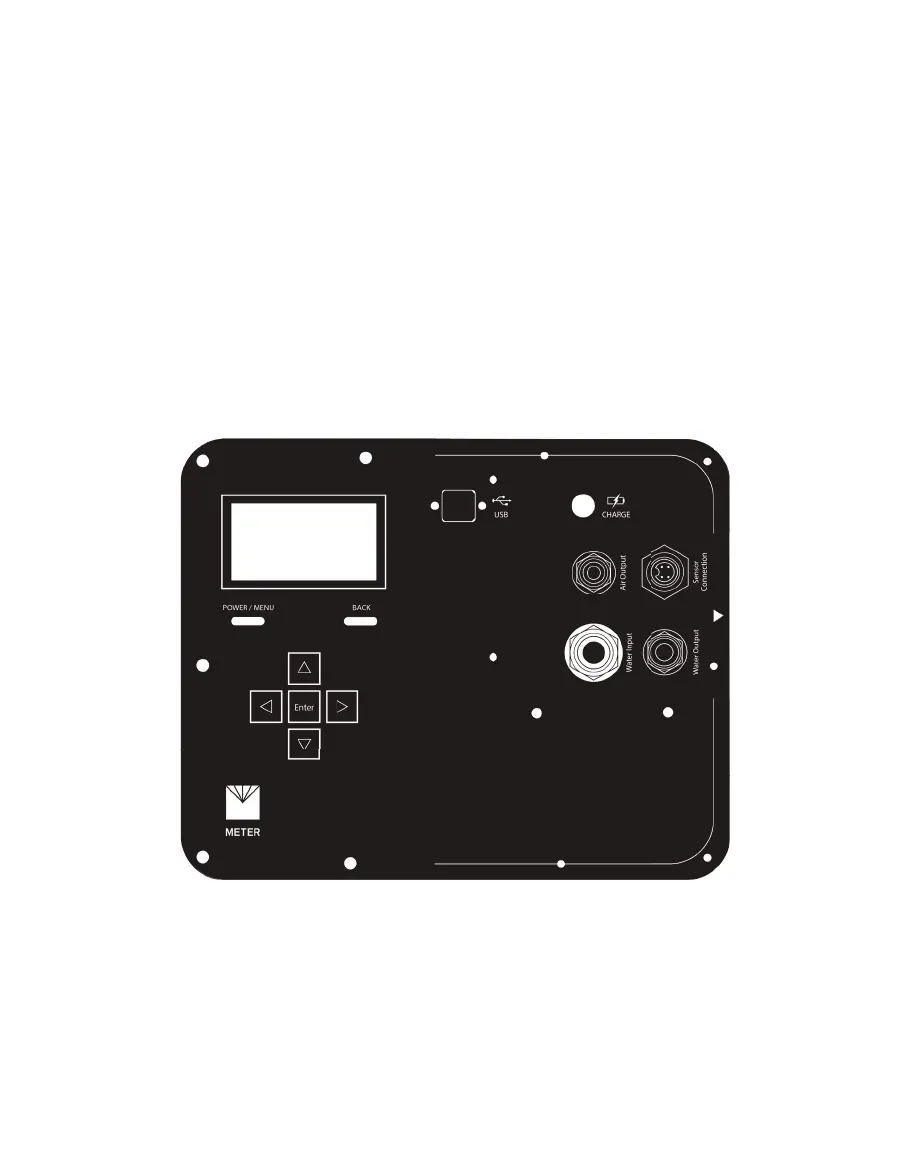
The SATURO control unit has seven buttons to navigate through screens and configure
settings (Figure11):
• When the device is off, press the POWER/MENU button to turn on the device.
Hold the POWER/MENU button down for more than 4 s to power off the device. This button
also navigates between different screen tabs.
• Pressing the BACK button returns the device to the parent screen. Pressing BACK on a
selection screen cancels any changes that have been made on that screen.
Holding BACK down for more than 7 s resets the device (hard reset).
• The UP, DOWN, LEFT, and RIGHT buttons on the directional pad allow navigation through
lists and scroll wheels. Pressing LEFT or RIGHT will highlight successive items in a list and
holding down the button will speed up scrolling.
• The Enter button selects the highlighted item to go to a submenu or save the highlighted
setting to memory.
Figure11 Control unit faceplate
The control unit is charged through a 18-V, 2.22-A, 40-W AC/DC charger. The unit takes
approximately 6 h to fully charge.
The control unit’s USB port takes a Type B to Type A USB to download data and to perform
firmware updates.



 To Next Page