MD 9273 Leakage Clamp MD 9273 as an Adapter of Master Instrument
31
6. Select your MD 9273 from the list. It is always presented in the format MD 9273_serial_number.
Pairing procedure is now finished.
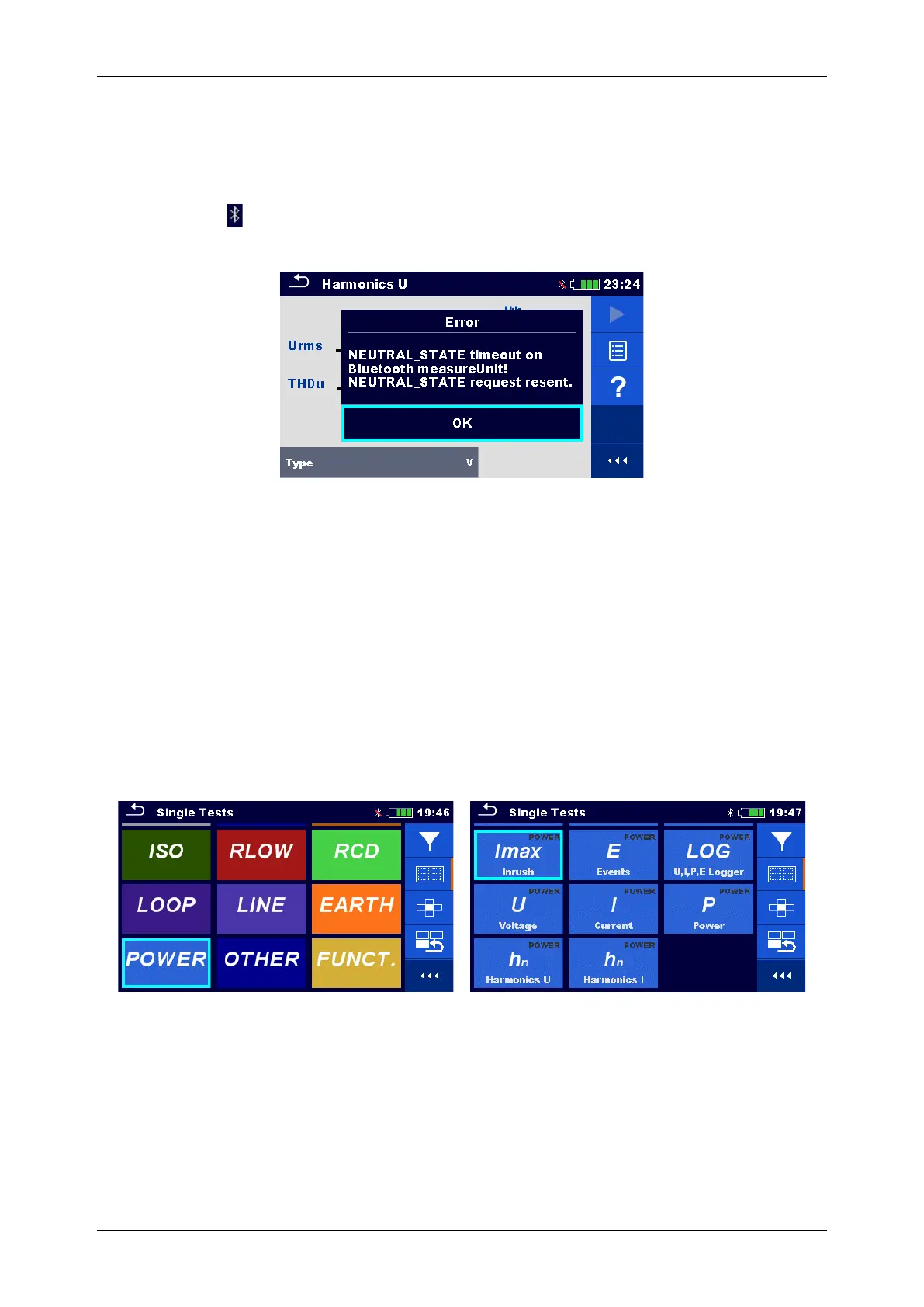
When MD 9273 adapter supported test is selected on Master Instrument, active BT communication is
indicated with sign on the right – top of the screen. If communication is not active, BT sign is crossed with
red line and Error warning message is presented, see Figure A.2 below.
Figure A.2: Master Instrument Bluetooth communication error message
NOTE:
Pairing between same Metrel Master Instrument and same MD 9273 is necessary only when MD 9273 is first
time used as a test adapter. If communication is not established, MD 9273 is probably switched OFF or
Bluetooth link is out of range.
A.2 Managing Tests with MD 9273 Adapter
When used as an Adapter, MD 9273 supported tests are managed in the same manner as Master Instrument
originate tests. They can be found under CLAMP group of Master instrument Single test Main menu, see
figure Figure A.3.
Figure A.3: Master instrument Test selection screens: Group selection (left) and Single Test selection on
the right.
Refer to Master instrument Manual to learn how to:
• Select single test
• Single test screen organization
• Setting parameters and limits
• Commands to start the single test and save the results











 To Next Page