MFJ-269C Instruction Manual LF/HF/VHF/UHF SWR Analyzer
6
2.4 Using Conventional “AA” Dry Cell Batteries
When using non-reachable batteries, install only high quality alkaline cells in matched sets (same
manufacturer and date code). Conventional zinc-based cells have a shorter shelf and service life, and they
are also more prone to leakage. Also, to prevent leakage, remove weak alkaline batteries immediately.
WARNING: WHEN USING NON-RECHARGEABLE BATTERIES, THE CHARGING SYSTEM MUST
BE DEFEATED! IF YOU FAIL TO FOLLOW THIS WARNING, THE BATTERIES WILL
LIKELY LEAK AND RUIN THE ANALYZER!
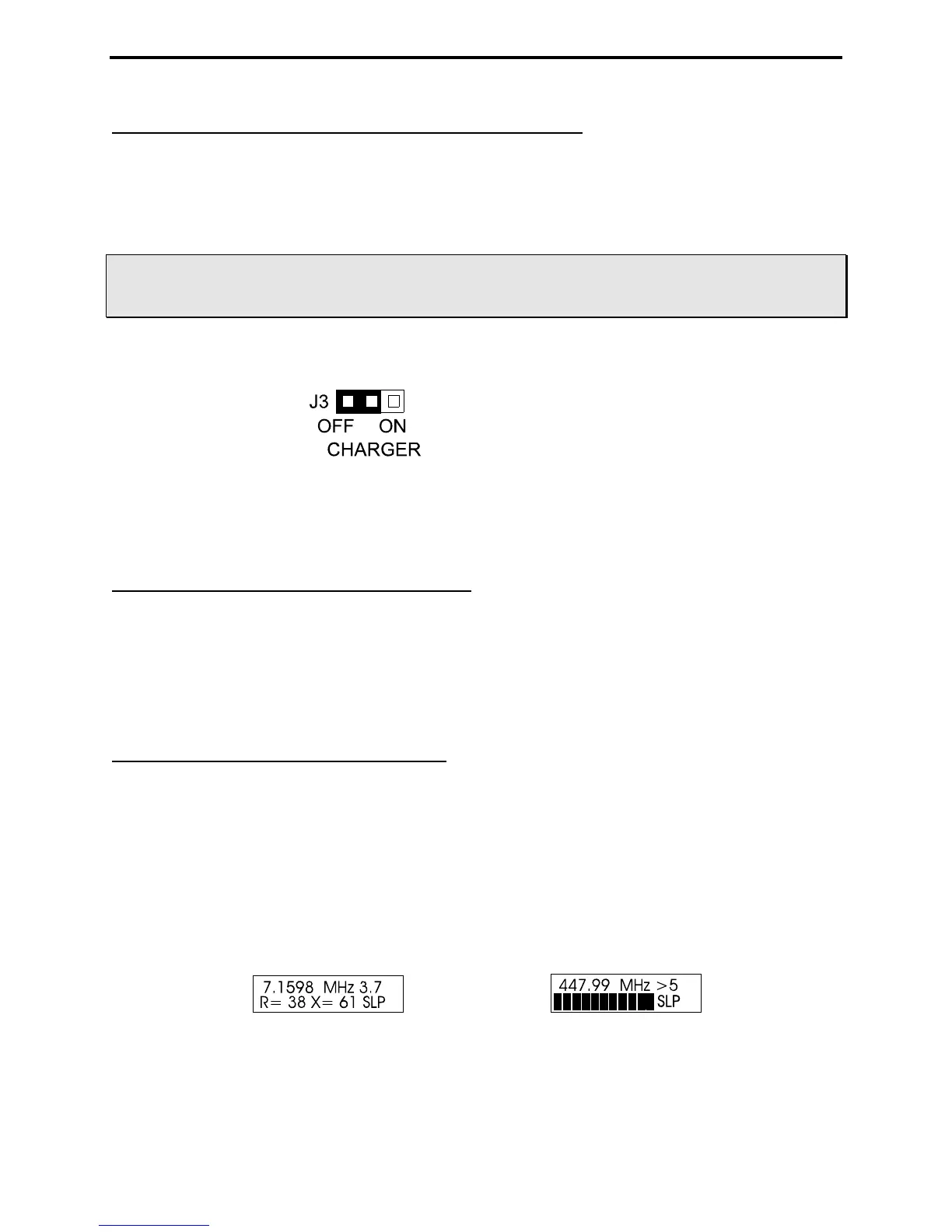
When using non-rechargeable batteries, set the internal jumper as shown below:
Never attempt to charge alkaline (or any other non-rechargeable cells) using the MFJ-269C's internal
charger circuit!
2.5 “Voltage Low” display warning
When the analyzer's supply or battery voltage drops below 11 volts, a blinking Voltage Low warning
will be displayed. Pressing Mode during a low-voltage warning will disable the on-screen alert and allow
you to continue operating. However, measurements may not be reliable when operating the analyzer with
insufficient supply voltage!
2.6 Sleep Mode “Power Saving”
Typical current drain for the MFJ-269C is around 150 mA for HF operation (250 mA for UHF). Battery
operating time is (by default) extended significantly through the use of Sleep Mode. Sleep mode reduces
current drain to less than 15 mA when it is engaged during periods of non-activity. Power-saving is a
default setting for the MFJ-269C unless you defeat it when you turn on the analyzer (instructions below).
Normally, the analyzer's processor looks for manual activation of the Mode switch or for any change in
Frequency greater than 50 kHz. If neither event occurs during any given three-minute interval, Sleep
mode automatically kicks in and places the analyzer in standby. A blinking SLP message in the display
screen lower-right corner indicates power-saving mode (see below):
To pull the unit out of SLP, momentarily press either the Mode or Gate button to resume operation.
To disable Sleep, first turn the unit Off and then press and hold the Mode button when reapplying power.
Continue holding Mode until after the copyright message appears on the LCD screen, then release. If the



 To Next Page