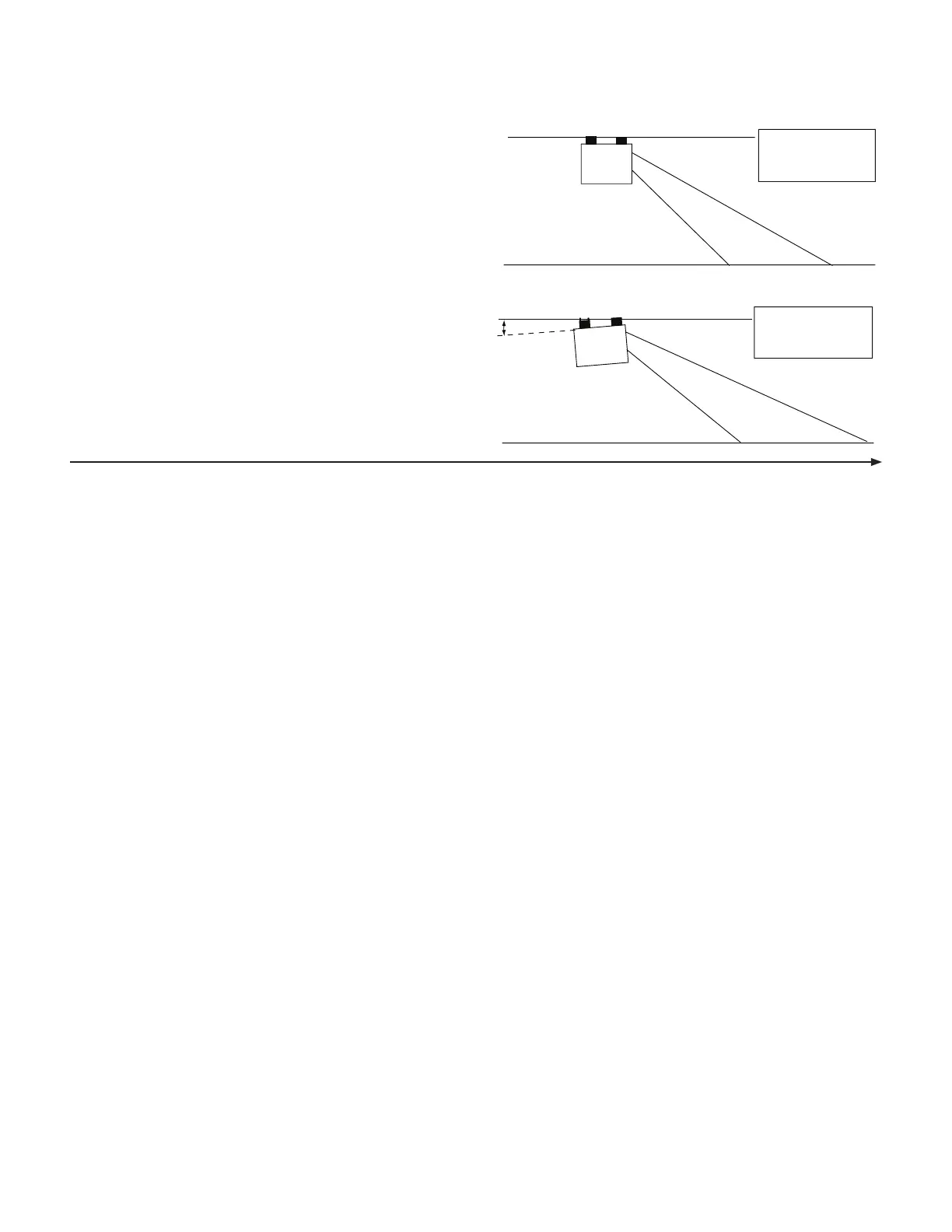
EXAMPLE:
NORMAL LEVEL MOUNTING POSITION
MOUNTING POSITION ADJUSTED TO
RAISE HORN END 8°
8°
DISPLAY READS
DISPLAY READS
SPEED
SPEED
5.0
5.5
If under actual field conditions you find that your speed
measurements (or distance) is consistently off, as determined
by another independent measurement, you can fine-tune
the system by following the speed calibration instructions
for your particular monitor/controller and increasing or
decreasing the speed calibration value by a small amount
and then rechecking the accuracy. Repeat as necessary until
true readings are achieved.
NOTE: With some systems, the speed calibration value
can not be adjusted with the console. In these cases,
adjustments to the speed measurement can be made by
slightly raising or lowering the horn end of the Trak-Star.
For each degree of angle that the horn is raised, the console
display will show an increase in speed of 1.3%. Likewise for
each degree that the horn is lowered, the speed will show
a decrease of 1.3%.
Installation (cont.)
Trak-Star Ultrasonic Speed Sensor (cont.)
Calibration Adjustments
Troubleshooting
NO SPEED
Trak-Star should emit a “crackling sound”. If not, check for
12 volts between pins A and B of the adapter cable six-pin
connector. If 12 volts is present but Trak-Star does nor
crackle, Trak-Star is defective. If there is no power from A and
B, check cable and connections.
Use a jumper wire (paper clip bent in a “U” works well)
and several times rapidly short together pins E and F of
the adapter cable. If console responds with some SPEED
reading, console and adapter cable are OK and the problem
may be in Trak-Star. If console will not respond, problem
may be in console or adapter cable.
SPEED ERRATIC, INTERMITTENT, SLOW TO RESPOND
OR NO SPEED AT ALL
This can be a result of echo interference when mounted
under vehicle. Move Trak-Star all the way to front and
pointed forward or all the way to rear and pointed rearward.
Remember to avoid chemicals and plant stalks.
Some ground surfaces (hard packed dirt or gravel; soft,
smooth sandy or powdery soil; some asphalt and concrete;
etc) may cause weak signals. If you experience erratic
operation under any of these conditions, try a lower mount
height.
Dirty Foam - Dust can usually be removed by tapping on the
foam. For anything other than dust, the foam will have to be
thoroughly washed.
Remove the foam and thoroughly clean it with soapy
water. (The foam can be removed without unscrewing the
retaining bracket. Completely rinse the soap and squeeze
out the water. Re-install the foam and check sensor
operation. The Trak-Star may also not function properly if
excessive moisture is present on the foam.
In some extreme conditions where marginal signal is
present, the foam may cause erratic operation. The Trak-
Star can be used without the foam. However, extreme care
must be exercised, especially in windy conditions, or in
fields with vegetation tall enough to contact the Trak-Star.
It would be better to leave the foam in place and relocate
the Trak-Star to a more suitable location.
Dirty transducer or holes in transducer membrane. Gently
flush horn with water and pat dry with soft cloth. (Do not
use high pressure or compressed air.) For oil or chemical
contamination, you may use an automotive aerosol brake
cleaner or aerosol electronic contact cleaner. If crackling
quits and will not come back within a minute or two, the
transducer membrane has been damaged and must be
replaces. NOTE: Do not use base ph liquids on transducer.
When driving over standing water or smooth wet surfaces,
the signal from the sensor may be deflected, resulting in a
temporary loss of speed measurement. Speed readings will
resume once the wet area has been passed.
Poor Ground - Run the Trak-Star’s blue ground wire direct to
the battery or the battery cable at the engine block.
SPEED READING WHILE STOPPED
Occasional reading of up to .5 MPH (1.2 kph) while stopped
may occur, especially when in or around buildings or other
machinery.
Echo interference from inadequate installation may cause
speed reading while stopped. Relocate the Trak-Star if this
occurs.
SPEED STEADY BUT INCORRECT
If the six-pin connector is mated with power applied, the
Trak-Star may program for the wrong monitor. Cycle power
after the six-pin connector is mated.
The six-pin connector of the Trak-Star is labeled A-F. Positions
C and D program the Trak-Star for the appropriate monitor.
If the wires to C or D are broken, pulled out or shorted, the
Trak-Star may be incorrectly programmed.
On monitors with adjustable speed calibration, fine-tune
calibration as needed to get correct speed. On monitors
without adjustable calibration, fine-tune speed by making
small changes in Trak-Star mounting angle.
15


 To Next Page