19
Calibration
Console Calibration
Calibration is simply a procedure that adapts the MT-3000
console to your particular equipment. There are two types
of calibration: DIRECT and AUTO. Direct calibration lets you
enter calibration numbers into the console using the “+/-”
switch. Auto calibration will automatically set the calibration
number while you watch the effect on the corresponding
total. (This feature will be explained in further detail later in
the calibration section of this manual.
IMPORTANT: The MT-3000 WILL NOT work properly if any
of the calibration values are incorrect.
ENTERING DIRECT CALIBRATION MODE
STOP your vehicle, place pray selector in HOLD, and turn
switch to CAL. After a three (3) second pause, the display
will read out width of center boom and a red warning light
(located above and left of the pressure gauge) will come on.
The console in now in the calibration mode and the rotary
switch will select the inner green ring of calibration settings.
The console will stay in the calibration mode as long as the
vehicle remains stopped and the console stays in hold. A
power interrupt will cause the console to lose the calibration
mode. The red warning light is always on during console
calibration.
NOTE: If you have a Trak-Star Ultrasonic Speed Sensor or
radar you should disconnect it from the MT-3000 console
when calibrating. While standing still the Trak-Star or
Radar may emit an occasional pulse which will take the
MT-3000 out of calibration.
ENTERING BOOM WIDTHS
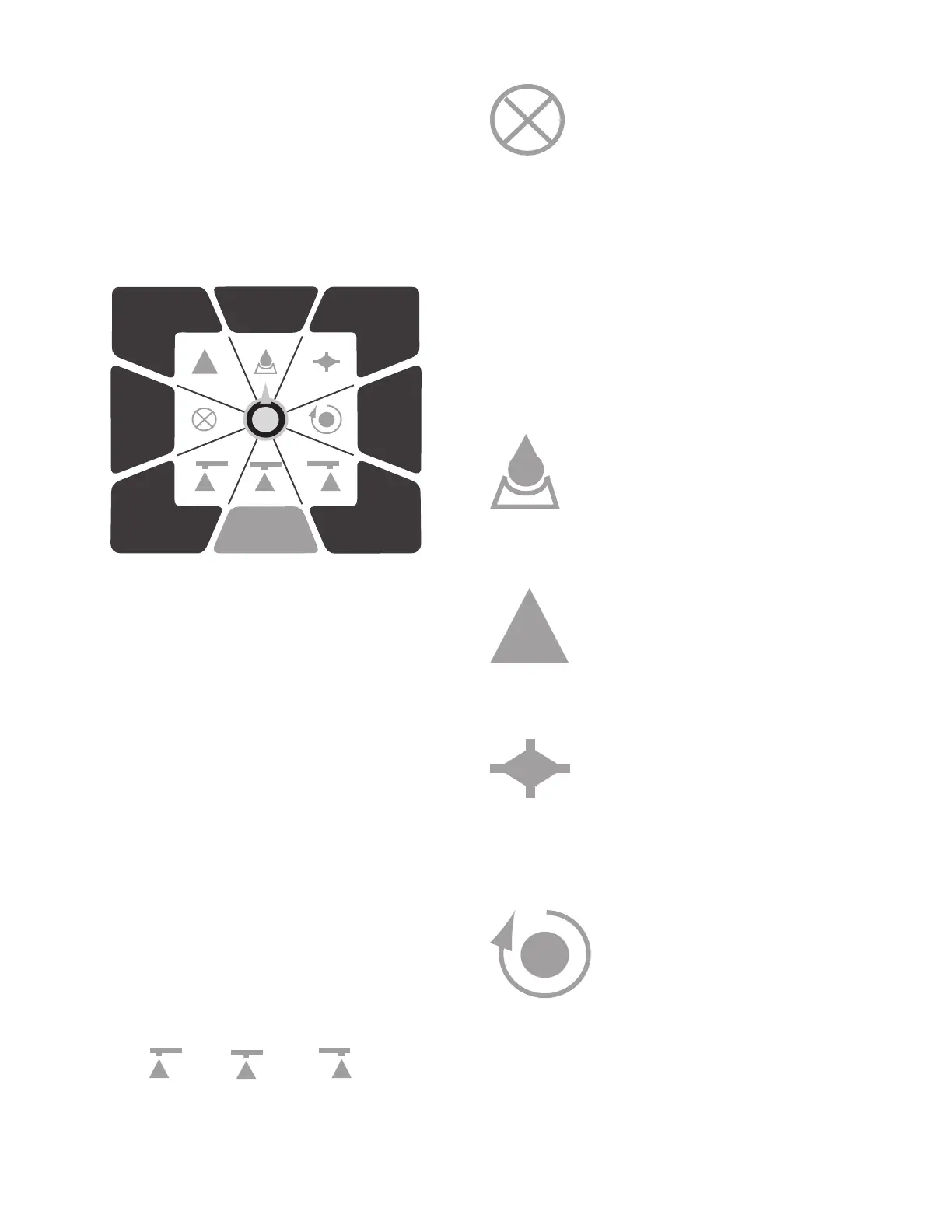
The three (3) bottom positions are for entering the effective
spray width of the left, center and right booms. Turn the
selector knob to the following positions to enter the boom
widths: Left Center Right
BOOM WIDTHS MUST BE IN INCHES/METERS TO WORK
PROPERLY. Unused booms should be programmed to zero.
NOTE: Consult your chemical supplier if you have questions
regarding broadcast versus banding application rates.
TOTAL
AREA
SPRAY
RATE
TOTAL
LIQUID
DIST.
%
ERROR
CAL.
FLOW
RATE
SPEED
TEST
SPEED
MINIMUM FLOW RATE: The MT-3000 will not allow the
flow rate to drop below this limit in automatic
control. It has been factory preset to 2.00 GPM
(7.5 lpm), the minimum recommended flow
rate for the FM750 GFN flowmeter when used
with the MT-3400. You may want to change this
value to the minimum recommended gallon per minute of
your nozzles. The purpose of this feature is to keep pressure
from going too low and causing a poor spray pattern.
EXAMPLE: If you have 15 nozzles that put out .22 GPM (.83
lpm) at their minimum recommended pressure, enter 3.30
(12.5) into console 15 X .22 GPM (.83 lpm) to assure good
spray pattern.
CAUTION: If the minimum flow rate is greater than the
actual flow rate, over-application in automatic may occur.
The the Pre-installation for calculation of the actual flow
rate.
TARGET SPRAY RATE: Enter desired application rate in
LITERS PER HECTARE or GALLONS PER ACRE.
When in AUTO, the console will lock onto
this value and automatically open or close
the electric servo valve to maintain uniformed
application.
DELTA ADJUST RATE: Enter value to be used for on-the-
go adjustments to Target Rate. If this feature will not be
used, enter “0” to avoid accidental changing of Target Rate.
EXAMPLE: Target Spray Rate is set to 10.00 and
Delta to 1.00. Each time “=/-” toggle is flipped,
Target will increase or decrease by 1.00. (Works
only with Master Switch in AUTO and rotary
Selector Knob at SPRAY RATE or % ERROR.
FLOWMETER CALIBRATION: Enter factory calibration
value stamped on metal tag attached to the
flowmeter. If you are spraying materials with
a specific gravity or viscosity different than
water, meter calibration should be checked
for that material. See AUTO CALIBRATION - Flowmeter on
page 25. This calibration value will not go below 10.0 (.01) or
above 1920.0 (6553.5).
DISTANCE/SPEED CALIBRATION: This value is equal to the
distance traveled (meters/inches) between
magnets. If the value is not known, see
AUTO CALIBRATION - DISTANCE/SPEED on
page 25. This calibration value will not go
below 1.00 (.001) or above 192.0 (65.535).
EXITING CALIBRATION
After all calibration numbers have been entered, you
must select MANUAL to exit calibration and save values to
memory.


 To Next Page