10. STARTING THE HOLTER RECORDING
PROGRAMMING USING THE BUTTONS
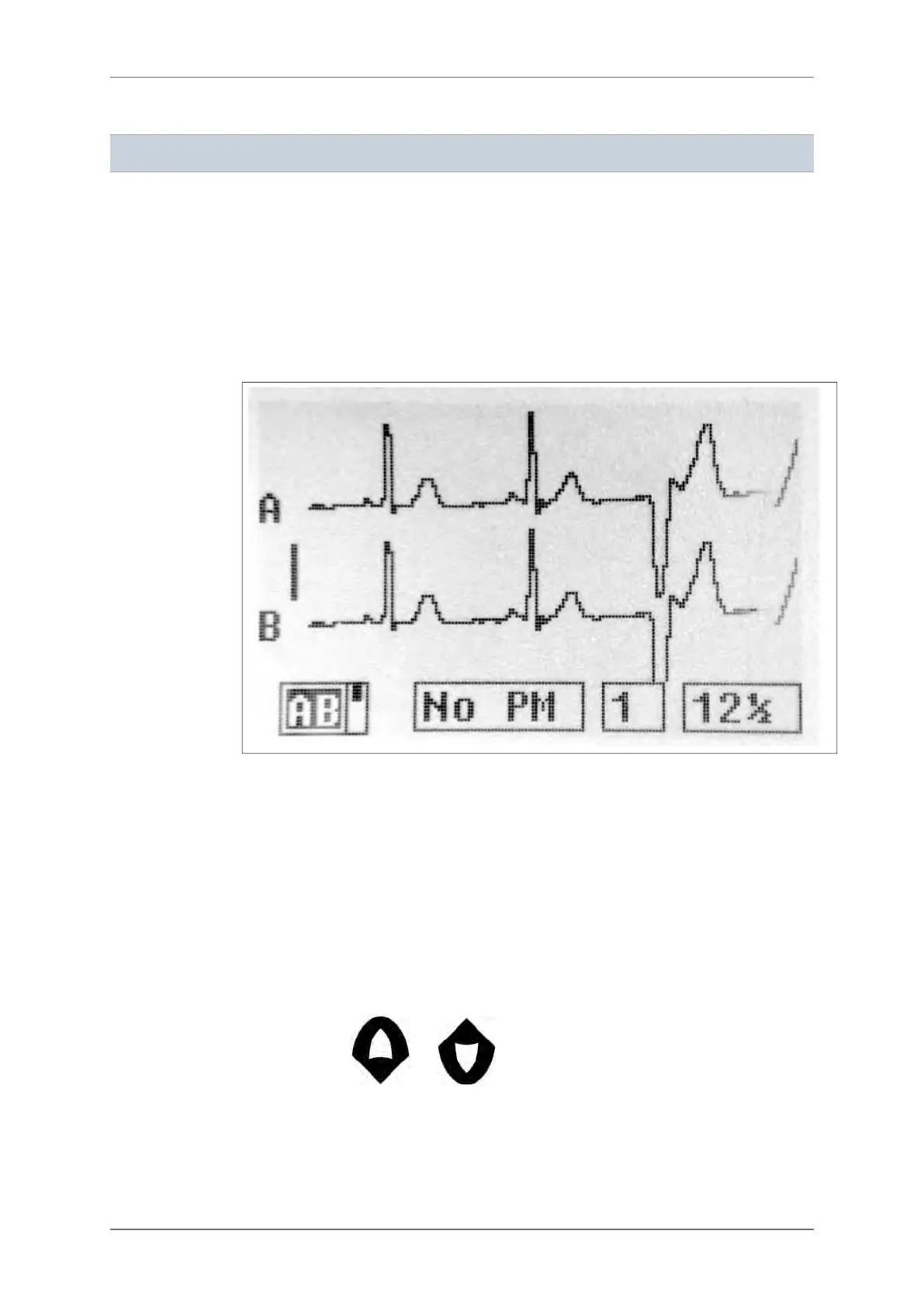
ECG screen
This screen allows you to:
― Visually check the quality of the ECG leads
― Program the type of pacemaker to record
ECG’s amplitude and scrolling speed can be changed for a better visualization on the screen.
This will not be taken into account during the recording.
For an accurate analysis of the ECG on the Holter analyzing software, the amplitude of the
QRS complexes on the first two channels should be at least 1 mV. This corresponds to the
amplitude of the calibration bar on the left side of the display.
Pacemaker recordings
If the patient undergoing a Holter recording has a pacemaker, it is mandatory to declare the
presence and type of pacemaker to ensure the ECG analysis software classifies the paced
beats correctly.
This must be done on the ECG screen: move the cursor to the field “No PM” and modify it
using the buttons and .
The device records single chamber or dual chamber pacemakers with two different
sensitivities: Unipolar (less sensitive) or Bipolar (more sensitive).
10.1.
10.1.1.
10.1.2.
10. STARTING THE HOLTER RECORDING
22 SpiderView – UA10709B


 To Next Page