24 Port Gigabit Ethernet PoE Switch – User Manual Page 33 of 72
________________________________________________________________________
©2014 MICROSENS GmbH & Co. KG – Hamm/Germany www.microsens.com
3-2-7. Aggregation
The Aggregation (Port Trunking) Configuration is used to configure the settings of
Link Aggregation. You can bundle ports by same speed, MAC, and full duplex to be a sin-
gle logical port, thus the logical port can aggregate the bandwidth of these ports. This
means you can apply your current Ethernet equipment to build the bandwidth aggrega-
tion. For example, if three Fast Ethernet ports are aggregated into a logical port, then
this logical port’s bandwidth would be as three times high as a single Fast Ethernet port.
Function name
Aggregation Configuration
Function description
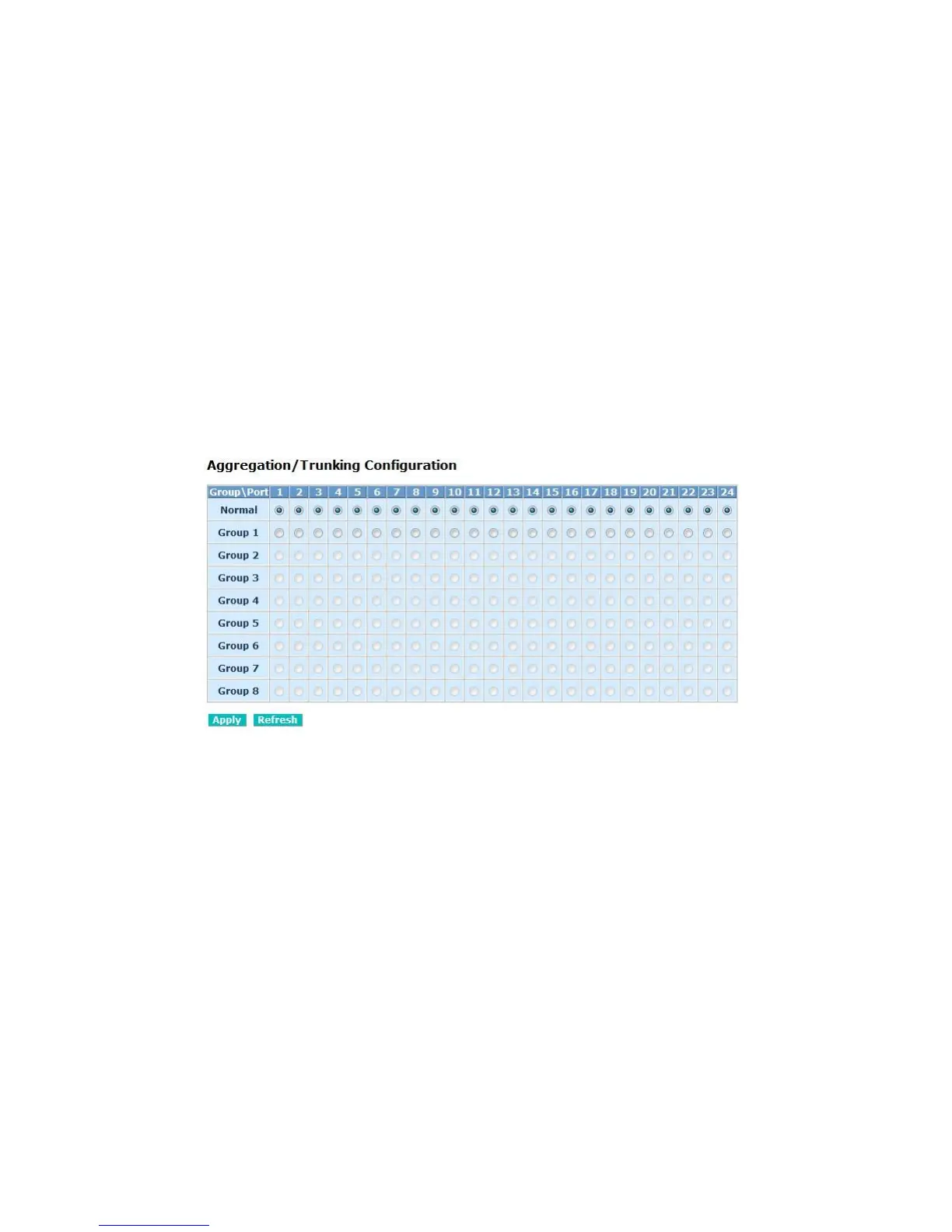
Display the current setup of Aggregation Trunking. With this function, user is al-
lowed to add a new trunking group or modify the members of an existed trunking
group.
The load balance mechanism is based on MAC SA/DA hash algorism and it is not configura-
ble.
Fig. 3-11 Aggregation / Trunking Configuration
Parameter description
Normal:
Set up the ports that do not join any aggregation trunking group.
Group 1~8:
Group the ports you choose together. Up to 2 to 12 ports can be selected for
each group.



 To Next Page