Print or save - miniDSP Flex Eight
https://docs.minidsp.com/product-manuals/flex-eight/print_page.html
Connecting to a device
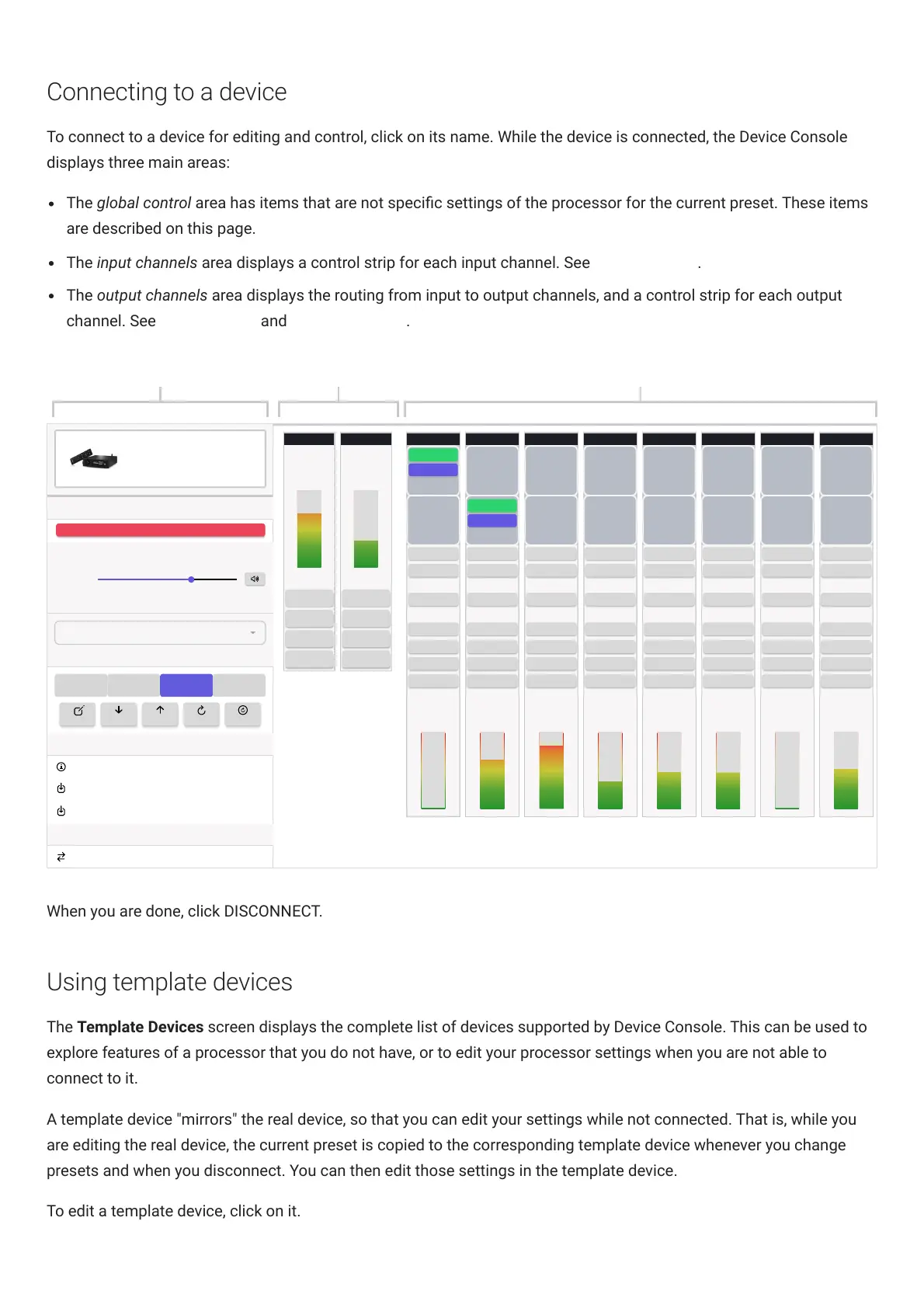
To connect to a device for editing and control, click on its name. While the device is connected, the Device Console
displays three main areas:
The global control area has items that are not specic settings of the processor for the current preset. These items
are described on this page.
The input channels area displays a control strip for each input channel. See Input channels.
The output channels area displays the routing from input to output channels, and a control strip for each output
channel. See Signal routing and Output channels.
Connection
Master Volume
Input Source
Presets
1 2
3 4
Firmware
Display Versions
Refresh DSP Firmware
Refresh XMOS Firmware
Model Conversion
Convert To Flex Eight (DL)
DISCONNECT
-41.5 dB
Output 7
INPUT 1
0 DB
INVERT
INPUT 2
INVERT
RMS-Meter
(dBFS)
0 DB
Output 2
INPUT 1
0 DB
INVERT
INVERT
RMS-Meter
(dBFS)
0 DB
Output 4
INPUT 1
0 DB
INVERT
INPUT 2
INVERT
RMS-Meter
(dBFS)
0 DB
Output 5
INPUT 1
0 DB
INVERT
INPUT 2
INVERT
RMS-Meter
(dBFS)
0 DB
Output 6
INPUT 1
0 DB
INVERT
INPUT 2
INVERT
RMS-Meter
(dBFS)
0 DB
Output 8
INPUT 1
0 DB
INVERT
INPUT 2
INVERT
RMS-Meter
(dBFS)
PEQ
CROSSOVER
Delay (ms)
0
Gain (dB)
0
INVERT
MUTE
COMPRESSOR
0 DB
Output 1
INVERT
INPUT 2
INVERT
RMS-Meter
(dBFS)
0 DB
0 DB
-98.0 -18.9 -42.9 -32.4 -33.5 -134.7 -29.1
INPUT 1
INPUT 2
PEQ
CROSSOVER
Delay (ms)
0
Gain (dB)
0
INVERT
MUTE
COMPRESSOR
PEQ
CROSSOVER
Delay (ms)
0
Gain (dB)
0
INVERT
MUTE
COMPRESSOR
PEQ
CROSSOVER
Delay (ms)
0
Gain (dB)
0
INVERT
MUTE
COMPRESSOR
PEQ
CROSSOVER
Delay (ms)
0
Gain (dB)
0
INVERT
MUTE
COMPRESSOR
Output 3
INPUT 1
0 DB
INVERT
INPUT 2
INVERT
RMS-Meter
(dBFS)
0 DB
-3.5
PEQ
CROSSOVER
Delay (ms)
0
Gain (dB)
0
INVERT
MUTE
COMPRESSOR
PEQ
CROSSOVER
Delay (ms)
0
Gain (dB)
0
INVERT
MUTE
COMPRESSOR
PEQ
CROSSOVER
Delay (ms)
0
Gain (dB)
0
INVERT
MUTE
COMPRESSOR
TOSLINK
RENAME IMPORT EXPORT RESET RESET-ALL
Input 1
RMS-Meter
(dBFS)
-14.0
Gain (dB)
Input 2
RMS-Meter
(dBFS)
-43.1
Gain (dB)
0
PEQ
FIR
MUTE
0
PEQ
FIR
MUTE
0
PEQ
FIR
MUTE
0
PEQ
FIR
MUTE
Global control Input channels Output channels
Flex Eight
When you are done, click DISCONNECT.
Using template devices
The Template Devices screen displays the complete list of devices supported by Device Console. This can be used to
explore features of a processor that you do not have, or to edit your processor settings when you are not able to
connect to it.
A template device "mirrors" the real device, so that you can edit your settings while not connected. That is, while you
are editing the real device, the current preset is copied to the corresponding template device whenever you change
presets and when you disconnect. You can then edit those settings in the template device.
To edit a template device, click on it.



 To Next Page