Record
34
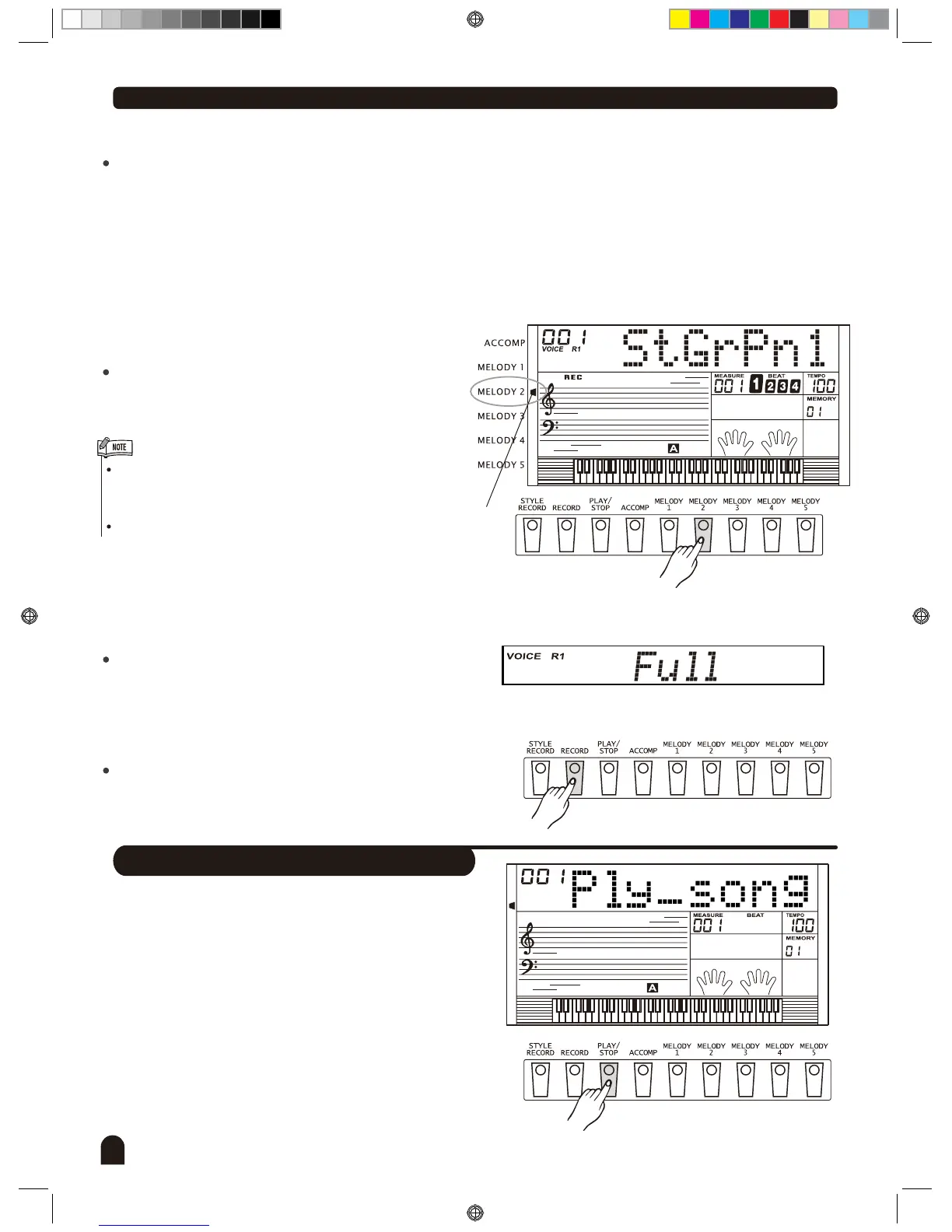
There are 3 states of choosing tracks in the left cursor of LCD: Lighten, Flashing, Darken.
When the cursor is flashing, it indicates the flashing track is the track chosen to be recorded.
When the cursor is lightened, it indicates there there's recorded material in this track for the selected song.
Material on this track will be played simultaneously while recording for another track.
When the cursor is darkened, it indicates there's no data in this track or there's data on this track but it's
forbid to play the recorded material while recording.
Press "Accomp" (or "Melody 1" to "Melody 5") to select
the desired track. The corresponding track will be
switched between the above three states.
Only 1 Melody track can be recorded at a time, whereas
"Accomp" track can be recorded with a Melody track
at the same time.
Style can only be recorded in "Accomp".
Choosing Tracks
2.
3.
Flash
Stop Recording
When the capacity is full, the recording will be stopped
automatically when recording is in process.
Press [RECORD] button again while recording to stop
this action immediately.
Playback Recording
1.
2.
Press [PLAY/STOP] button to enter the user song
selected mode. LCD reveals the sequence number of
user's song at upper left corner, the lattice district reveals
" Play _ Song".
Press [+/YES] / [-/NO] button to select the user song you
want to play.
DZB0'B0DQXDOBB*BSDUWBDZB0'B0DQXDOBB*BSDUWB


 To Next Page