41
Quantify a Style
Style Record
2.
STYLE
STYLE
+/YES-/NO
FUNCTIONMIXER
BACK NEXT
As timing of the recording may not be as accurate as it should be, Quantization helps users to correct the timing
by aligning the notes to the exact beat. we'd suggest choosing the shortest note of the piece as the quantization
precision for best result. If a lower quantization precision is chosen, for example choosing a quarter note as the
precision when the shortest note is a 16th, the note with the short duration may be filtered.
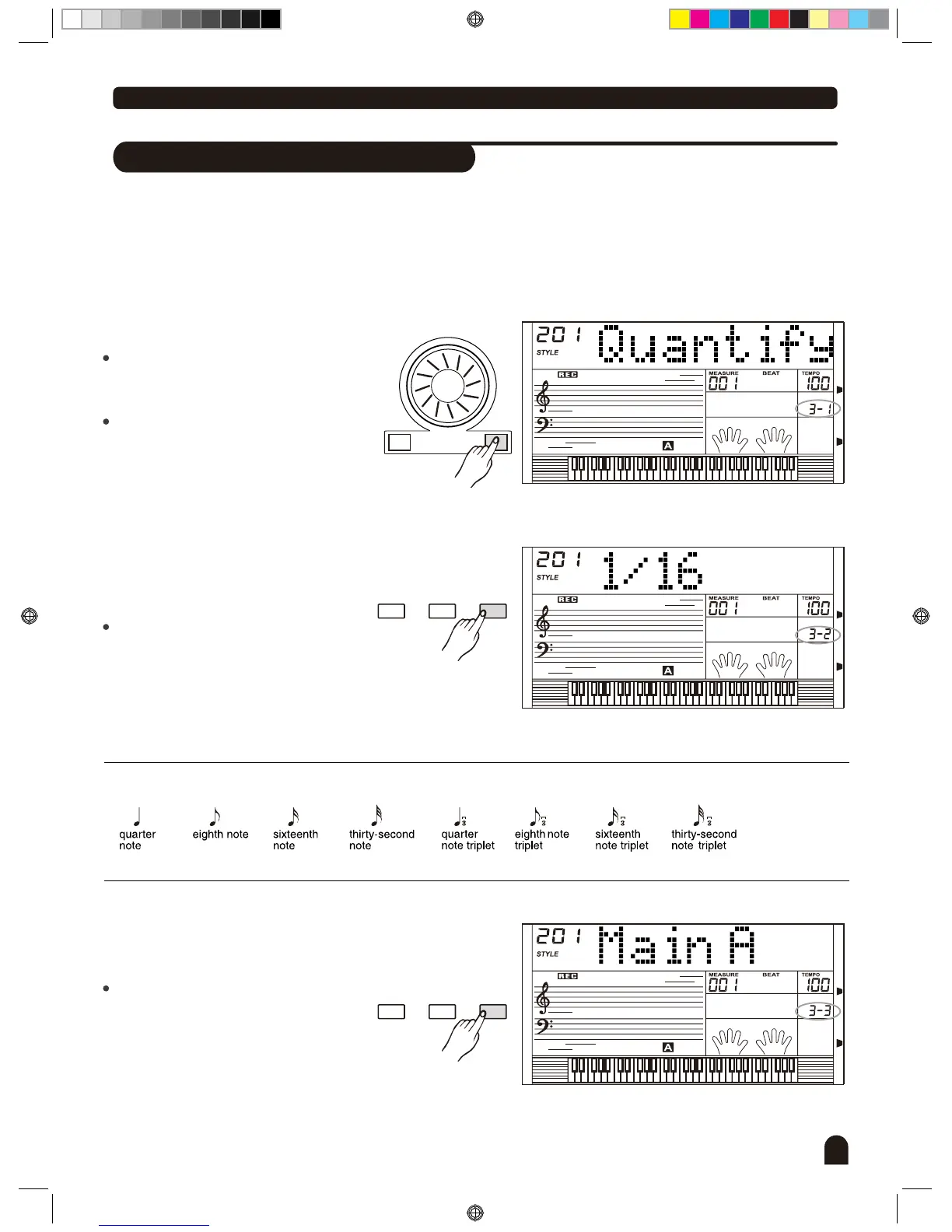
Select the user style that needs to be
quantified.
Press to enter [FUNCTION/NEXT]
choice menu.
Press [+/YES], [-/NO] button or turn
the DIAL "" to choose Quantify (if there
is no data in user style, this menu can
not be selected).
Press to enter [FUNCTION/NEXT]
Quantization Precision menu.
Press button or turn [+/YES], [-/NO]
the dial to select quantization precision.
Precision includes 1/4 (quarter), 1/3
(Quarter Triplet), 1/8 (Eighth), 1/8
(Eighth Triplet), 1/16 (Sixteenth), 1/16
(sixteenth Triplet), 1/32 (32nd), 1/32
(32nd Triplet).
1.
Quantization Precision value
Press to enter [FUNCTION/NEXT]
the paragraph menu.
Press [+/YES], [-/NO] button or turn
the DIAL to select the paragraph of
rhythm: Main _ A, Main _ B, Intro _ M,
Intro _ m, Fill _ A, Fill _ B, Ending _ M,
Ending _ m.
3.
STYLE
FUNCTIONMIXER
BACK NEXT
DZB0'B0DQXDOBB*BSDUWBDZB0'B0DQXDOBB*BSDUWB


 To Next Page