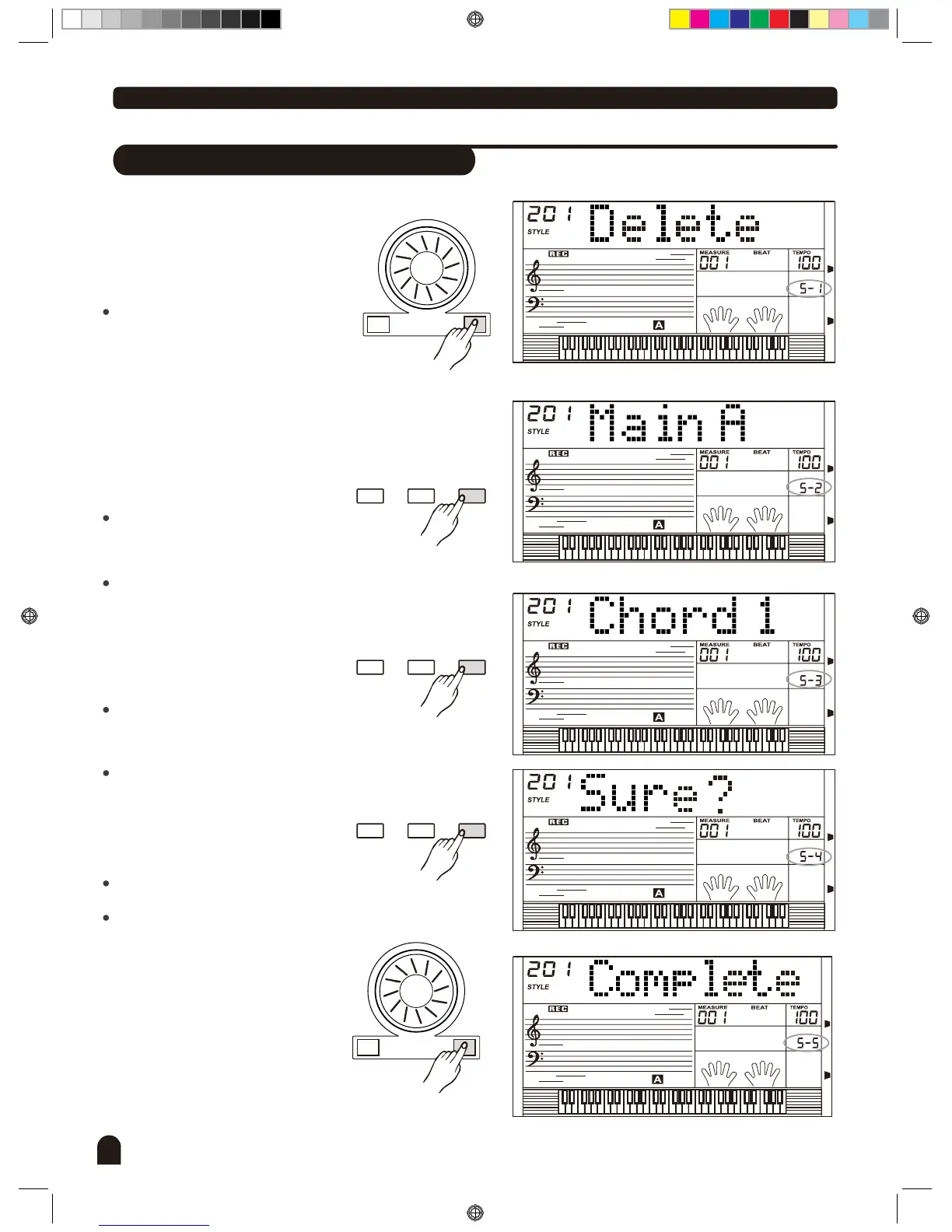
Delete a style
44
Style Record
STYLE
1.
+/YES-/NO
STYLE
2.
FUNCTIONMIXER
BACK NEXT
STYLE
3.
4.
FUNCTIONMIXER
BACK NEXT
STYLE
FUNCTIONMIXER
BACK NEXT
+/YES-/NO
5.
STYLE
Select the user style that needs to
be deleted.
Press
enter choice menu.
Press
choose Delete
Press
enter Paragraph Selection
page.
Press
select the paragraph
that needs to be deleted.
If All is selected, the menu will jump
to step 4.
Press
enter Track Selection page.
Press
select the track
that needs to be deleted.
If All is selected, the rhythm will be
deleted.
Press
enter next menu.
LCD now displays Sure?
Press [+/YES] if yes, other Press
[-/NO] to return to previous menu.
If pressed [+/YES], Delete of the
track is now completed.
[FUNCTION/NEXT] button
to
[+/YES], [-/NO] button or
turn the DIAL to "".
[FUNCTION/NEXT] button
to
[+/YES], [-/NO] button or
turn the DIAL to
[FUNCTION/NEXT] button
to
[+/YES], [-/NO] button or
turn the DIAL to
[FUNCTION/NEXT] button
to
"".
DZB0'B0DQXDOBB*BSDUWBDZB0'B0DQXDOBB*BSDUWB


 To Next Page