43
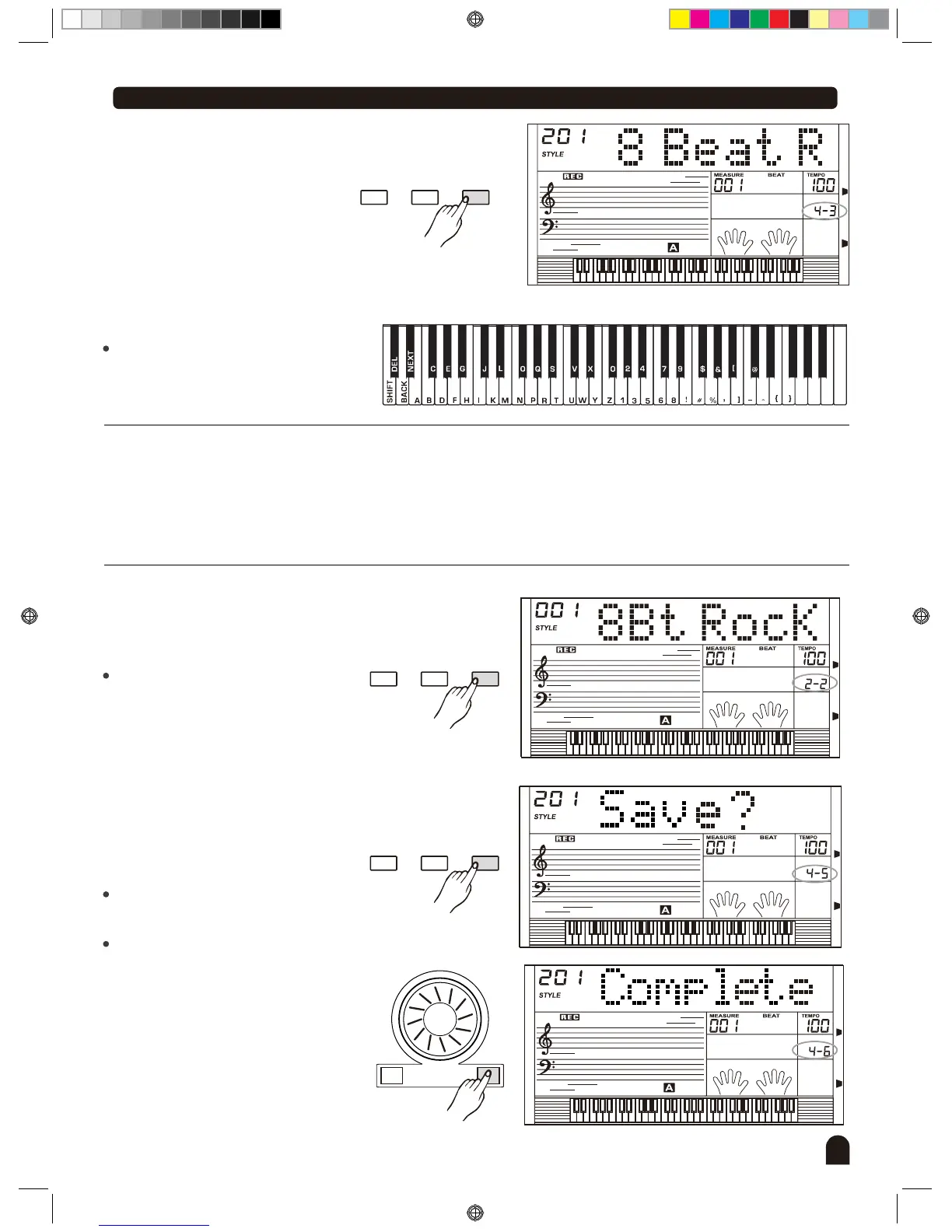
Style Record
STYLE
Press [FUNCTION/NEXT] button
to enter page of the rename of
style name (full name).
3.
FUNCTIONMIXER
BACK NEXT
Keyboard & Character Relative Table
File name includes 1-8 characters to
be input it with the keyboard.
、
STYLE
FUNCTIONMIXER
BACK NEXT
Press [FUNCTION/NEXT] button
to enter page of the abbreviation
of style name.
Only 8 characters or digits can be
entered.
4.
[SHIFT]:
26 letters will be displayed with
capital letter by pressing the key-
board in letter area directly.
To display small letter, press the
[SHIFT] key hold on.
[DELETE]:
when the flashing cursor is at the
last character (the eighth bit),press
it to erase the current character.
Otherwise, it will erase the left
character.
[BACK]:
move the current cursor to the left.
[NEXT]:
move the current cursor to the right.
Explanation:
STYLE
STYLE
+/YES-/NO
FUNCTIONMIXER
BACK NEXT
Press [FUNCTION/NEXT] button
to enter next menu.
LCD now displays "Save? "
Press [+/YES] if yes, otherwise
press [-/NO] to return to previous
menu.
If pressed [+/YES] , edit is now
completed.
5.
6.
DZB0'B0DQXDOBB*BSDUWBDZB0'B0DQXDOBB*BSDUWB


 To Next Page