Record
35
Delete Recording
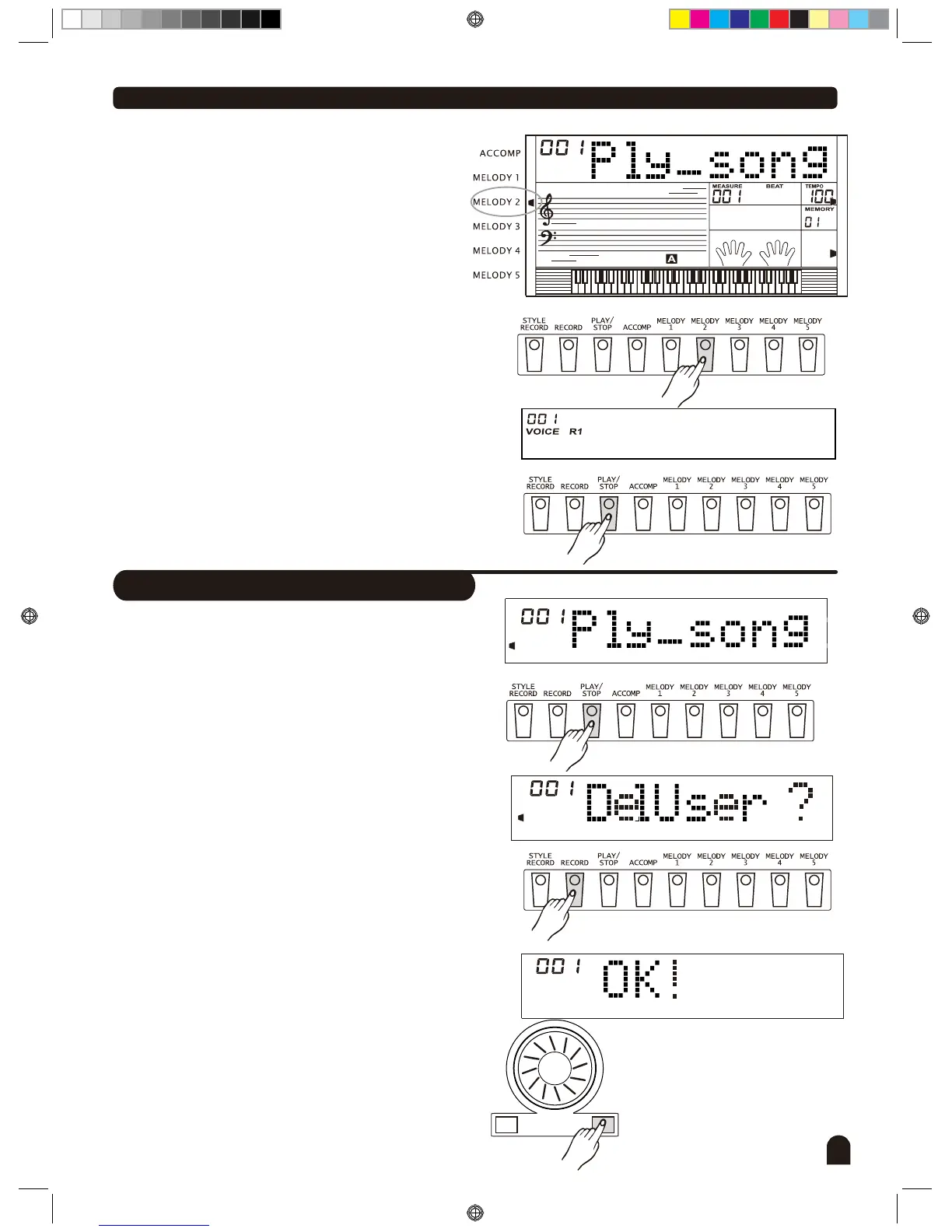
Press [PLAY/STOP] button to enter the user song
selected mode.
Press [+/YES] / [-/NO] button to select the user song
you want to delete.
Press [RECORD] button, LCD will display "DelUser".
Press [+/YES] button to delete the current user song
When complete, LCD displays " OK! ", the cursor of the
track will all darken simultaneously.
1.
2.
3.
4.
3.
4.
5.
6.
Null
On the left side of LCD, cursor indicates the track where
data has been recorded. If there's data on this track, the
cursor will be lightened. Otherwise the cursor will not be
lighted.
To disable a track with data, simply press the button of
selected track and cursor will be darkened. This track
will not sound when the song is played.
Press [PLAY/STOP] button again to play the user song.
If there is no user song when you press [PLAY/STOP],
LCD will display "NULL" temporarily.
Press [START/STOP] button to stop the song.
+/YES-/NO
DZB0'B0DQXDOBB*BSDUWBDZB0'B0DQXDOBB*BSDUWB


 To Next Page