6.
HOW
"
.,
TO
.
USE
EACH
FUNCTION
6.9.15
Settlng conductivity display
YEWNO
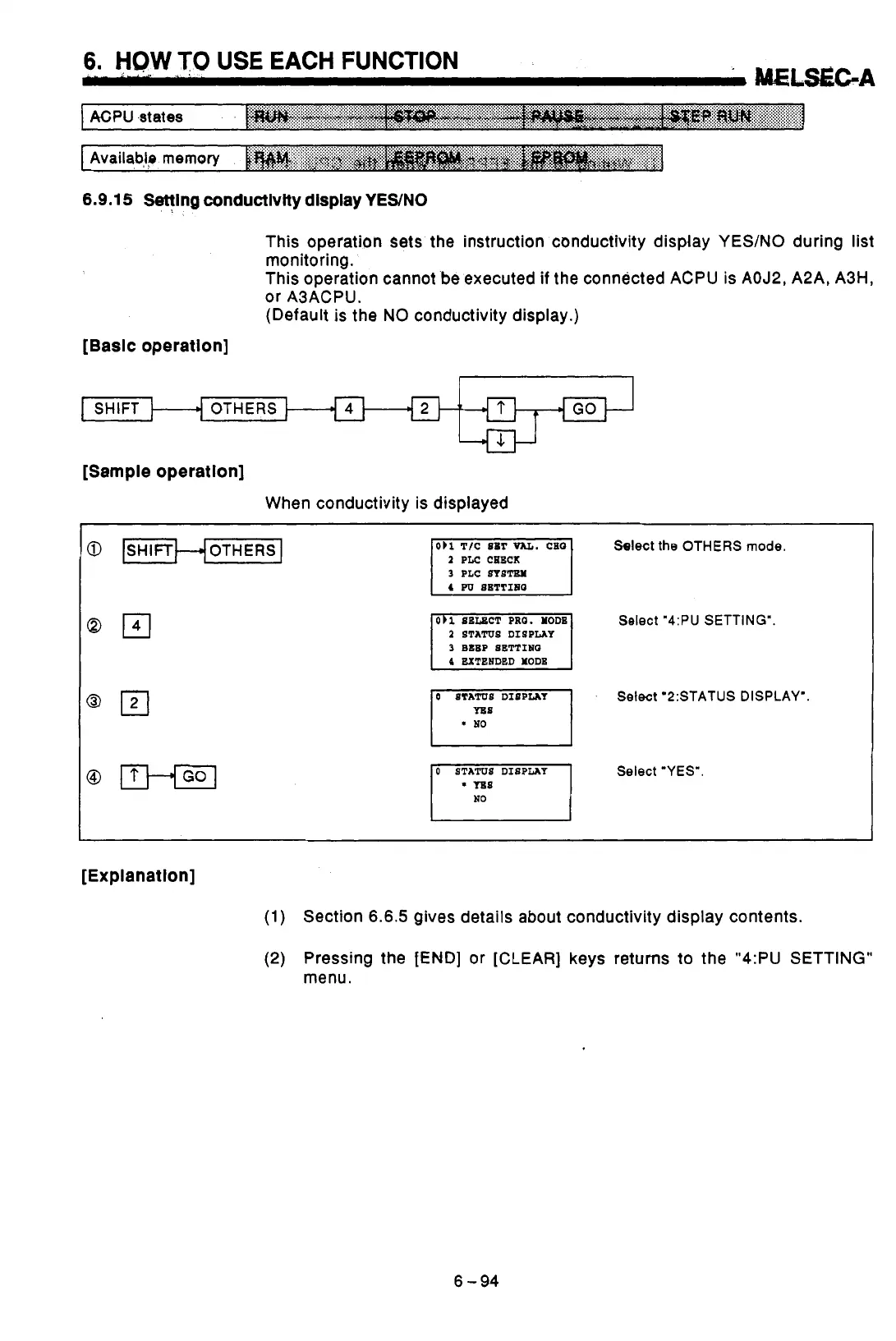
This operation sets the instruction conductivity display YES/NO during list
monitoring.
This operation cannot be executed
if
the connected ACPU is AOJ2, A2A, A3H,
or A3ACPU.
(Default
is
the
NO
conductivity display.)
[Basic operation]
SHIFT OTHERS
GO
[Sample operatlon]
When conductivity is displayed
@
[SHIFTHOTHERS
I
Qrn
Select
the
OTHERS
mode.
1
PLC CHECK
3
PLC
SIsm
2
STATUS DISPLAY
4
EXTENDED
YODB
3
BEEP SETTINQ
Select
"4:PU
SETTING".
0
STATUS DISPLAY
Select '2:STATUS DISPLAY'.
0
STATUS DISPLAY
Select "YES".
[Explanation]
(1)
Section
6.6.5
gives details about conductivity display contents.
(2) Pressing the
fEND]
or [CLEAR] keys returns
to
the
"4:PU
SETTING"
menu.
6-94



 To Next Page
 Loading...